

Submitted:
01 July 2024
Posted:
01 July 2024
You are already at the latest version
Abstract
Camping offers invaluable experiences in nature exploration, but the expense of acquiring camping gear can deter potential enthusiasts. To mitigate this, camping gear rental services emerge as a practical solution, promoting accessibility and reducing financial barriers. However, existing rental systems often encounter issues such as limited payment options, inconvenient pickup/return processes, and opaque management. In response, this paper introduces "Rent-n-Play," a web-based camping gear rental platform built on Laravel framework. It enables cashless transactions, offers pickup/delivery services, and employs a real-time admin system for transparent management. User feedback guided platform enhancements, including review systems and responsive support. The "Rent-n-Play" platform enhances user experience, fosters trust, and promotes sustainable camping practices, thus contributing to a more accessible and enjoyable camping culture.
Keywords:
Camping gear rental
; accessibility
; cashless transactions
; transparency
; user experience
; laravel
; vue js
1. Introduction
This paper’s remainder is structured as follows: Section 1 Camping has become one of the most popular recreational activities, offering profound experiences in exploring nature and spending quality time outdoors. However, the cost of purchasing complete and high-quality camping gear can often be a barrier for many individuals. Many occasional campers find it inefficient to invest in equipment that may be seldom used. In this situation, renting camping gear becomes a practical solution. By providing easier and more affordable accessibility, camping gear rental services enable more people to enjoy camping activities without the need to make a large investment in equipment permanently. This also promotes a more active lifestyle and awareness of the importance of preserving the natural environment by minimizing purchases of seldom-used items. [1]
Section 2. Some of the main issues often faced by camping enthusiasts include the inconvenience of payment methods, as many camping gear rental places only accept cash payments, making it difficult for customers who do not carry cash or prefer using digital payment methods. Additionally, there are difficulties in picking up and returning the gear, where renters often have to spend a lot of time and effort to collect and return the equipment to the rental location, especially if the rental place is far from their home or the camping area. Lastly, the lack of transparency and efficiency in rental management often frustrates users. For example, they may not be able to see the availability of gear in real-time, have difficulty making reservations, or receive inaccurate information about their booking status.
Section 3. "Rent-n-Play" presents an innovative solution to address the challenges faced by camping enthusiasts by providing a web-based camping equipment rental platform using the Laravel framework. The solutions we offer include the ease of cashless transactions, as we provide various digital payment methods, allowing customers to easily and conveniently make transactions using credit cards, bank transfers, or digital payment applications. Additionally, we offer equipment pickup and delivery services, enabling customers to access the equipment they need more easily and conveniently without having to visit the rental location directly. By using a real-time admin management system, we can provide full transparency to customers regarding equipment availability, booking status, and other necessary information. This makes it easier for customers to make quick and accurate rental decisions, enhancing their satisfaction and experience in using our camping equipment rental services.
Section 4 After receiving feedback from users, the development team has successfully created the "Rent-n-Play" platform that is easy to use and feature-rich. Additional features such as review and rating systems, responsive customer support, and user interface enhancements have been implemented based on feedback. This helps provide transparency regarding the equipment’s condition, increases user trust, and makes the user experience more comfortable and intuitive..
Section 5 The conclusion should summarize the paper’s key points and reiterate the significance of the "Rent-n-Play" platform in facilitating accessible and enjoyable camping experiences. You may also want to mention any future directions or potential improvements for the platform.
2. Related Work
Suwan Chawla’s report titled "The Website of Selling Camping Equipment" discusses the development of a website for selling camping equipment (Chawla, 2003). Chawla developed a marketing plan that includes product, price, place, and promotion tailored for the online store. A prototype of the website was also developed, along with an online preparation and implementation plan. The report includes recommendations and future plans for the company to maintain its competitiveness in the fast-changing business world. The conclusion highlights that the website is expected to add value to customers and facilitate their online shopping experience for camping equipment [2].
Yuniatin Trisnawati Dwi Kusuma Wardani and Ismi Rohani’s journal titled "Desktop-Based of Outdoor Tools Buying and Sales Information System" discusses the implementation of a desktop-based sales and purchasing information system for Alambara Adventure (Wardani & Rohani, 2022). They identified issues with the manual system, such as data search difficulties, item recording, and report generation, and proposed an automated system using Borland Delphi 7 and Microsoft Access. Their study included Acceptance Testing through interviews and questionnaires to ensure the system met user needs, significantly improving operational efficiency and user satisfaction. Additionally, Zulfa’s 2018 research emphasized the transition from manual to automated systems to enhance transaction processing and report accuracy, incorporating user feedback mechanisms for system refinement (Zulfa, 2018). Similarly, Herlina (2021) and Sabir (2021) found that desktop-based sales applications expedite sales performance and simplify data management, supporting their effectiveness in business operations (Herlina, 2021; Sabir, 2021). These studies collectively underscore the advantages of desktop-based systems in improving business process efficiency and user satisfaction [3].
Intan Afriza Malna, Yulian Findawati, Suprianto, and Nuril Lutvi Azizah’s journal titled "Web-Based Information System for Hiking Equipment Rental (Case Study of Camp 2 Shop)" discusses the implementation of a web-based information system for renting hiking equipment at Camp 2 Shop (Malna et al., 2023). They identified issues with the traditional rental system, such as the inconvenience of customers physically coming to the store only to find the desired items unavailable and the inefficiencies in manual data recording and reporting. They proposed an automated web-based system to address these issues, improving the ease of renting equipment and managing data using modern information technology. This system aims to enhance customer satisfaction by providing real-time information about item availability and simplifying the rental process.
The study included data collection through field surveys and literature reviews, followed by system design using Flowchart, Context Diagram, and Data Flow Diagram (DFD) methodologies. The implementation and testing phases ensured the system met user needs and functioned as intended, with features like user registration, item selection, checkout, and payment upload.
The findings highlight the benefits of the web-based system in improving operational efficiency, data accuracy, and customer service quality. The research aligns with previous studies by Zulfa (2018), Herlina (2021), and Sabir (2021), which also found that transitioning from manual to automated systems significantly enhances transaction processing, report generation, and overall business performance (Zulfa, 2018; Herlina, 2021; Sabir, 2021). These studies collectively underscore the importance of adopting technological solutions to streamline business processes and improve customer satisfaction [4].
3. Methodology
This methodology outlines the methods used in the research on "RnP: Management Information System for Camping Equipment Using Agile Method". The methods used include data collection through interviews, observations, documentation, and literature study. This approach aims to obtain comprehensive and in-depth data regarding the needs and development of a management information system for camping equipment.
A. Data Collection Methods
Data collection is a method used to gather various types of data and information that will be used as evidence or support in explaining a study or research. In this study, data and information are needed by applying the methods of interviews, observations, documentation, and literature study, as follows :
- 1)
-
InterviewInterviews are a method of data collection involving face-to-face meetings to obtain information directly from individuals who have knowledge or experience in the field under study. In this study, interviews were conducted with the owners and staff of relevant camping equipment rental companies to gain a clear understanding of the needs and challenges faced in managing camping equipment rentals.
- 2)
-
ObservationObservation is a data collection technique through direct observation of the object or situation being studied. This method involves systematic recording of activities and conditions in the field. Researchers conducted observations at camping equipment rental companies to understand the work processes and interactions that occur, as well as to identify areas that require improvement or optimization in the information management system.
- 3)
-
DocumentationDocumentation is the process of collecting data information from various types of relevant documents, such as company records, books, pictures or photos, transcripts, and other documents. In this study, documentation was used to gather historical and operational data from camping equipment rental companies, which will assist in designing an information system that meets user needs.
- 4)
-
Literature StudyLiterature study is a method of data collection by analyzing various written sources, including journals, books, articles, and internet resources related to the research topic. Researchers conducted a literature study to gather theoretical and practical references supporting the development of Agile-based management information systems. The literature reviewed includes Agile techniques, best practices in equipment rental management, and relevant technologies for information system development.
B. System Design Methods
In addition to data collection methods, software development techniques also play a significant role in this research. The processes involved in software development methods can facilitate the design and construction of systems. In this study, we used the Agile Software Development method for software development [5].
The Agile Development method was first introduced by Kent Beck and 16 other software developers in 2001. Kent Beck and his colleagues developed this software development approach as a set of methods that enable everyone in the team to work efficiently, think more effectively, and make better decisions. The Agile method processes correlate with each other through team interactions to meet user needs and enable the team to respond to changes quickly.[6]
Figure 1.
Agile Methodology
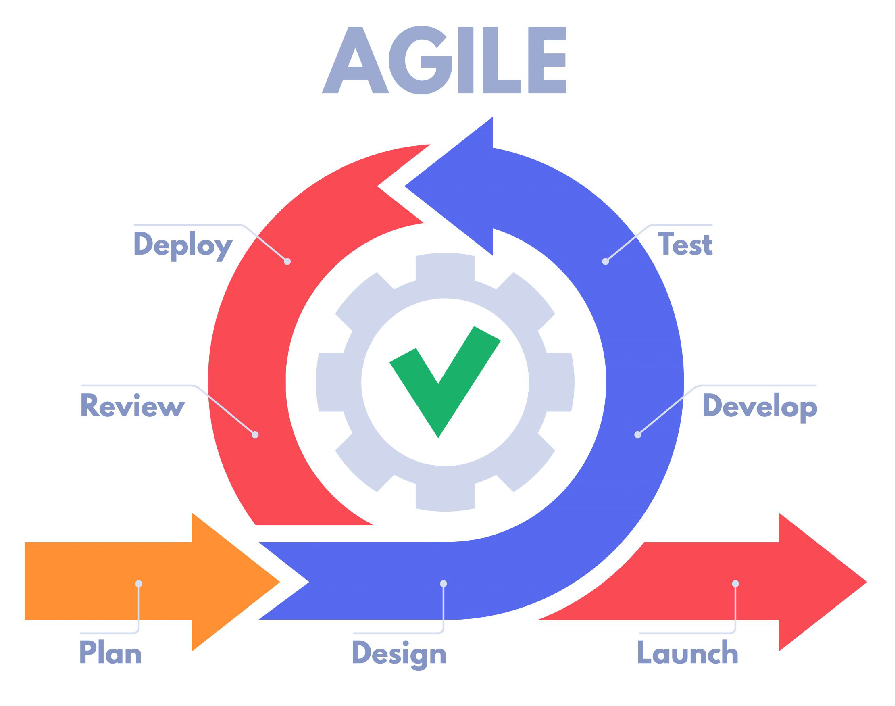
In developing software using the Agile Method, there are several stages to go through, including:
- Plan: At this stage, the main focus is to identify and document user needs and the problems that need to be solved. Based on interviews and data studies at Erabarala camping equipment rental in Manisi, several issues were identified, such as discomfort with payment methods, difficulties in returning equipment, and a lack of transparency and efficiency in rental management. Therefore, this research aims to develop an information system application that can address these issues by adhering to the applicable rules at the rental.
- Design: This stage involves gaining a comprehensive understanding of what needs to be done and how the system functions overall. Components like flowcharts, Use Case Diagrams, Activity Diagrams, and ERD will be involved in this stage.
- Development: In the development stage, software is implemented according to the designed plan. It’s crucial to ensure that each developed feature meets user requirements.
- Testing: Continuous testing is carried out in this stage to ensure the quality and functionality of the system. It aims to ensure that the system operates correctly and meets the established requirements.
- Deployment: In this stage, every accepted change is deployed quickly and securely. Deployment occurs gradually to reduce risks and ensure smooth system operation, allowing users to start using the application immediately without major issues.
- Review: In this final stage, review meetings are typically held to demonstrate developed features. Evaluation is conducted to determine if features are functioning properly, identify features that need improvement, and explore ways to enhance future development processes. Continuous review ensures that the developed solution optimally meets user needs.
4. Result and Discussion
4.1. Result
The result of this research is the development of a Camping Equipment and Goods Rental Information System. Based on the issues identified from the information we obtained from Erabarala rental, we created a website as the solution. This website provides various features that allow users to rent different camping equipment.
Additionally, this website aims to facilitate customers with features such as cashless transactions, equipment delivery and pick-up services, and a real-time admin management system that offers full transparency to customers regarding equipment availability, booking status, and other information.
This website is developed using the Laravel framework to maximize the development process. By using Laravel, the resulting website becomes more dynamic.
Figure 2.
Laravel

The presence of the Laravel framework makes the PHP programming language more powerful. PHP is used as the main backend language to manage application logic, database manipulation, and user session management.
We chose to use the Laravel framework for the backend because it facilitates the development of websites with various features and tools, making the development process faster, safer, and more efficient.
In addition to Laravel, we also use JavaScript and CSS programming languages to ensure the application runs smoothly, Apart from that, we also use some specifics, for example Git and Vue.js.
Git is a highly popular version control system used by software developers to manage changes to source code during software development. The primary use of Git is to track changes in the source code over time. It allows developers to work collaboratively with a team, manage code branches, and seamlessly integrate changes from various contributors.
Figure 3.
Git

We use Git as our version control system because it facilitates structured, collaborative, and flexible development, making it easy to detect errors or bugs. And The last one is Vue.js.
Vue.js is a JavaScript framework used for building user interfaces (UI) in web applications. One of the main features of Vue.js is its reactivity and ease of use. Vue.js employs a declarative approach to constructing UIs, allowing us to define the UI structure within simple HTML templates and specify the UI behavior in separate JavaScript code. The core components of Vue.js include HTML templates, JavaScript logic, and associated CSS.
Figure 4.
Vue.js

We chose Vue.js for our frontend development because it excels in ease of use, combines high performance with extensive documentation, and offers a comprehensive ecosystem.
By combining Laravel, PHP, JavaScript, and CSS, Rent n Play ensures that users have a fast, secure, and enjoyable experience when searching for and renting camping equipment they need. This robust stack allows us to create a seamless and efficient application, providing users with a reliable platform for all their camping rental needs.
4.2. Discussion
The user satisfaction survey shows that [percentage] of users are satisfied with the goods lending service. The main satisfaction points include [process speed, system convenience, etc.], while the main complaints include [goods damage, difficulty in returning, etc.]. Condition of goods after return
The goods lending program has proven to be effective in meeting users’ needs for [borrowed goods]. The high number of transactions indicates that there is significant demand for this service. However, there are several aspects that require improvement, such as managing late returns and damaged goods. User Satisfaction
- 1)
-
System Design PlanningThe system design phase is the initial stage in developing this application. The researcher includes the processes and components that are carried out as follows:
- (a)
-
FlowchartA flowchart is a visual representation that describes the steps and sequence of procedures of a program in order. A flowchart is used to show the stages of problem-solving. The following are flowchart diagrams for item rental and item return in the RnP rental information system.[7]
-
Item Rental Flowchart
- i)
- Start the rental process
- ii)
- The renter opens the initial catalog page
- iii)
-
Check if the customer has an account or not
- -
- If not, create an account first
- iv)
- If yes, log in
- v)
- Select the item to be rented
- vi)
-
Check the availability of the item
- -
- If not available, the process returns to point 3
- vii)
- If available, proceed to checkout
- viii)
- The renter makes the rental payment
- ix)
- The payment is confirmed by the admin
- x)
- The item is handed over to the renter
- xi)
- process completed
-
- 2)
-
Use Case DiagramA use case diagram is a modeling method used to describe the behavior of the system being built. This diagram provides a description of how one or more actors interact with the system. The main function of a use case diagram is to identify the functions within the system and who has the right to use these functions. This diagram provides a clear overview of the system’s functions from the user’s perspective in a simple manner. Below is the use case diagram for the rental information system at RnP:The diagram shows the design of the use case diagram for the web-based rental information system at InOutdoors Rental. There are two actors involved: the renter and the officer. The activities that can be performed by the renter include logging in and opening their profile, viewing the store catalog page, opening the cart, and viewing rental history. On the other hand, the activities that can be performed by the admin include logging in, viewing renter data, category data, item data, rental history, creating reports, and processing item return requests.[8]
- 3)
-
Activity DiagramAn activity diagram is a type of diagram used to represent processes within a system. This diagram illustrates the sequence of processes in order with a vertical orientation. An activity diagram is an extension of the use case diagram that describes the sequence of activities within a system. The activities depicted can be a series of menus or business processes within the system. Activity diagrams are specifically used to illustrate workflows or activities within the system. Below is an overview of the activity diagram for the rental information system at RnP:The transaction process begins with the customer selecting products to add to their shopping cart. After the products are selected, the customer fills out the necessary transaction form. The customer then needs to determine whether the shipping address is the same as the address stored in the system. If the shipping address is the same, the customer selects the appropriate address from the list and then submits the transaction form. If not, the customer will be prompted to fill out a new shipping address.[9]Once the form is submitted, the system will save the transaction information into the database. The system then sends a notification to the admin to inform them that a new transaction has been created. The admin can view this new transaction and update the transaction status as needed, such as verifying payment or preparing the goods for shipment.[10]Next, the customer must choose a payment method. If the customer chooses to make a payment via bank transfer, they will proceed to complete the payment. After the payment is made, the system will process and confirm the payment. If the customer chooses another payment method, they will also be directed to complete the payment according to the chosen method.[11]Once all payment steps are completed, the transaction process is considered finished. The customer will receive a confirmation that their transaction was successful and that the rented items will be shipped to the selected address. The admin can continue to monitor the transaction status and take necessary actions to ensure smooth delivery. This diagram illustrates in detail how each party interacts in the transaction process, from product selection to payment completion, ensuring all steps are well integrated within the system.[12]The diagram below shows the activity diagram of the rental information system at RnP. This diagram depicts the sequence of activities that occur within the system, from selecting the items to be rented to the item return process. This diagram helps in understanding the workflow of each activity within the rental system.[13]
- 4)
-
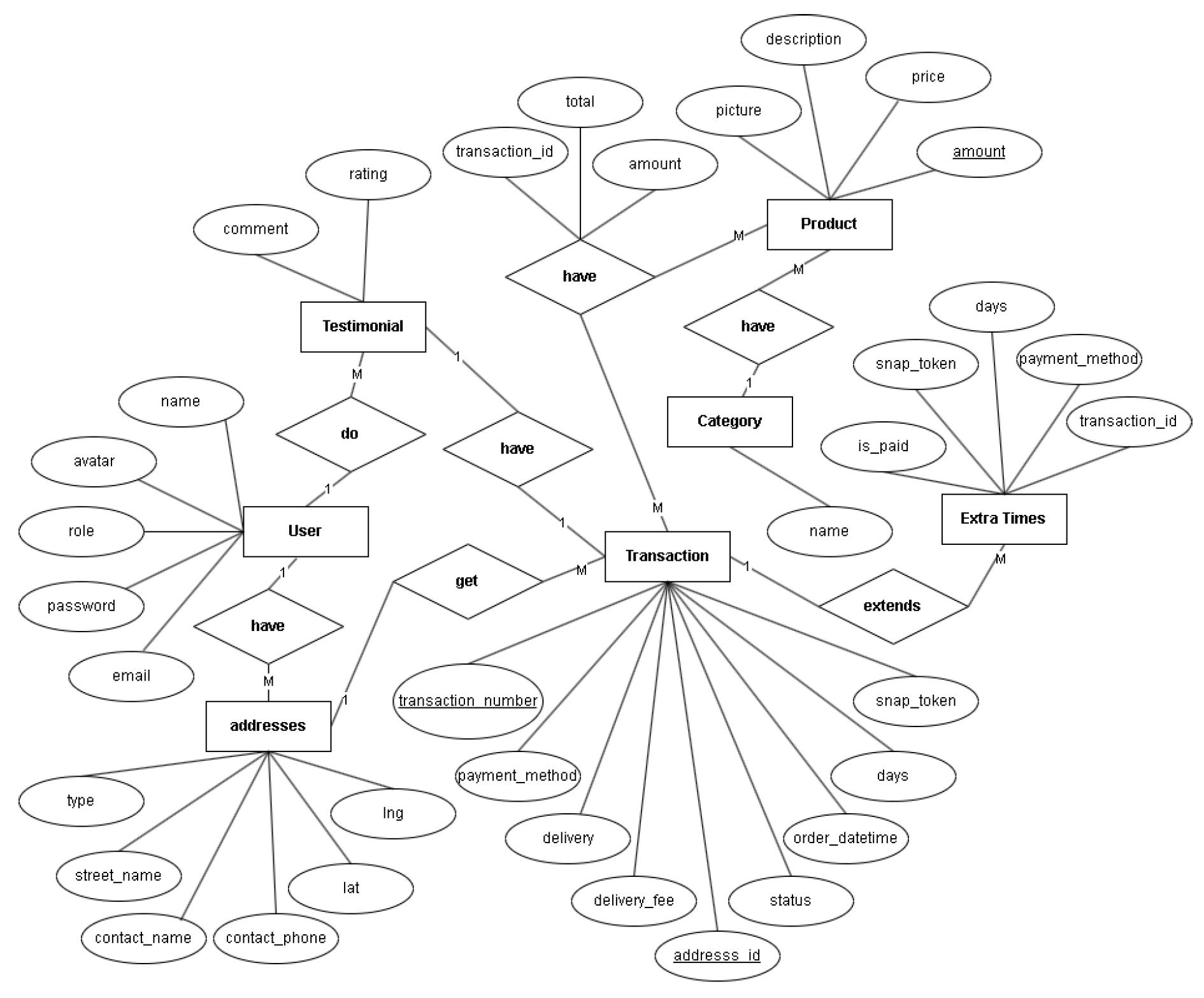
Entity Relationship Diagram (ERD)An Entity Relationship Diagram (ERD) is a diagram that visualizes data requirements and relationships between entities in a database.[14] An ERD uses symbols or objects structured with three main components: entities, attributes, and relationships. Each of these symbols has connections or associations with other symbols. Below is the ERD for the rental information system at RnP :
Figure 5.
Flowchart of RnP rental information system
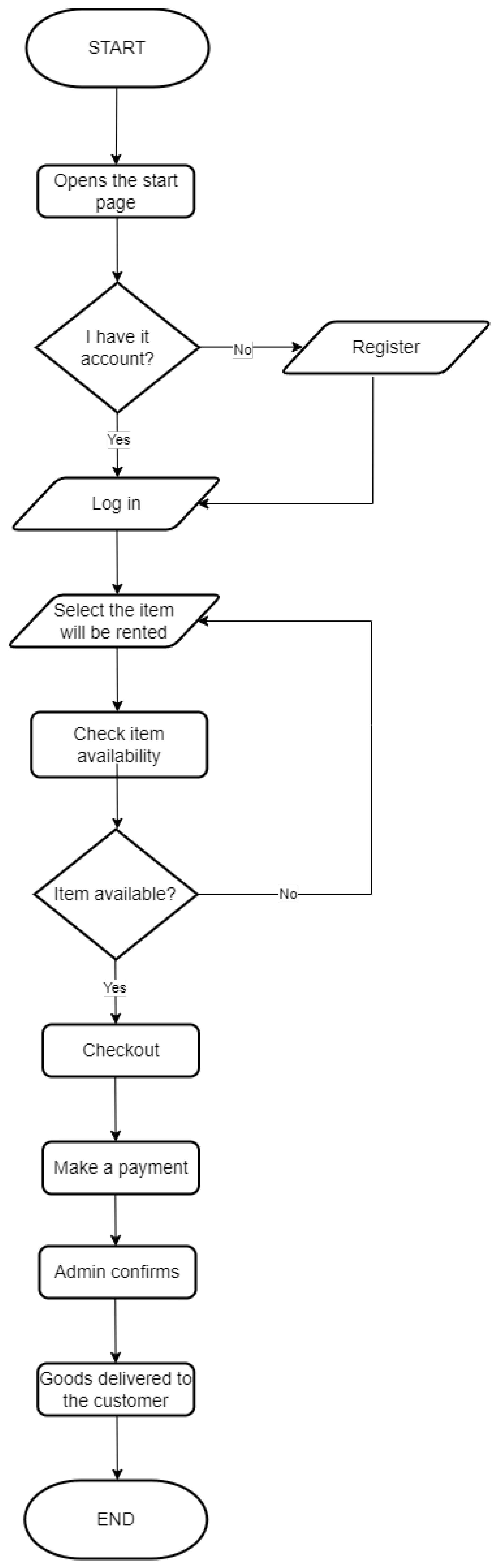
Figure 6.
Use Case diagram
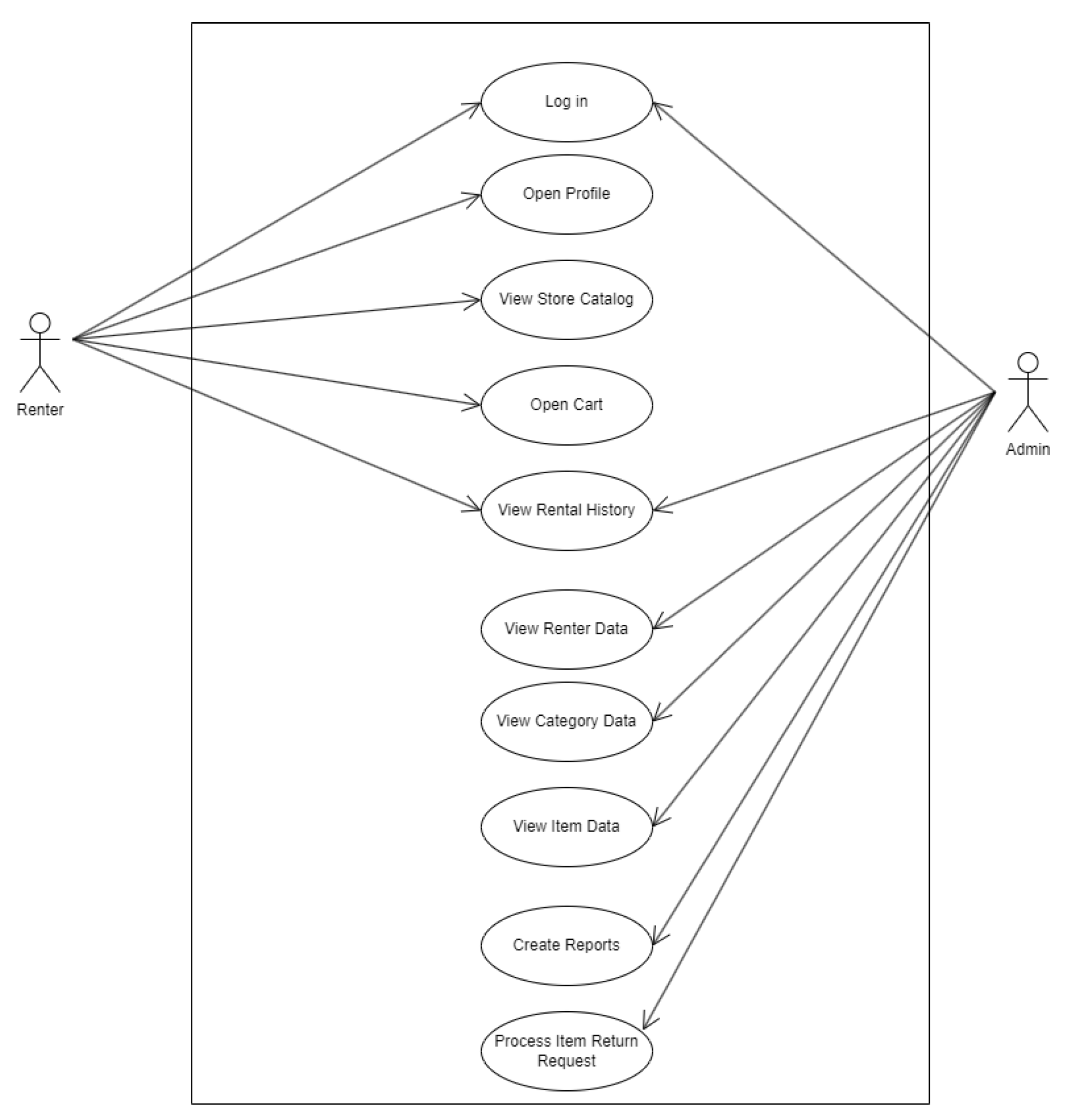
Figure 7.
Rental Camping-Activity Diagram
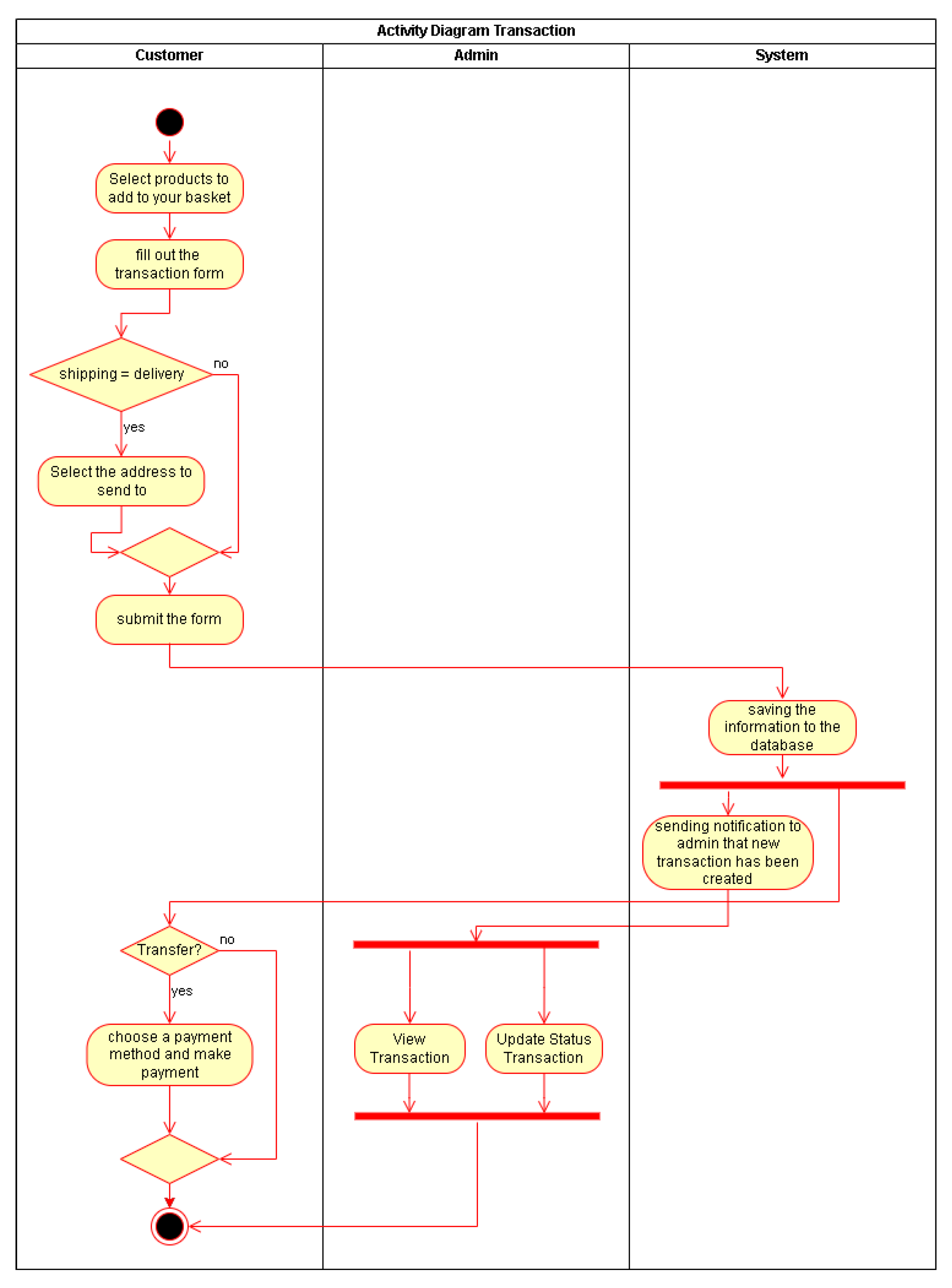
Figure 8.
Entity Relationship Diagram (ERD)
4.3. Demo
The user homepage on this website is designed to provide an intuitive and easily accessible experience. Its main features include Home, which offers an overview of our website; About Us, which contains information about our website; Product, which displays a complete list of items available for rent; Checkout, which facilitates the rental process; and Log In, for accessing and managing user accounts.
Figure 9.
Feature Initial View (Guest)
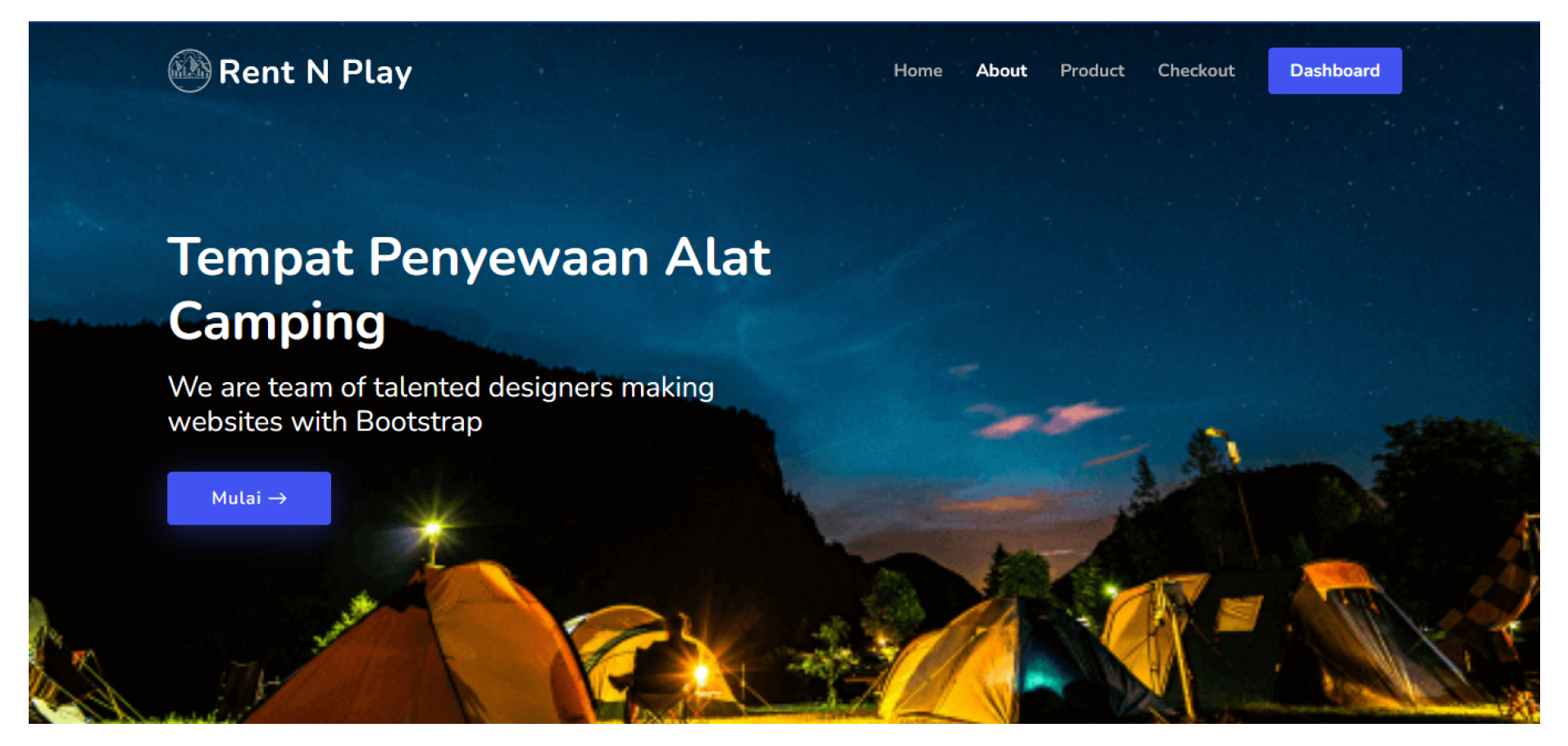
Figure 10.
About-Us (Guest)
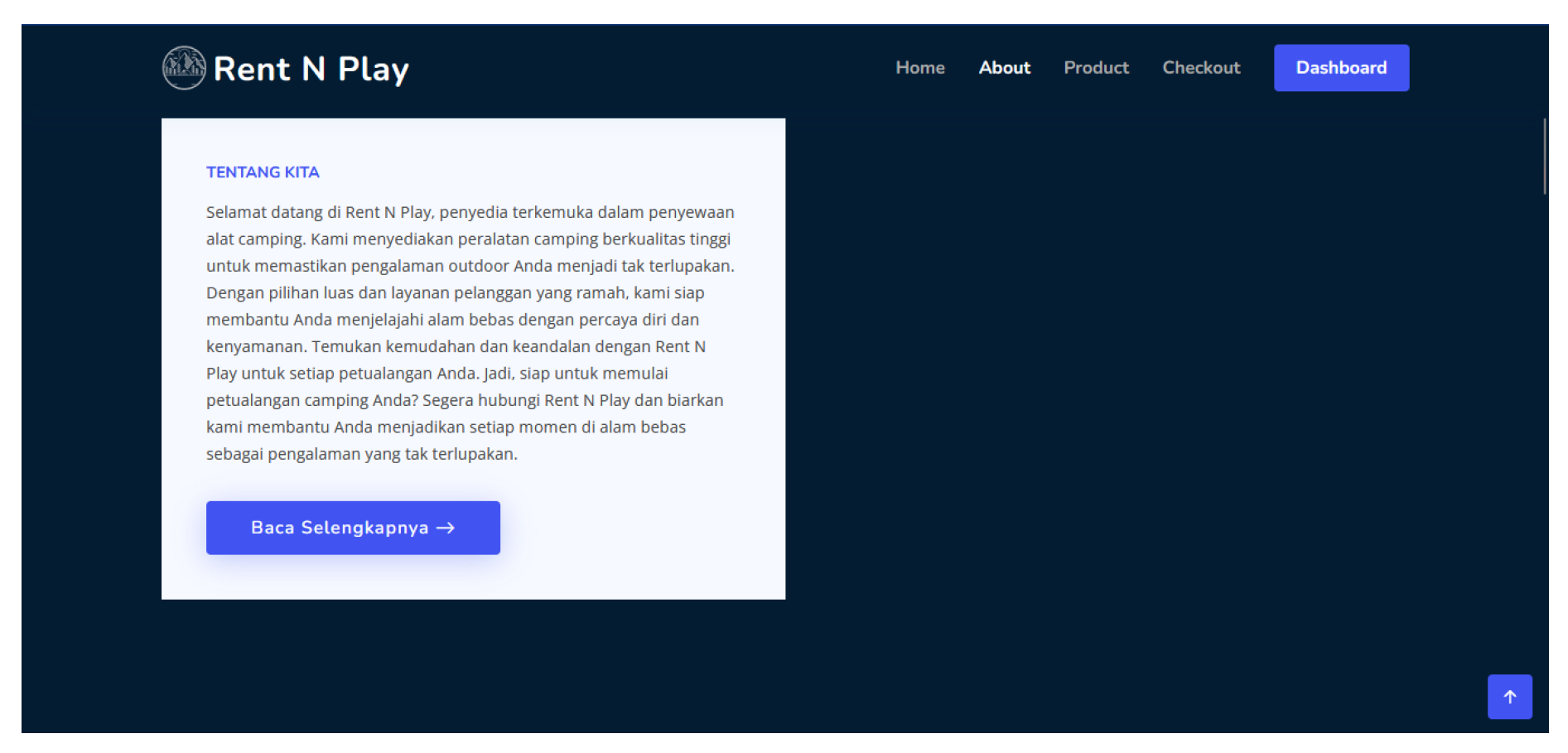
The About Us page on this website is designed to provide comprehensive information and build user trust. Here, users can find the background of our website. Through transparent and thorough descriptions, the About Us page helps strengthen the relationship between the team and the users.
Figure 11.
Popular Products View (Guest)
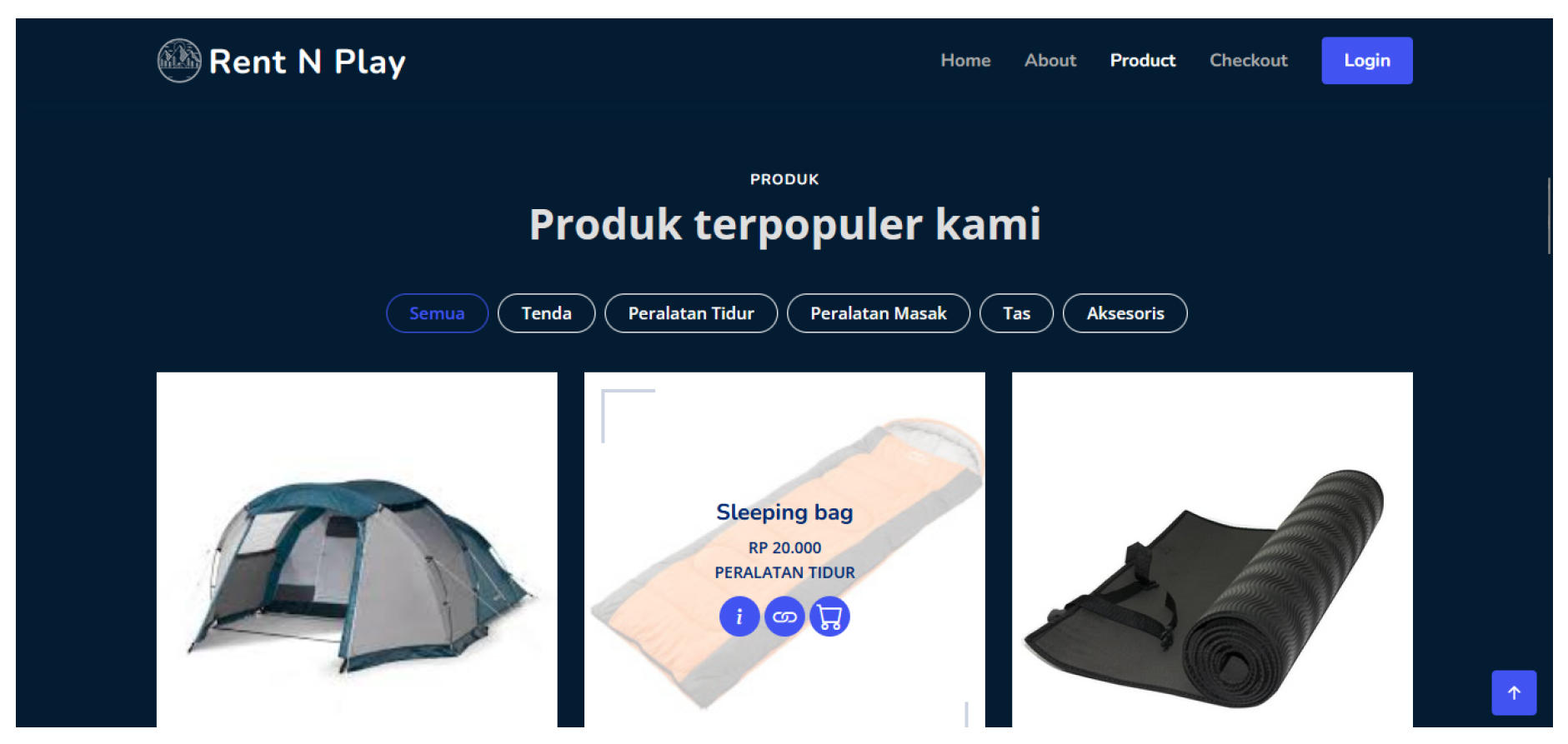
The Products page on the camping equipment rental website is designed to display all available items for rent in an organized and accessible manner. On this page, users can view various categories of camping gear such as tents, sleeping equipment, cooking tools, bags, and accessories. Each item listed includes the product name, rental price, and an option to add it directly to the cart. With an informative and user-friendly layout, the Products page makes it easy for users to find and rent the camping equipment they need.[15]
Figure 12.
Display Item Description (Guest and User)
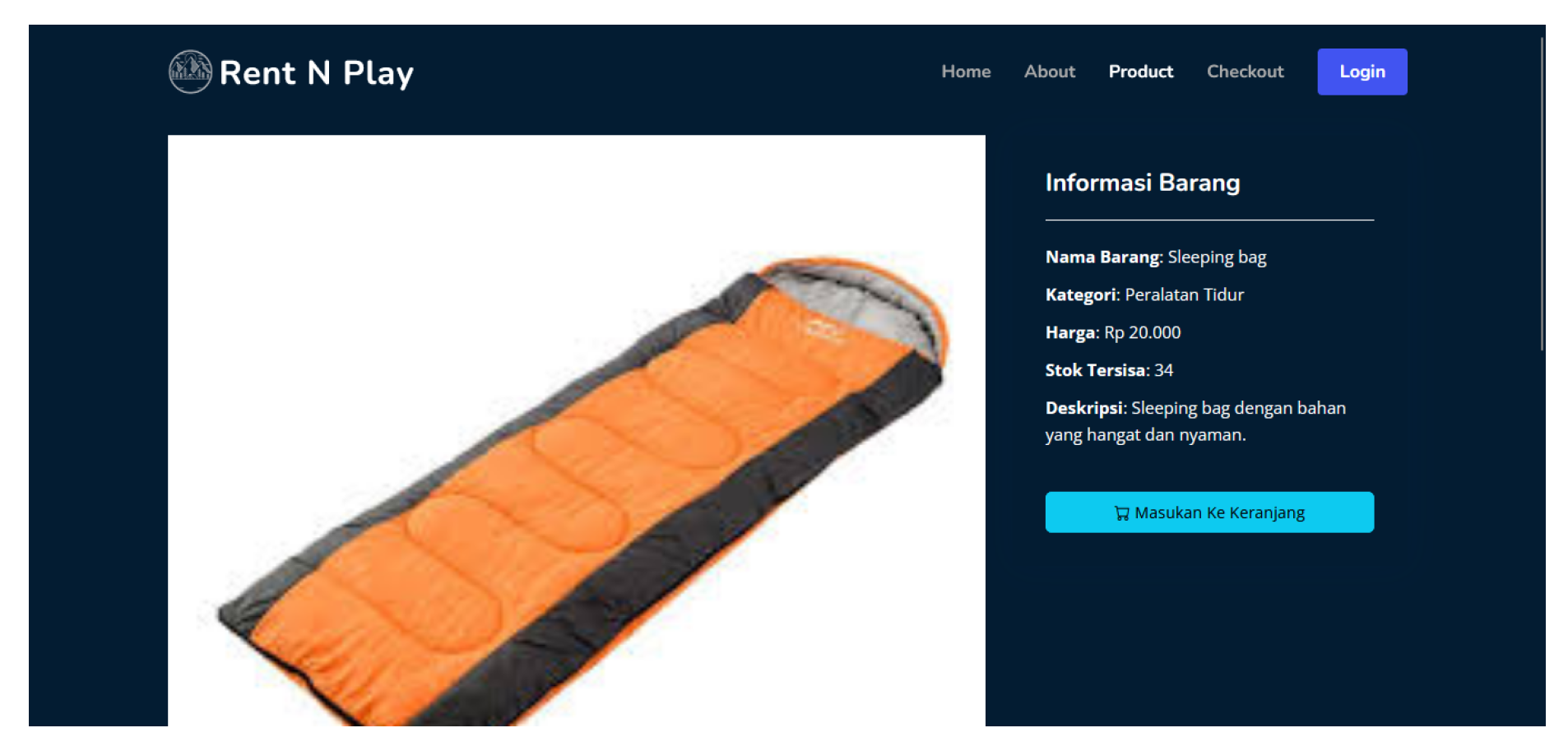
On this page, users can view detailed information about the items, including the item name, category, price, remaining stock, and item description. For example, the item description might read "Sleeping Bag." Additionally, there is a feature to add the item to the cart, making it easy for users to complete the rental process.
Figure 13.
testimonial page (Guest)
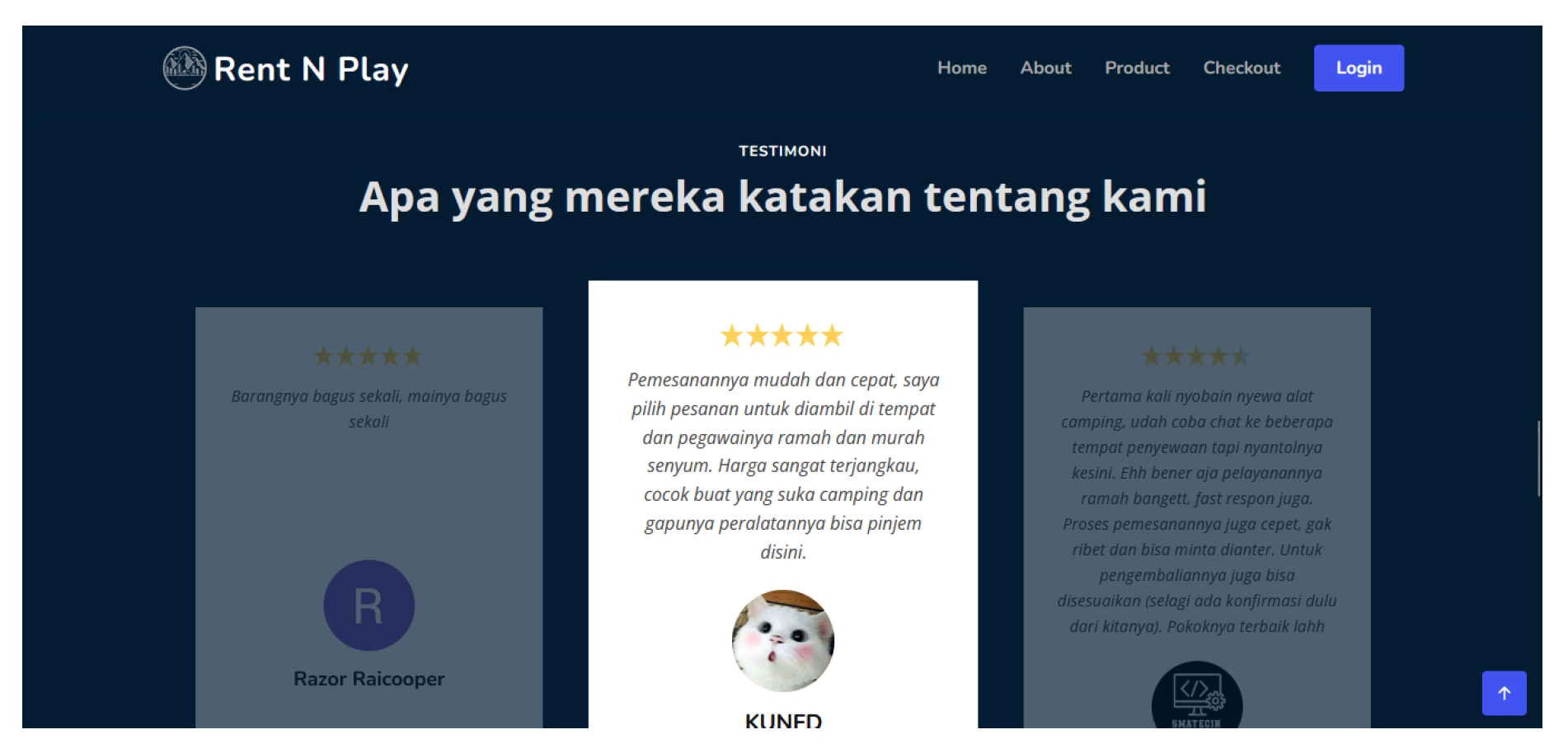
penjelasannya uantuk testimonial page (Guest)
Figure 14.
Team and Footer views (Guest)
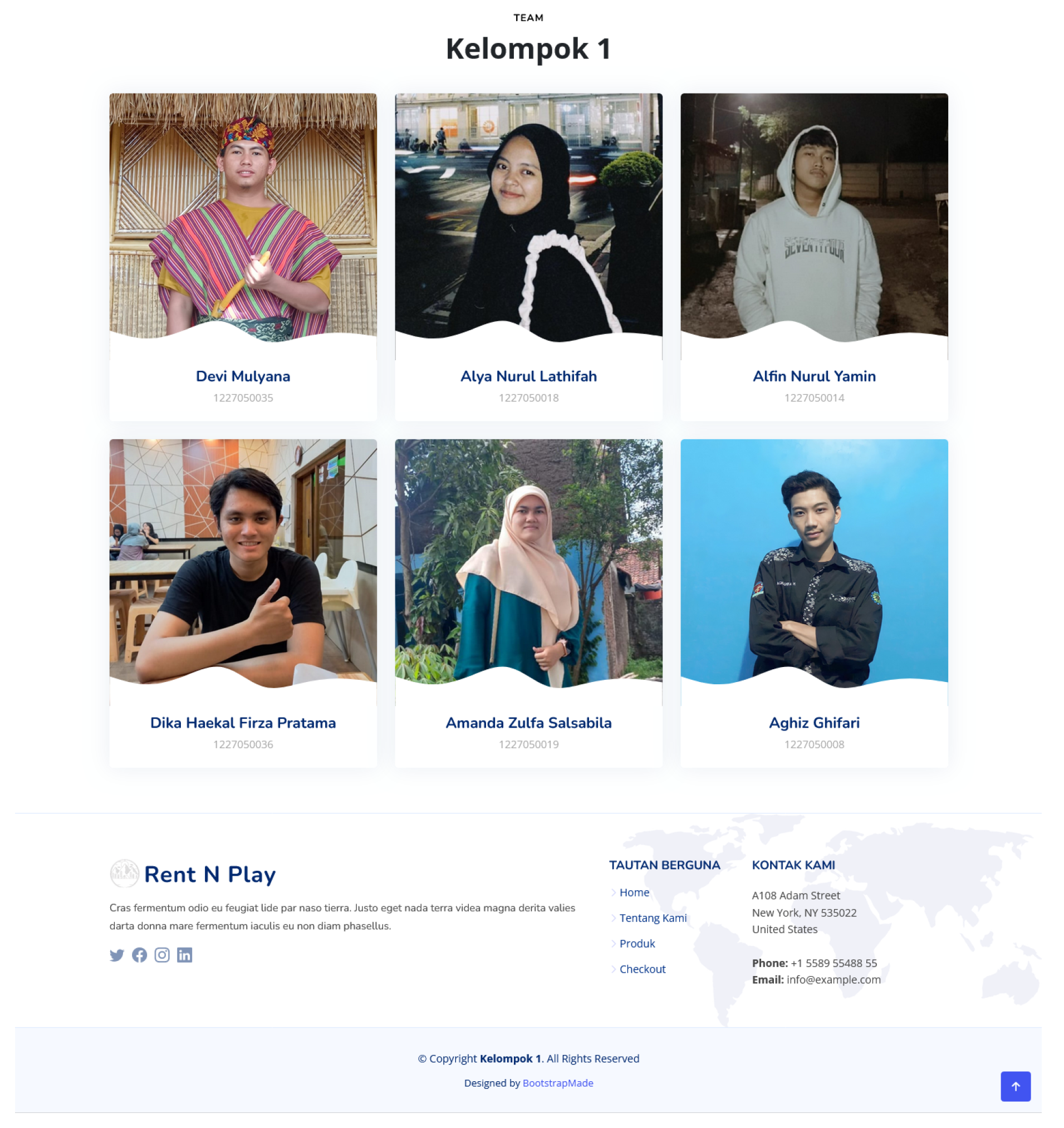
The Team and Footer pages on the camping equipment rental website are designed to provide comprehensive information about the team behind this service and offer useful links and contacts for users. The Team page displays members who played roles in the creation and management of the website, showcasing their photos, names, and Student Identification Numbers (NIM). Meanwhile, the Footer provides important navigation links such as Home, About Us, Products, and Checkout, making it easier for users to access necessary information. Additionally, the Footer includes contact information and links to social media platforms like Instagram, LinkedIn, Facebook, and Twitter, allowing users to connect with us through various channels. At the bottom of the Footer, there is copyright information indicating ownership of the website’s content.
Figure 15.
Login Page (Guest)
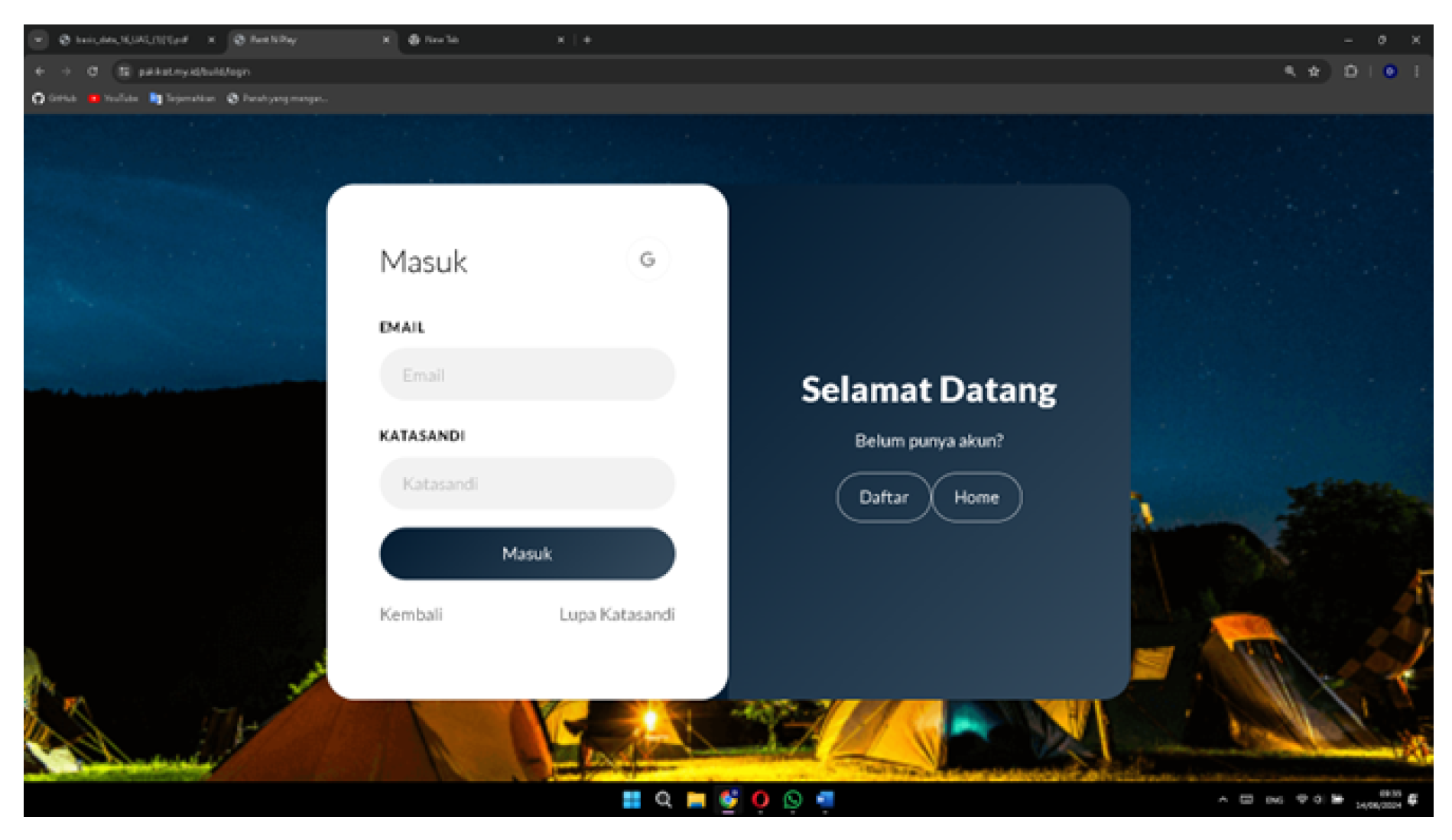
The Login page on the camping equipment rental website is designed to make it easy and secure for users with existing accounts to access the services. On this page, there is a field to enter an email and password, allowing users to log into their accounts. Additionally, there is a "lupa katasandi" (Forgot password) feature linked to the user’s email, helping them recover access if they forget their password. For users who do not yet have an account, there is an option to register, which will directly take them to the registration page. This page also offers the option to sign in directly using a Google account, providing a faster and more convenient alternative for users.
Figure 16.
Register Page (Guest)
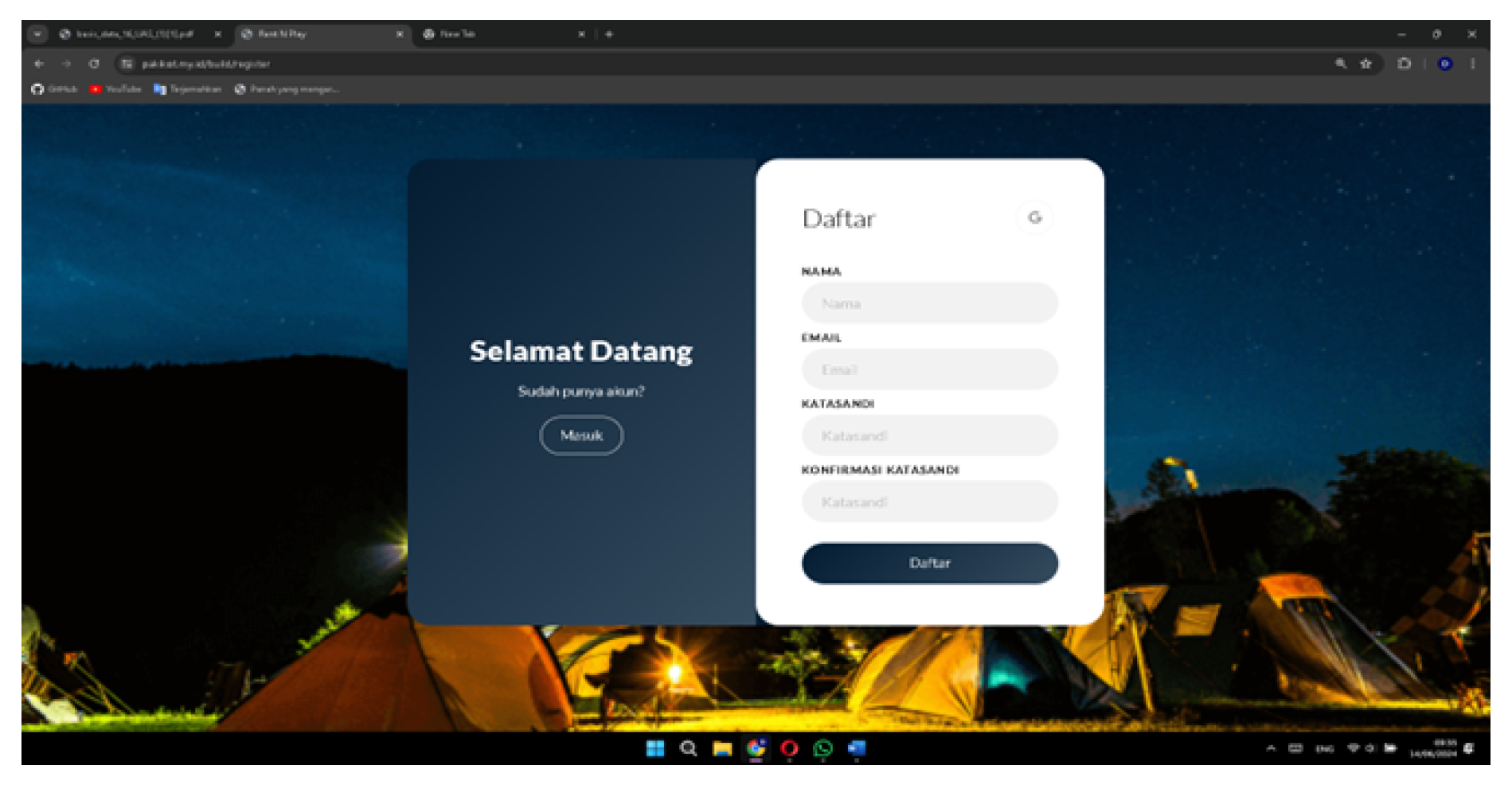
The Register page on our website is designed to make it easy and efficient for new users to create an account quickly. On this page, users are asked to enter their name, email, password, and confirm their password, then click the register button to complete the registration process. Additionally, this page offers the option to sign up directly using a Google account, providing a faster and more convenient alternative for users.
Figure 17.
Forgot password page User
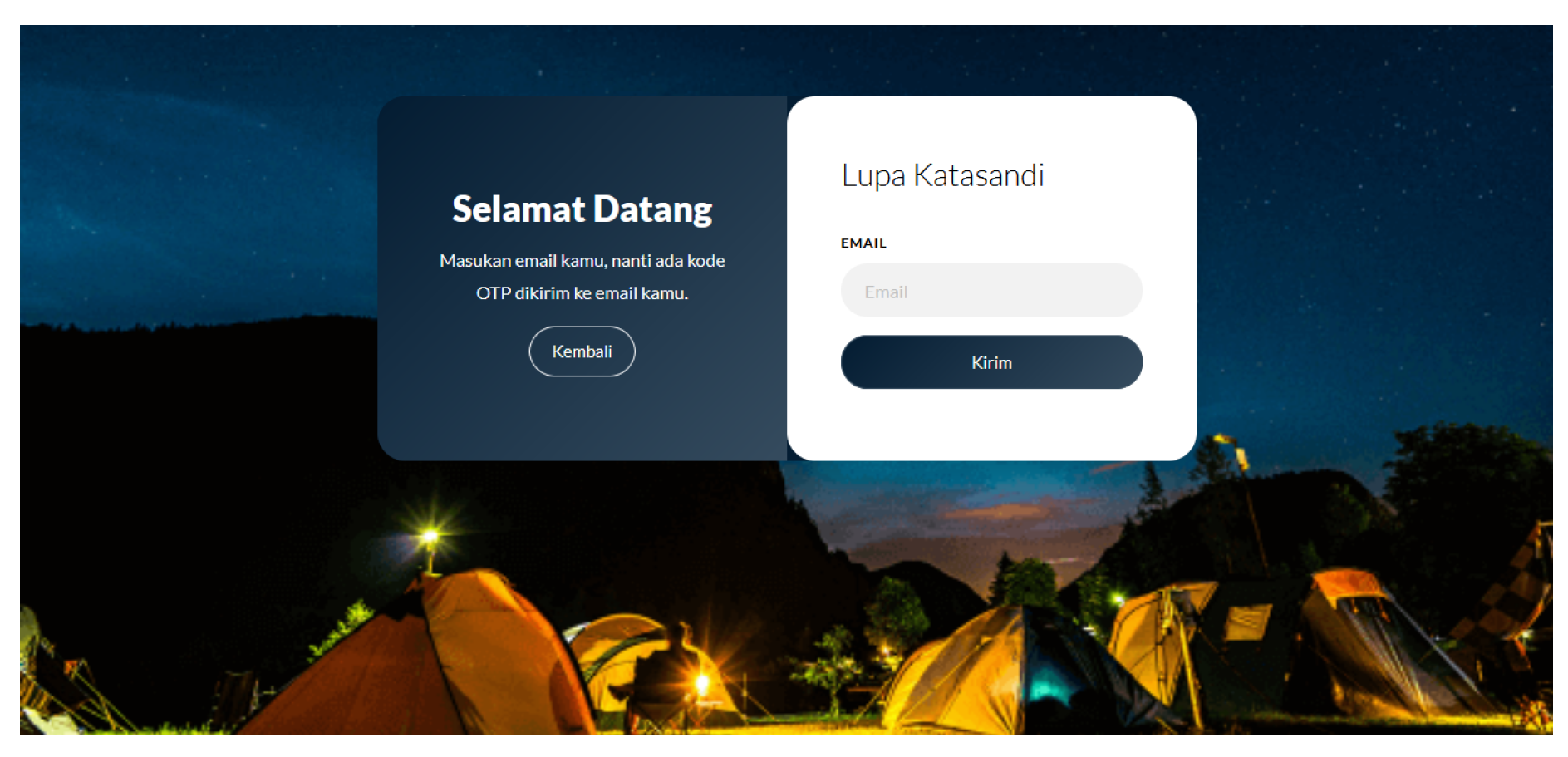
On this page, the user is asked to enter their email, and then an OTP code will be sent to the email that was entered, as in the Figure 18. If the entered email is in the system, the user will be directed to reset the password by entering the OTP code sent via email and the new password along with its confirmation as in the Figure 19.
Figure 18.
OTP CODE (User)
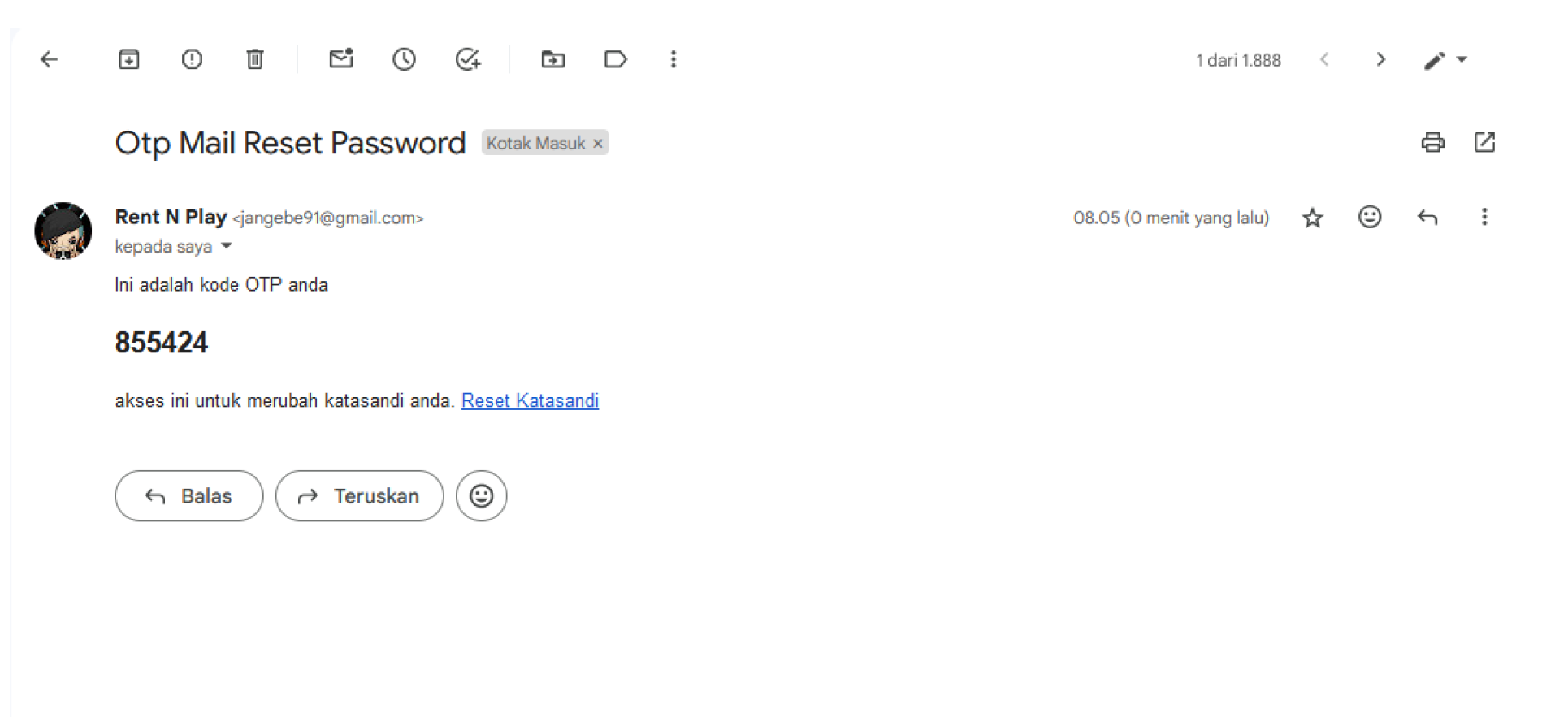
Figure 19.
Password change page (User)
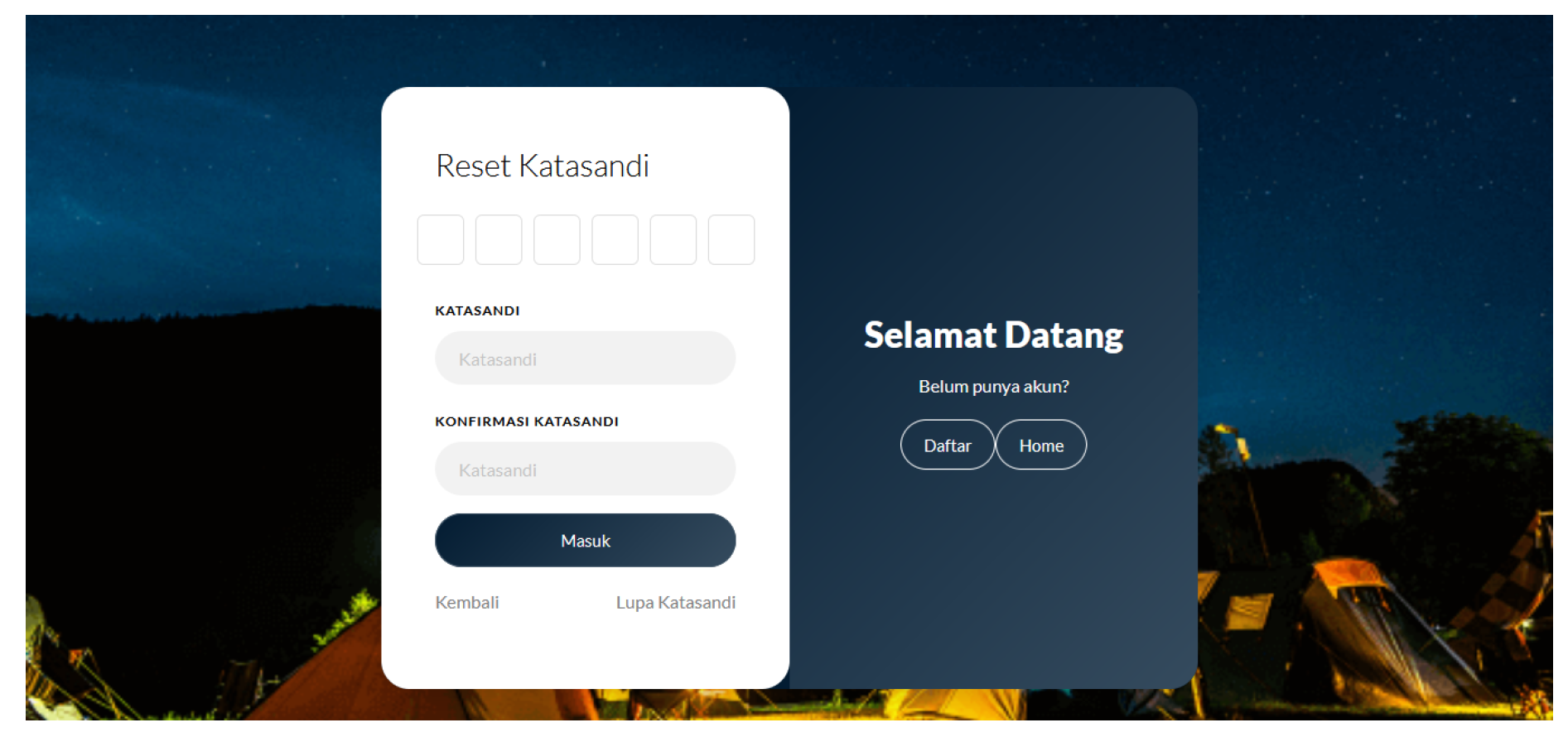
Figure 20.
Customer Dashboard Display (User)
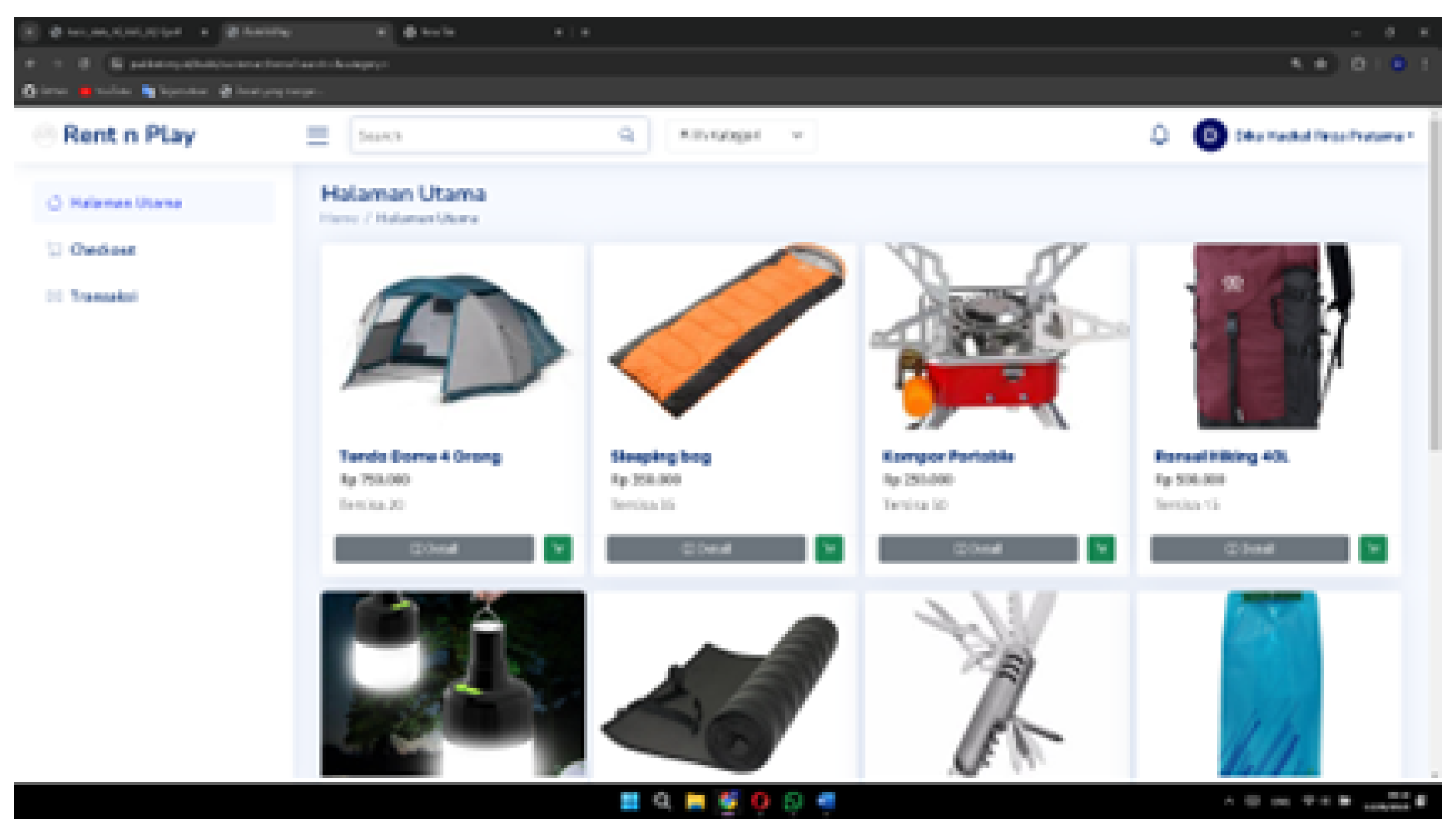
The Customer Dashboard page on our website is designed to provide an organized and efficient user experience. On this page, there is a main page feature that displays details of products available for rent, complete with an option to choose categories for easier item search. Users can easily view and select the camping equipment they need from various categories provided. Additionally, below the main page feature, there are Checkout and Transaction features.
Figure 21.
Search Bar Display (Guest and User)
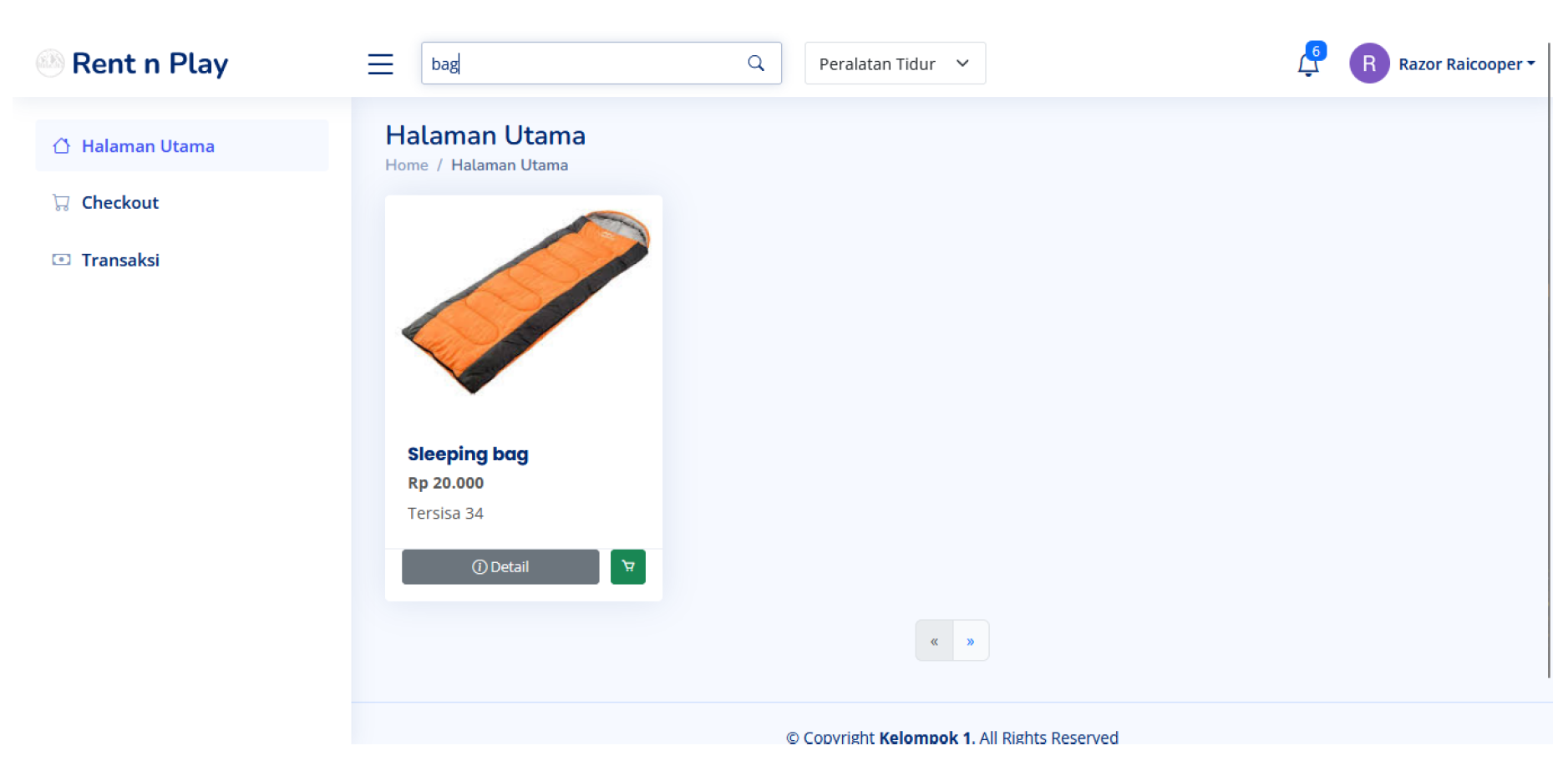
The Search Bar page on the camping equipment rental website is designed to help users quickly find the items they need. This page features a direct search function that allows users to look for specific items. For example, when a user enters the word "Tent" in the search bar, a list of products with the name tent will appear, as shown in the image above. Each search result will display the product name, price, availability, and detailed information about the item.
Figure 22.
notification feature (User)
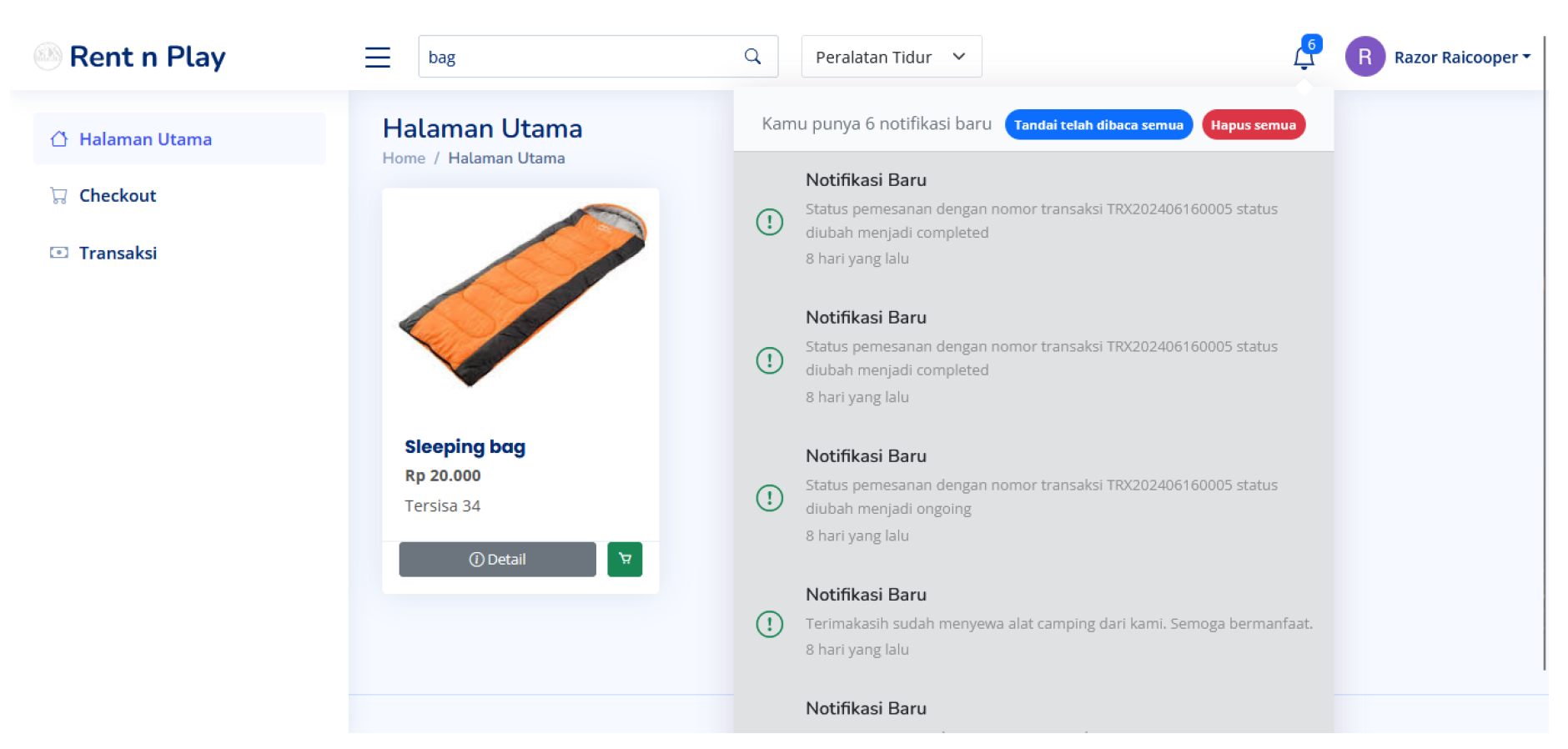
The page in the image above is part of a system designed to provide information. It includes notifications about incoming orders, order status changes, and more, as shown in the image above.
Figure 23.
Profile page (User)
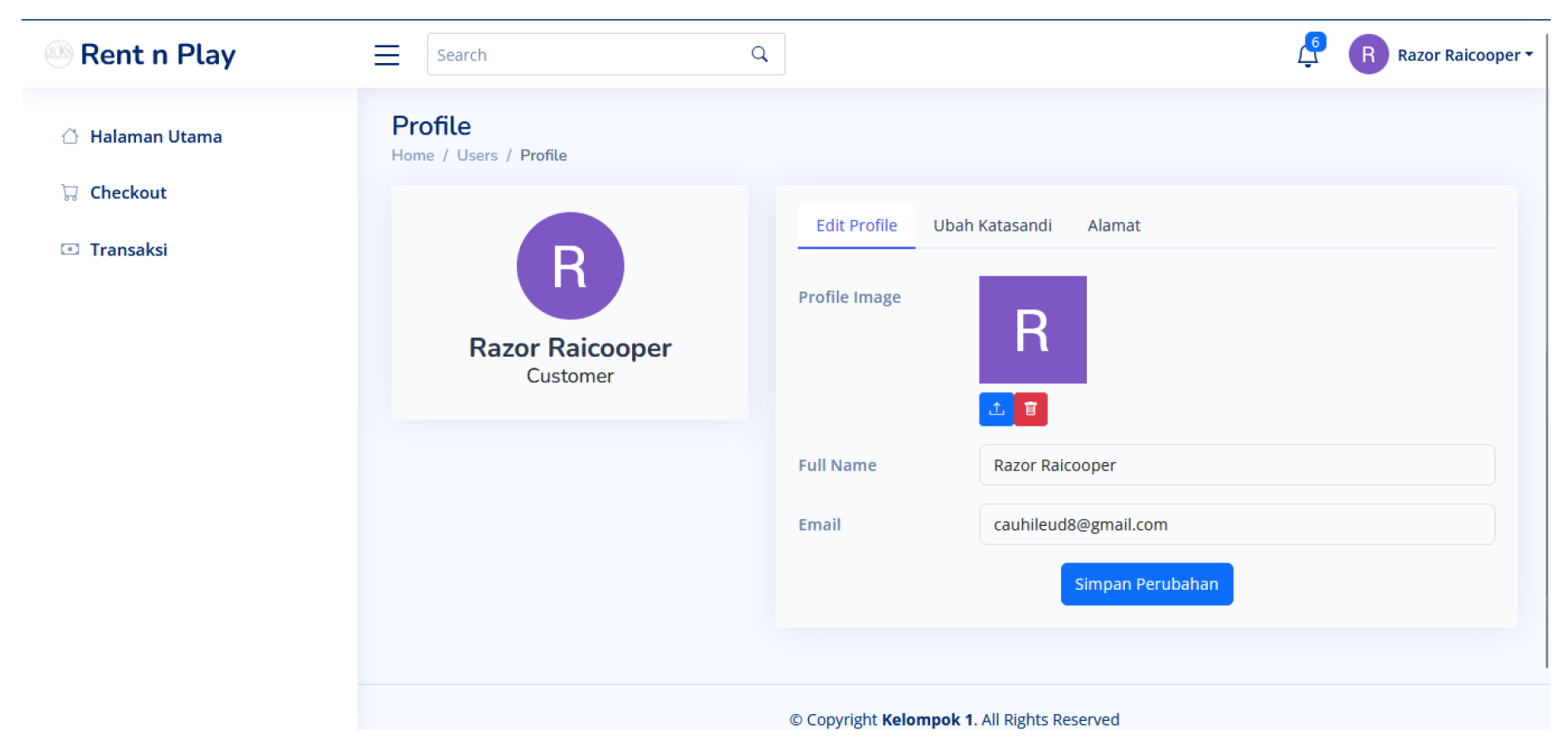
This page is the profile page for customers and admins, where users can edit their profiles, change their passwords, and specifically for customers, add addresses for transactions as in the Figure 24.
Figure 24.
Add address page (User)
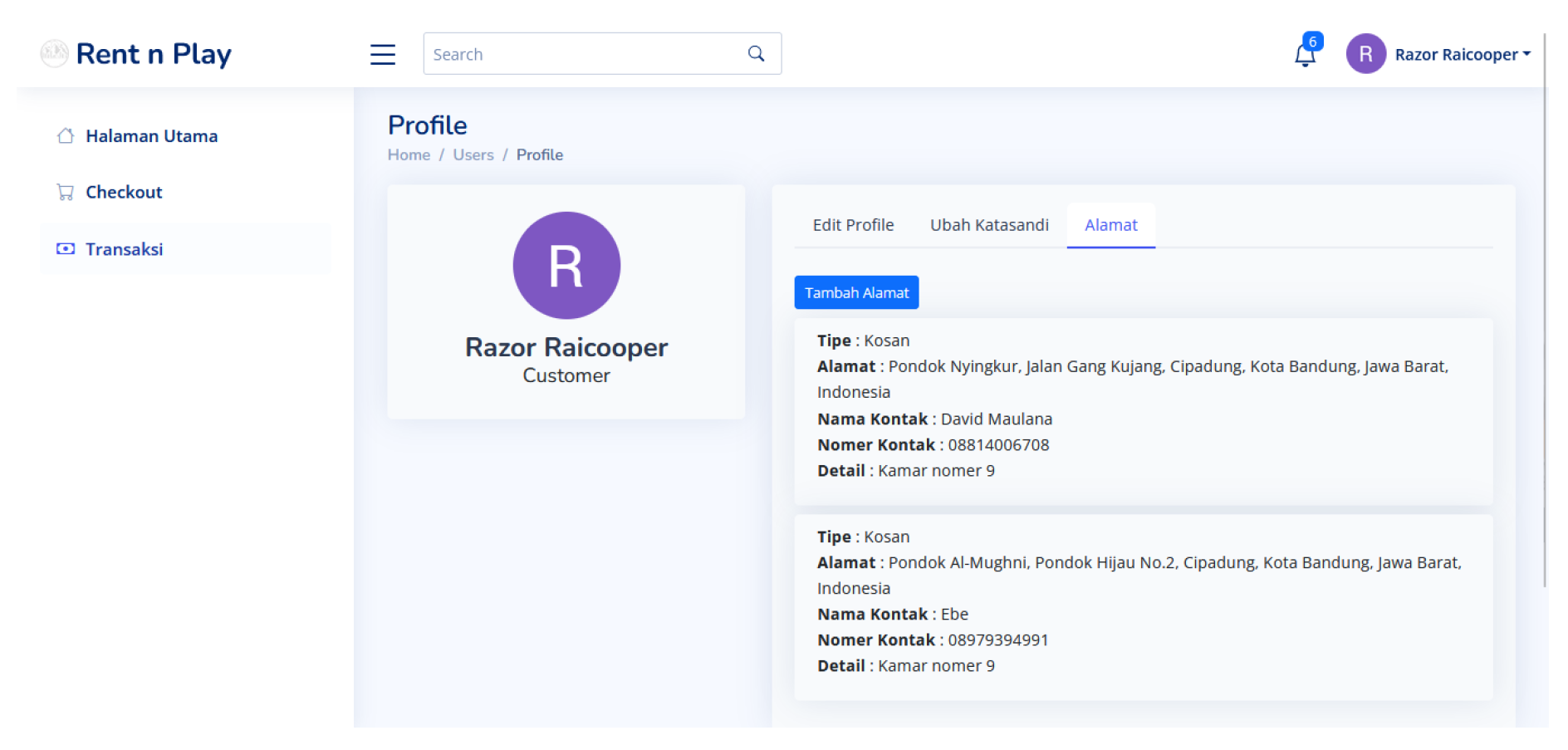
The page in the image is an essential part of our system designed to collect and manage user address information. This page also includes options for users to save their addresses, update existing information, and set a default shipping address for their camping equipment orders. Users can select the address type from a drop-down list, such as "Home," then fill in the contact number, contact name, and specific details about their address. At the bottom of the form, there is an interactive map that helps users review the entered address location. This map has "Map" and "Satellite" view options. Once all the information is filled in, users can save the changes by clicking the "Save" button at the bottom right corner.
On this page provides users with a comprehensive summary of their rental order. On this page, users will find a list of products and subtotal of the items they have chosen to rent. Additionally, this page displays important information, including the user’s name, email, transaction number, and some field that must be filled including payment method with two options (Cash and Transfer), shipping with two options too ("Pickup" and "Delivery"), rental duration, and total price, ensuring that users can review and complete their transactions easily and confidently. One of the standout features is the ability to add an address through a form integrated with Google Maps API when the shipping is Delivery, allowing users to select locations directly from the map, enhancing the convenience and accuracy of address entry as in the Figure 25.
Figure 25.
Address form (User)
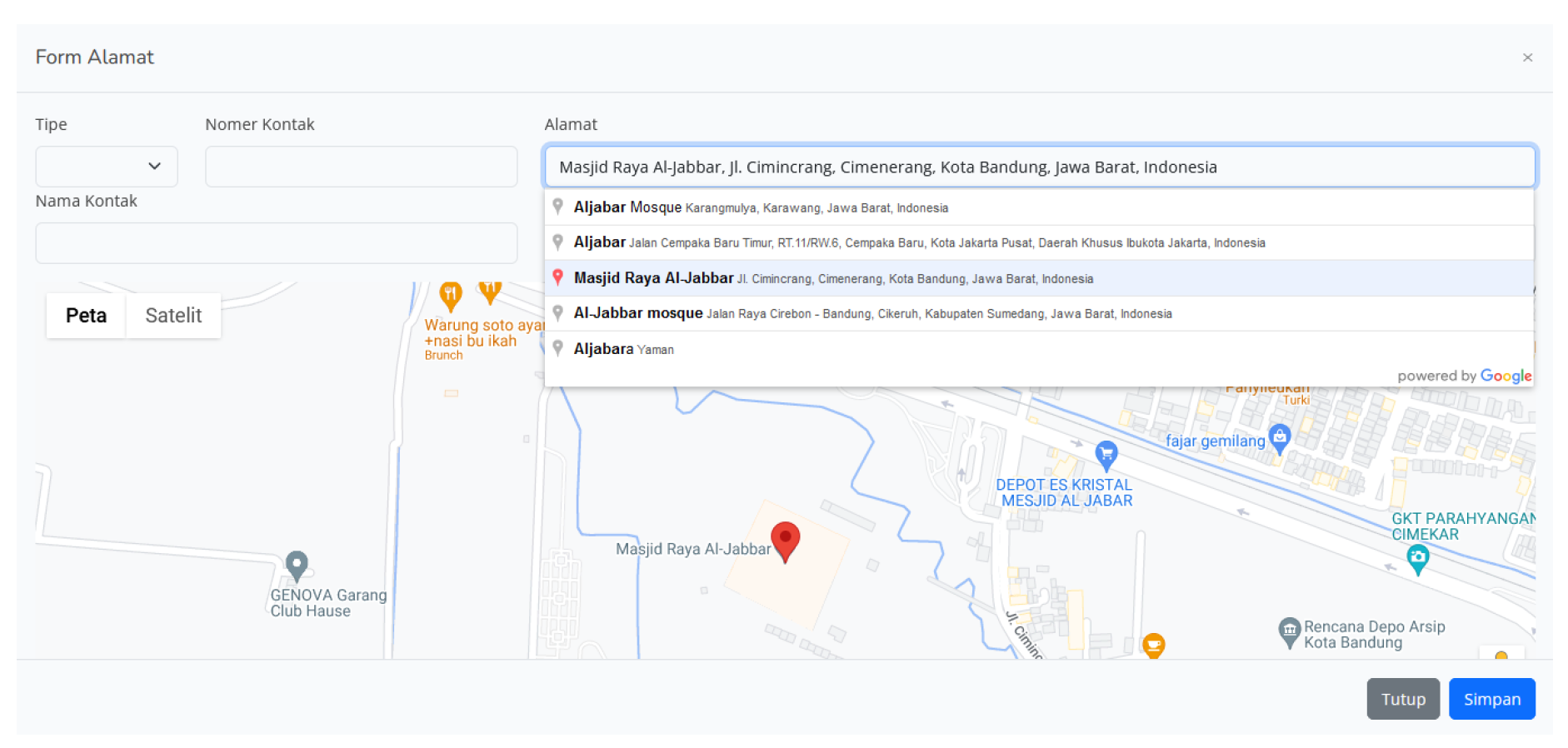
Figure 26.
Checkout View (User)
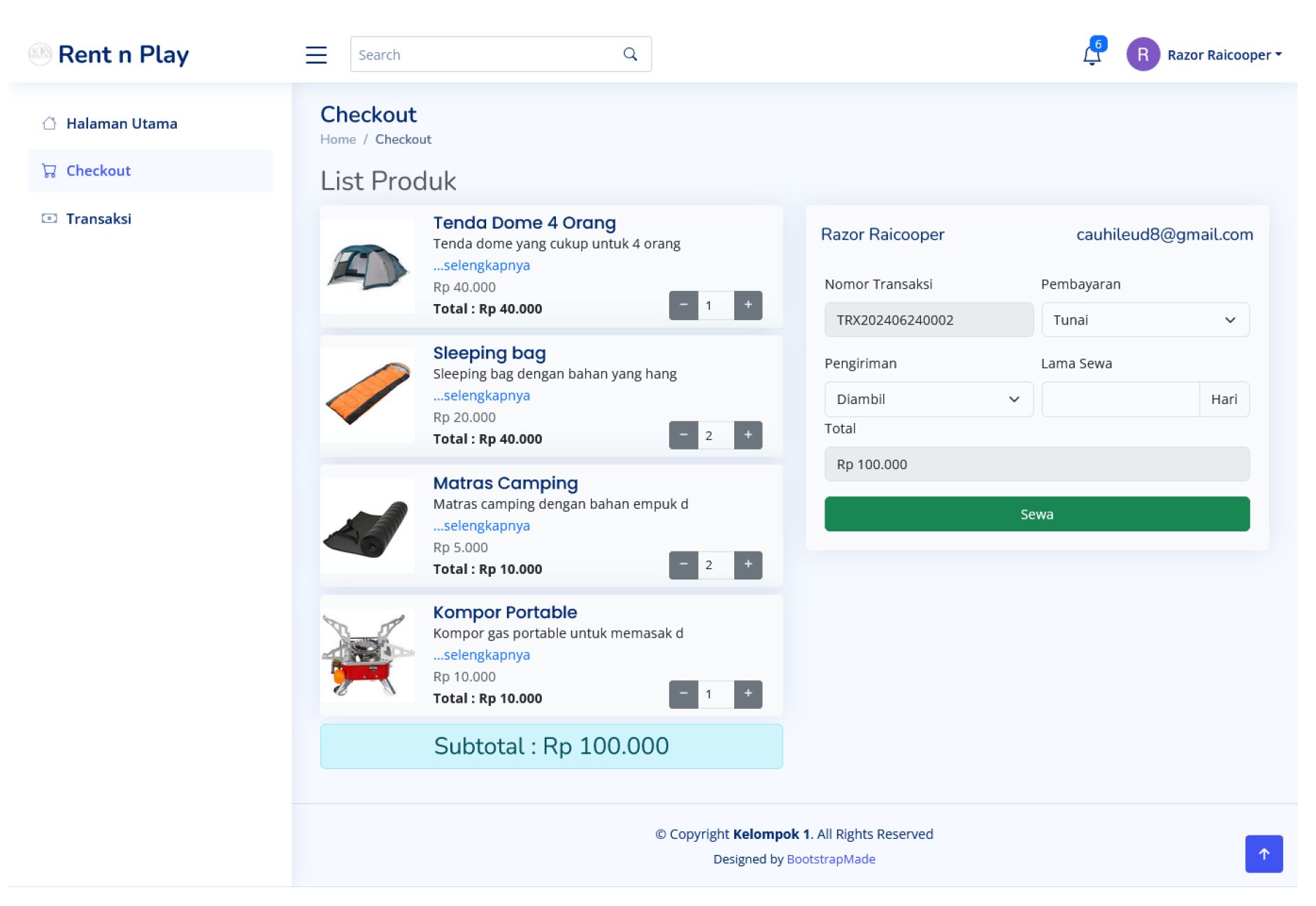
Figure 27.
Checkout page by filling in address data (User)
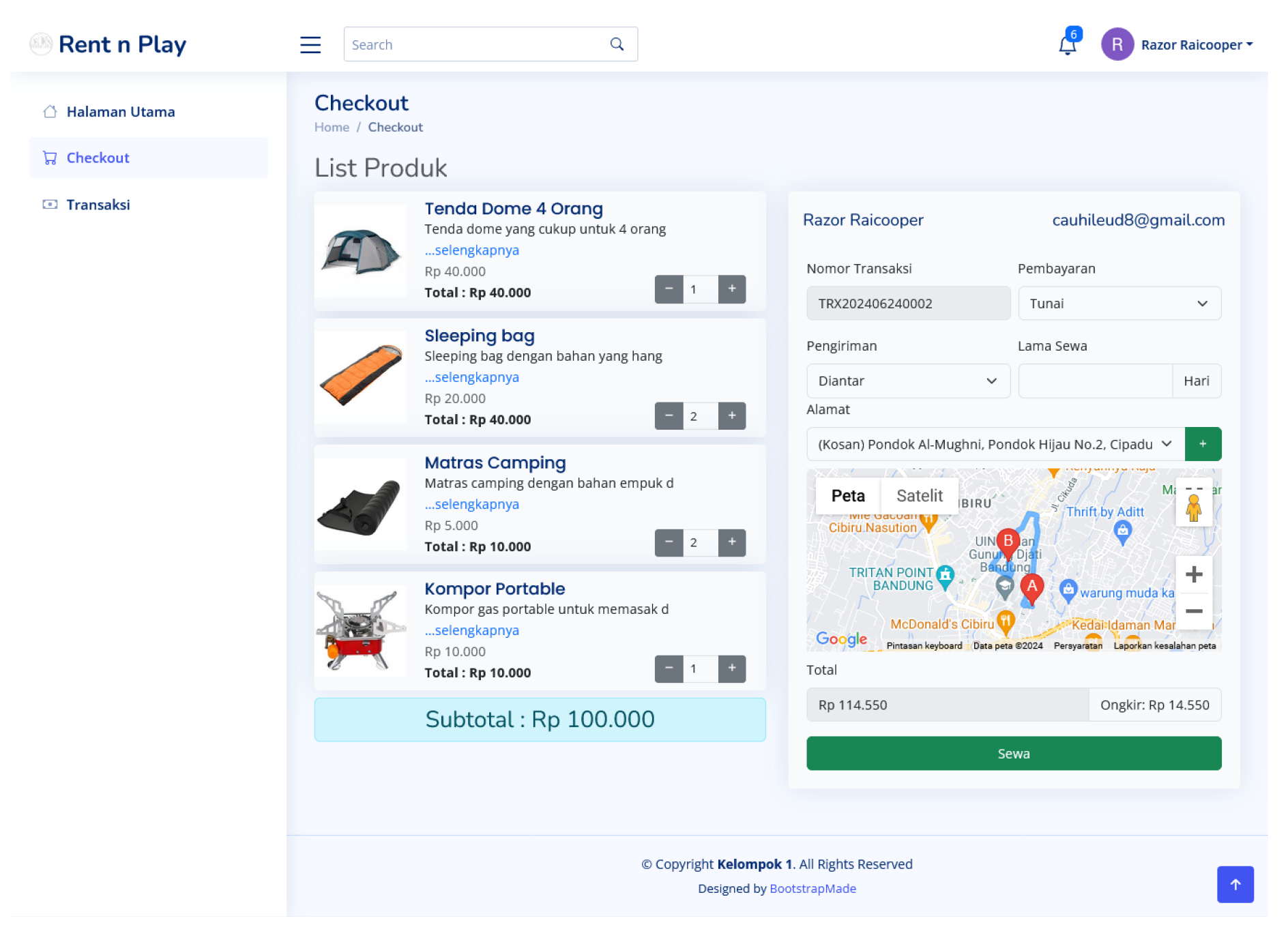
After the user completes filling out the form, the customer will be directed to the transaction details page of the previously ordered items. When the customer chooses to pay using the transfer method, a pop-up will appear with various payment method options such as QRIS, Dana, GoPay, and others as in the Figure 28
Figure 28.
Payment methods page(User)
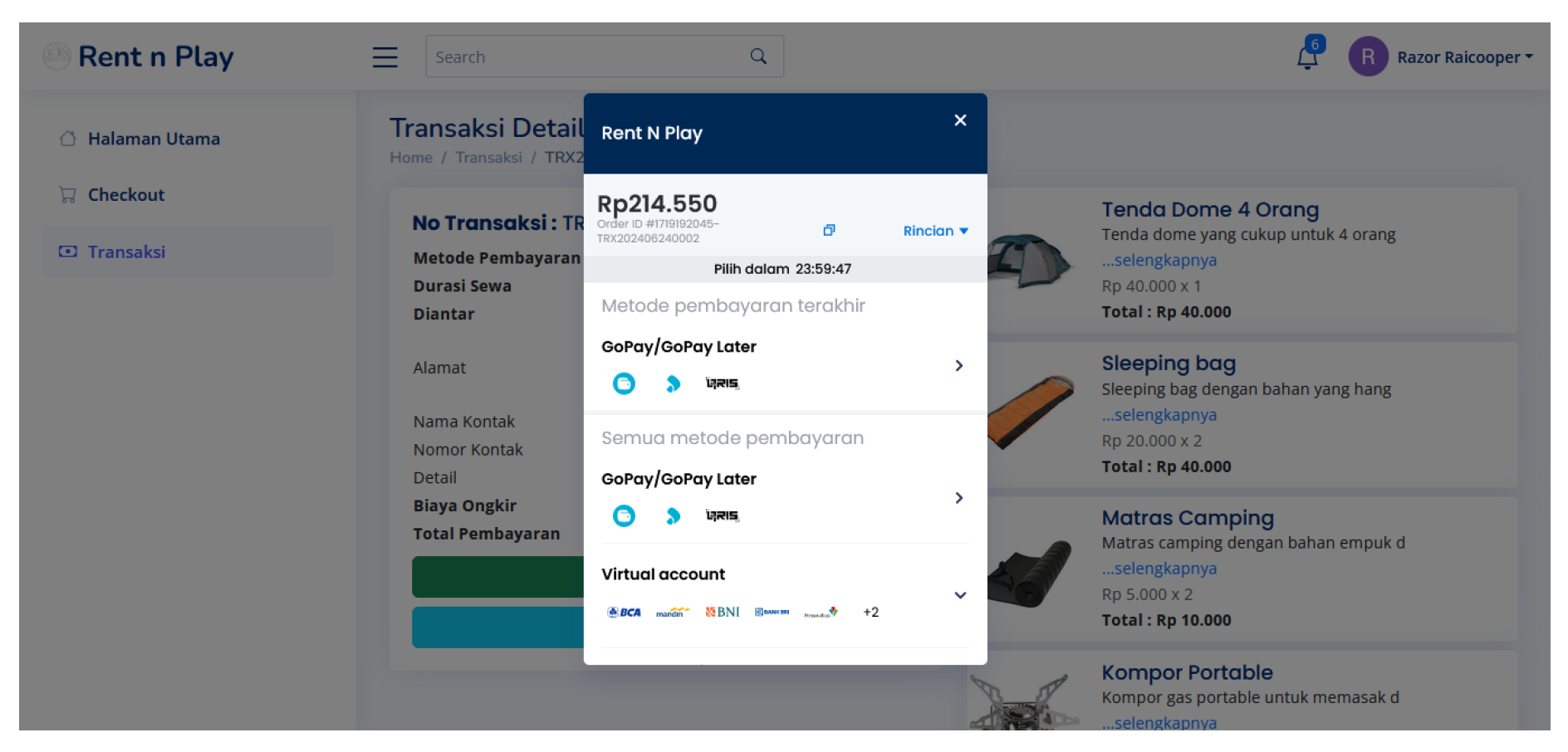
Figure 29.
Transaction Detail View (User)
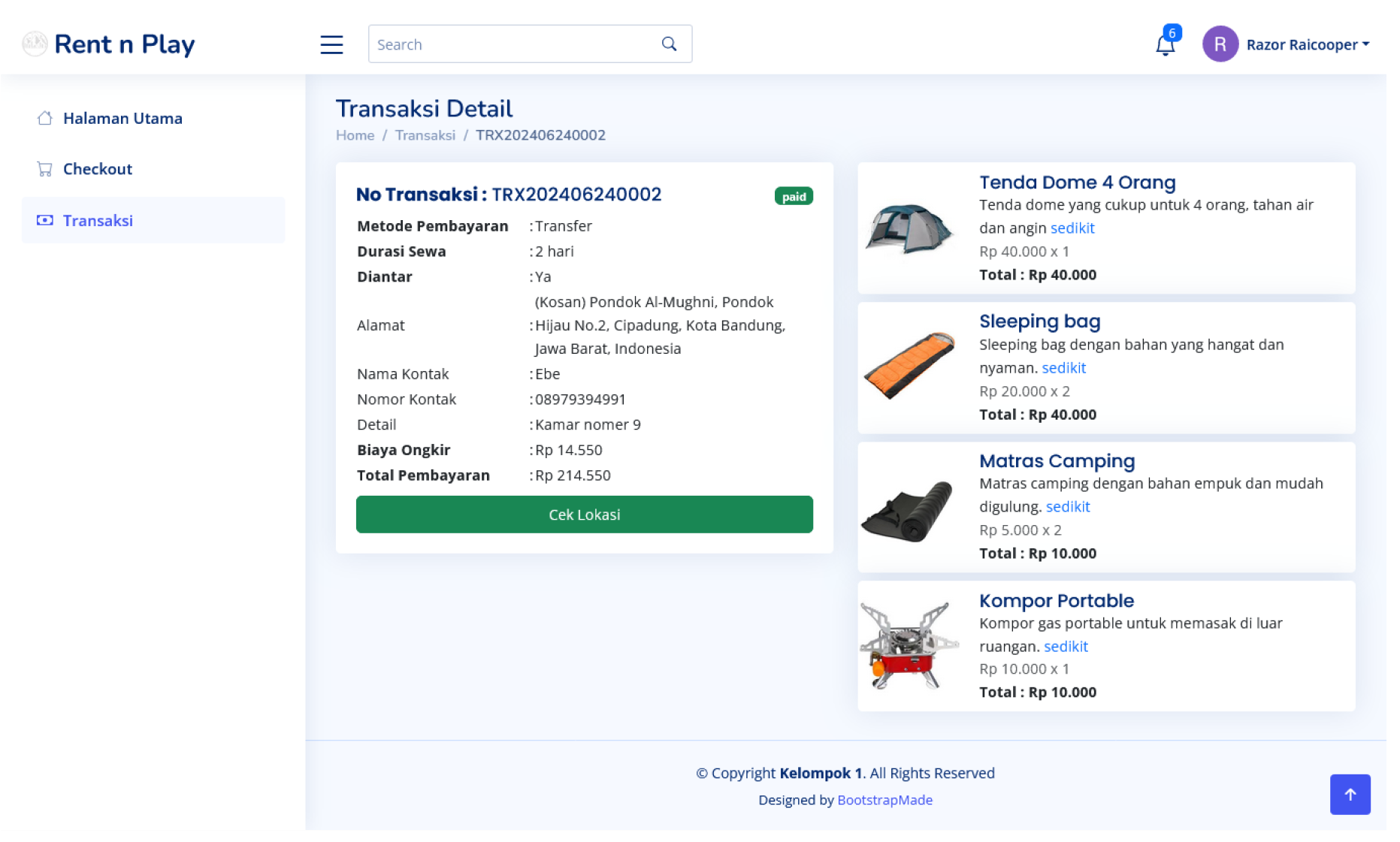
In this image, it is explained that when the customer completes the transaction, the transaction details will appear and the status will change to "paid." When clicking "check location," it will directly open the Google Maps application and show the location of the rental place.
When the order has arrived at the customer, the status will change to "ongoing" and a countdown will appear as in the Figure 30. If the customer wants to extend the rental period, they can click "Extend Time" and a new payment form will appear as in the Figure 31. In the transaction details, the countdown will automatically update as in the Figure 32
Figure 30.
Page to see the remaining loan time (User)
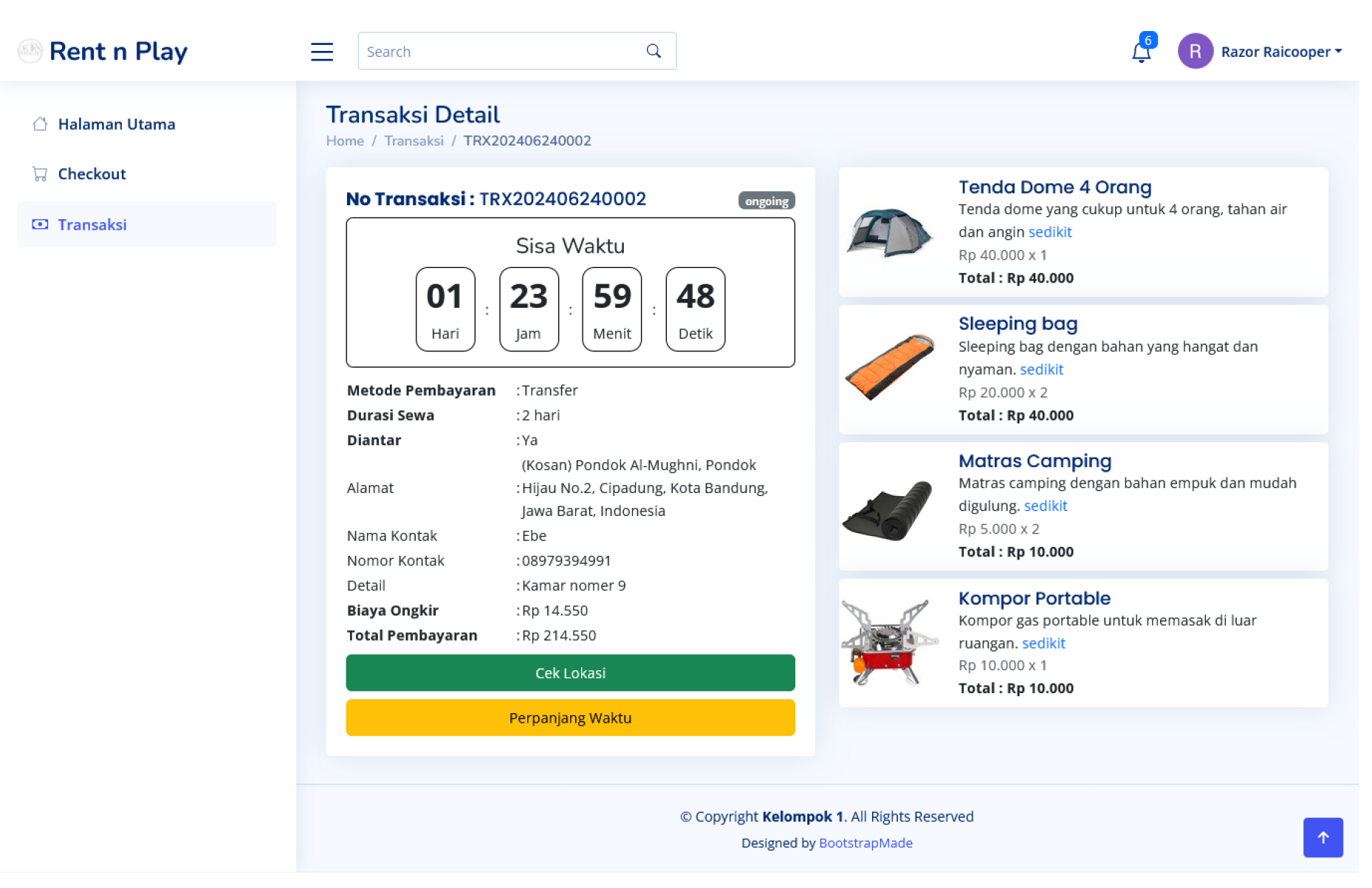
Figure 31.
Extend time form page(User)
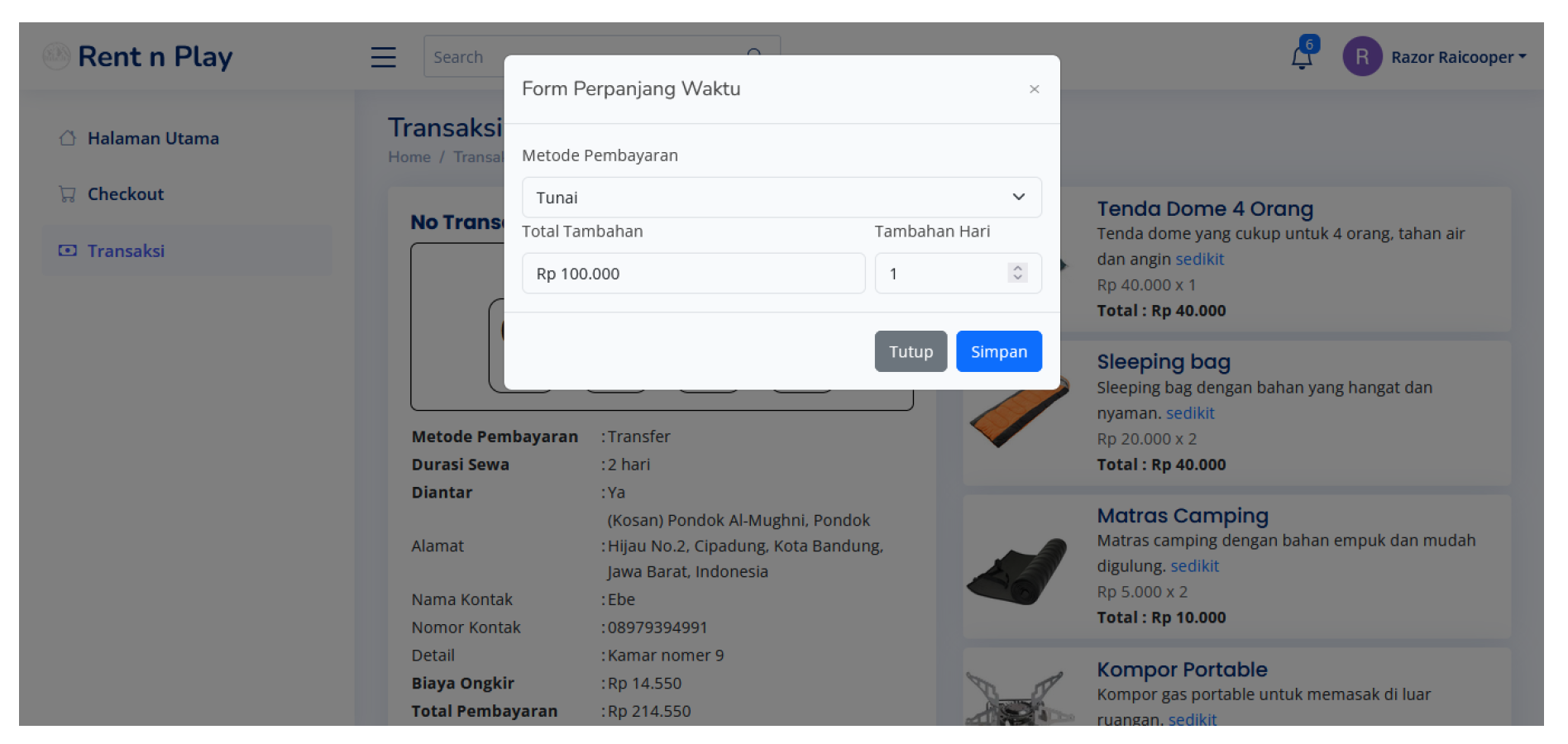
Figure 32.
Time addition feature (User)
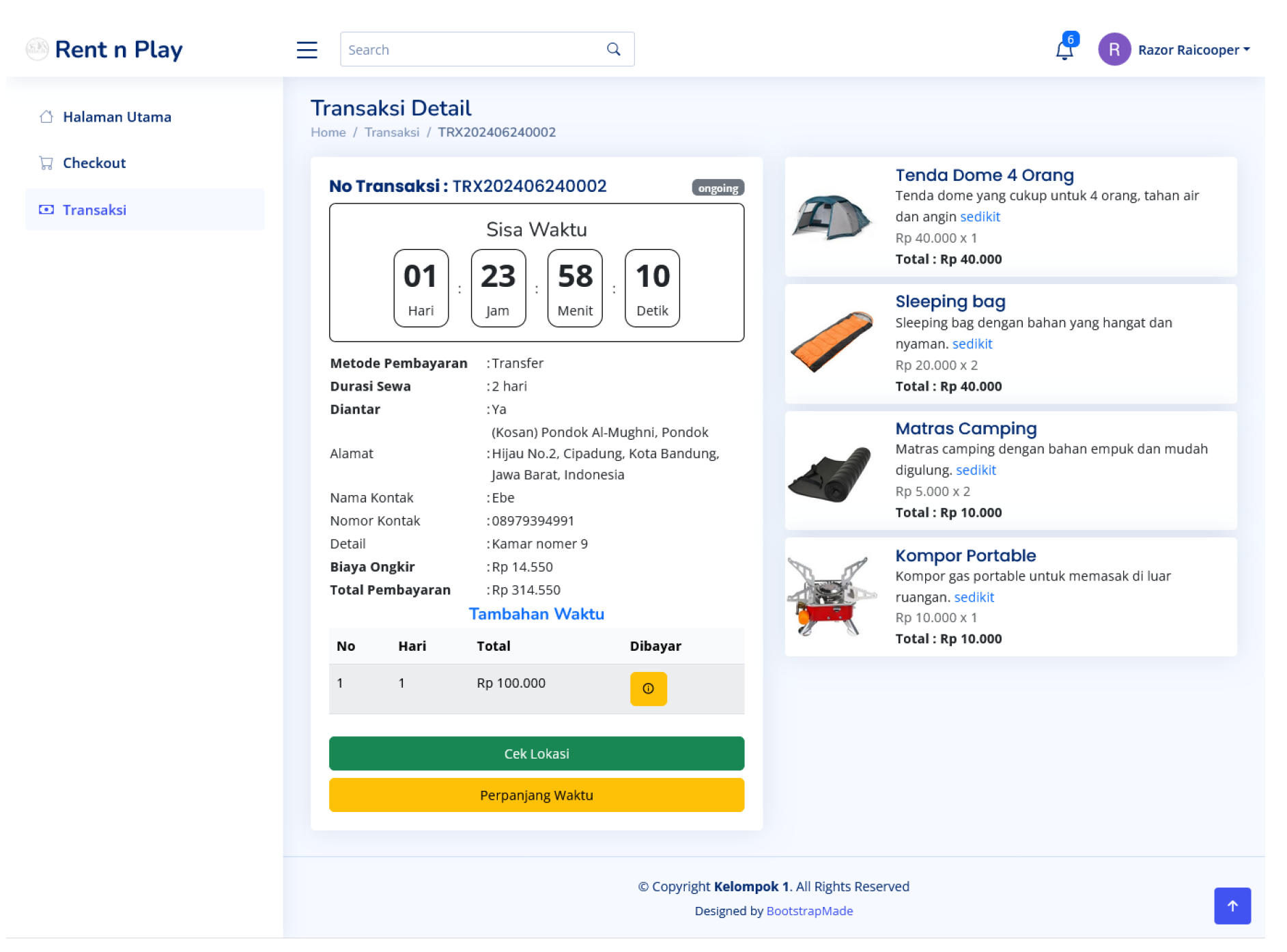
Figure 33.
Comment feature (User)
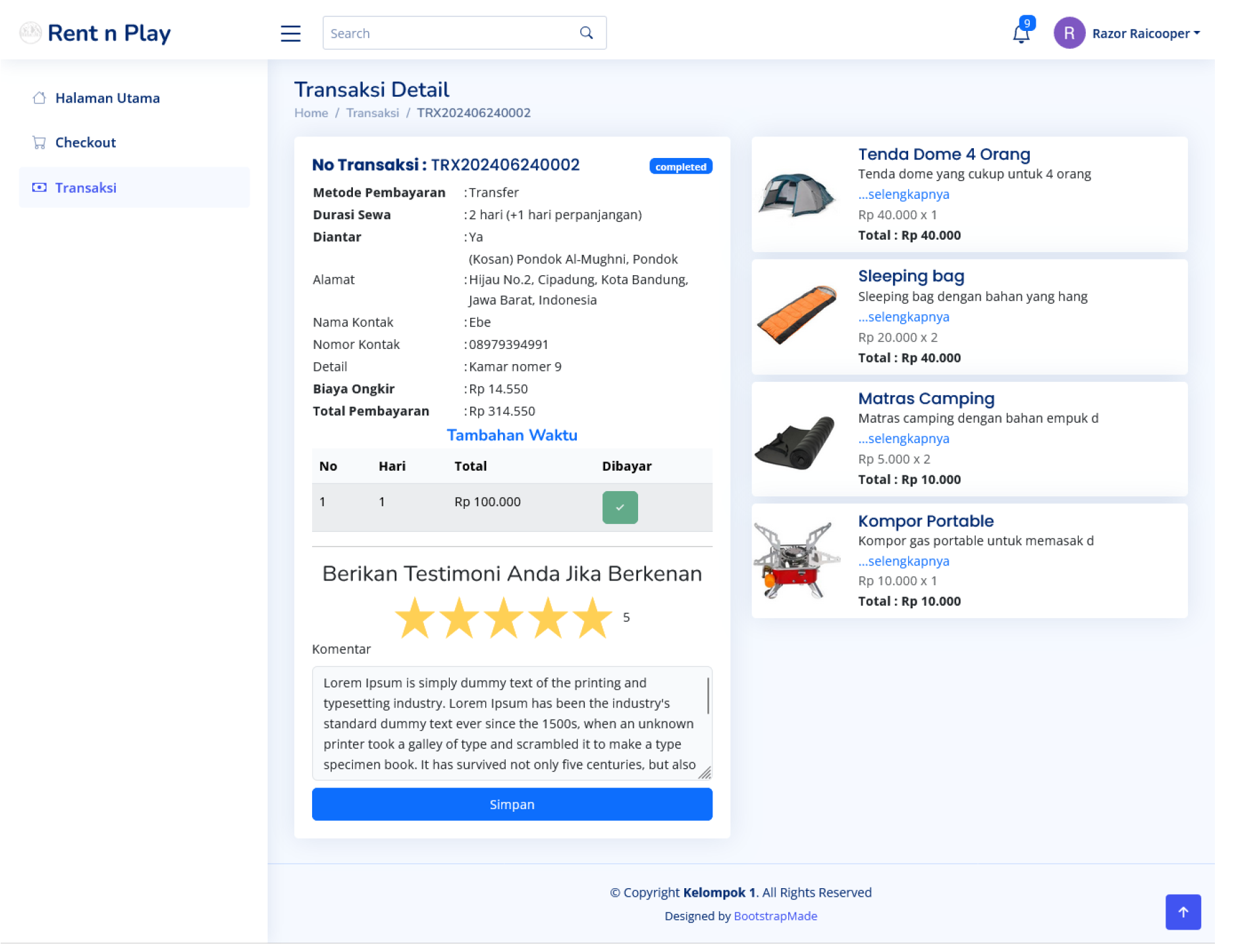
In the image above, when the customer completes the rental, the admin will change the status to "completed." On this page, the customer can also provide a testimonial.
Figure 34.
Transaction History View (User)
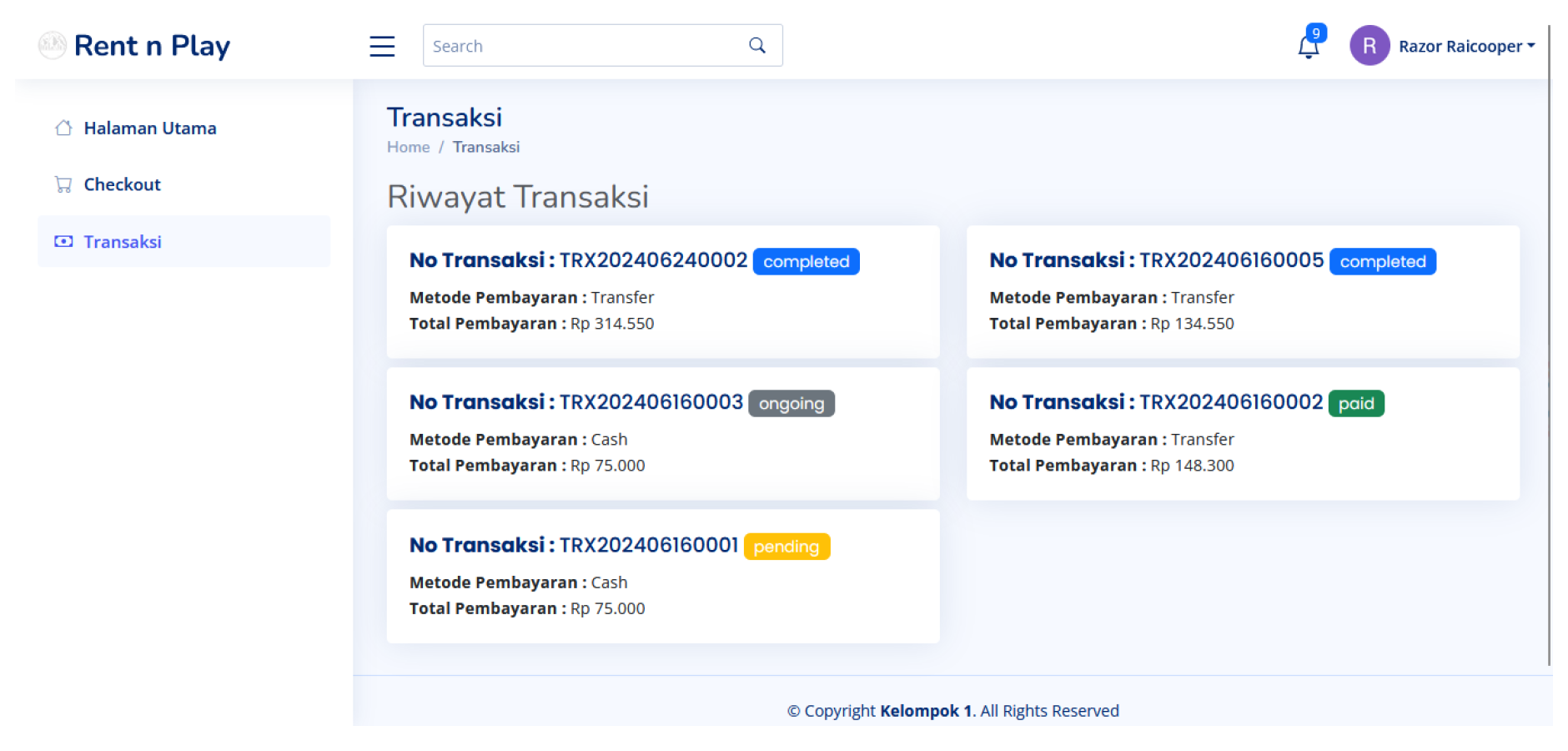
On this page, customers can view a complete list of their transactions, including details such as transaction number, payment method, total payment, and shipping status. The shipping status can be "in progress," "pending," or "paid," providing users with the latest information about their rental progress. With this feature, users can manage and track all their rental activities transparently and efficiently.
Figure 35.
Dashboard Page (Admin)
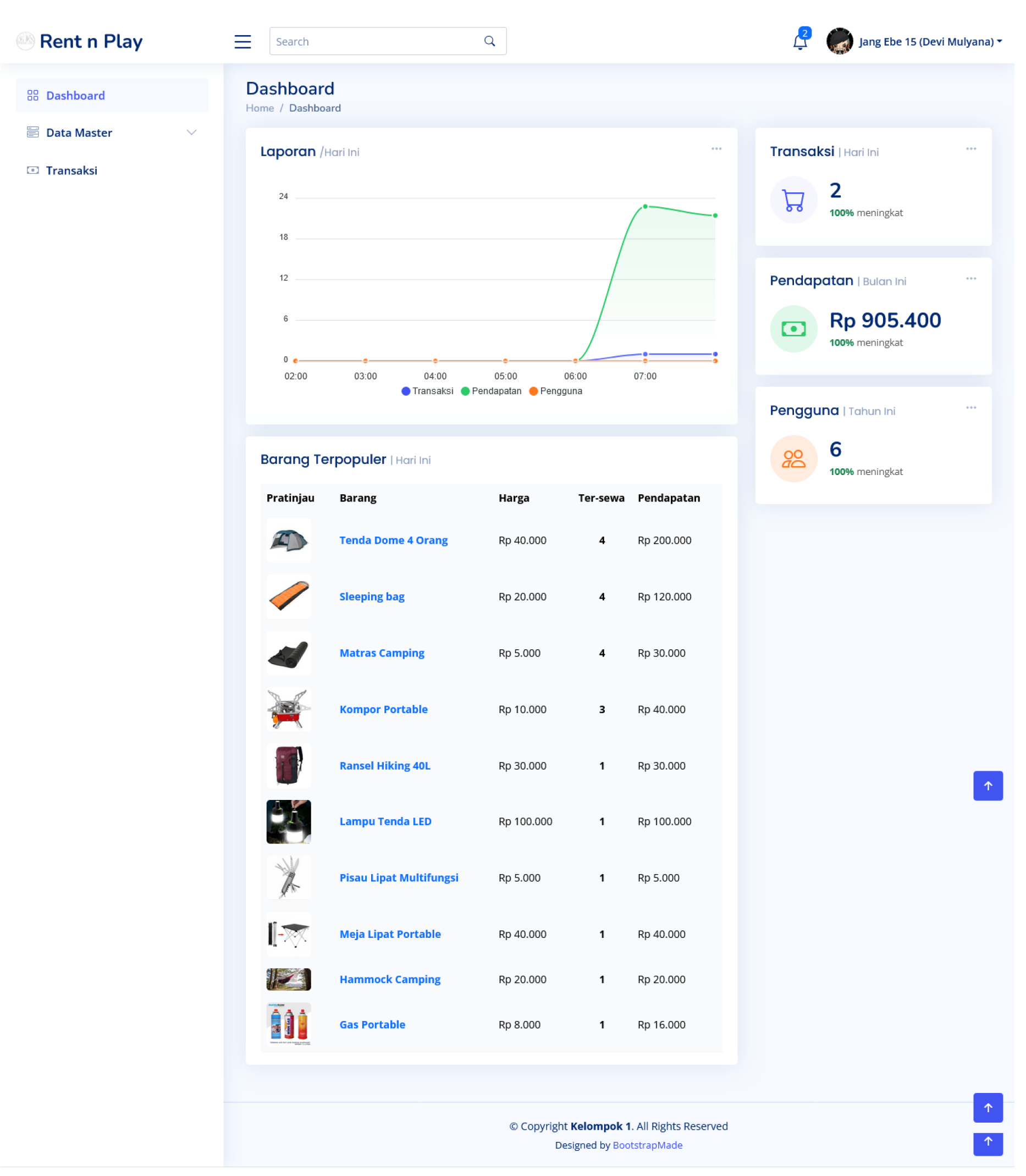
The admin dashboard provides a comprehensive, real-time overview of platform activities, featuring daily reports, today’s transactions, this month’s revenue, this month’s users, and today’s popular items. The daily reports include total transactions and new user counts, while the transactions section details the latest transactions. This month’s revenue highlights income trends with graphs or tables, and this month’s users provide insights into user base growth. The popular items section showcases the top-selling products of the day, helping the admin understand customer preferences. With an intuitive interface that employs charts, tables, and statistical cards, this dashboard facilitates easy monitoring and analysis of platform performance.
Figure 36.
Category data page (Admin)
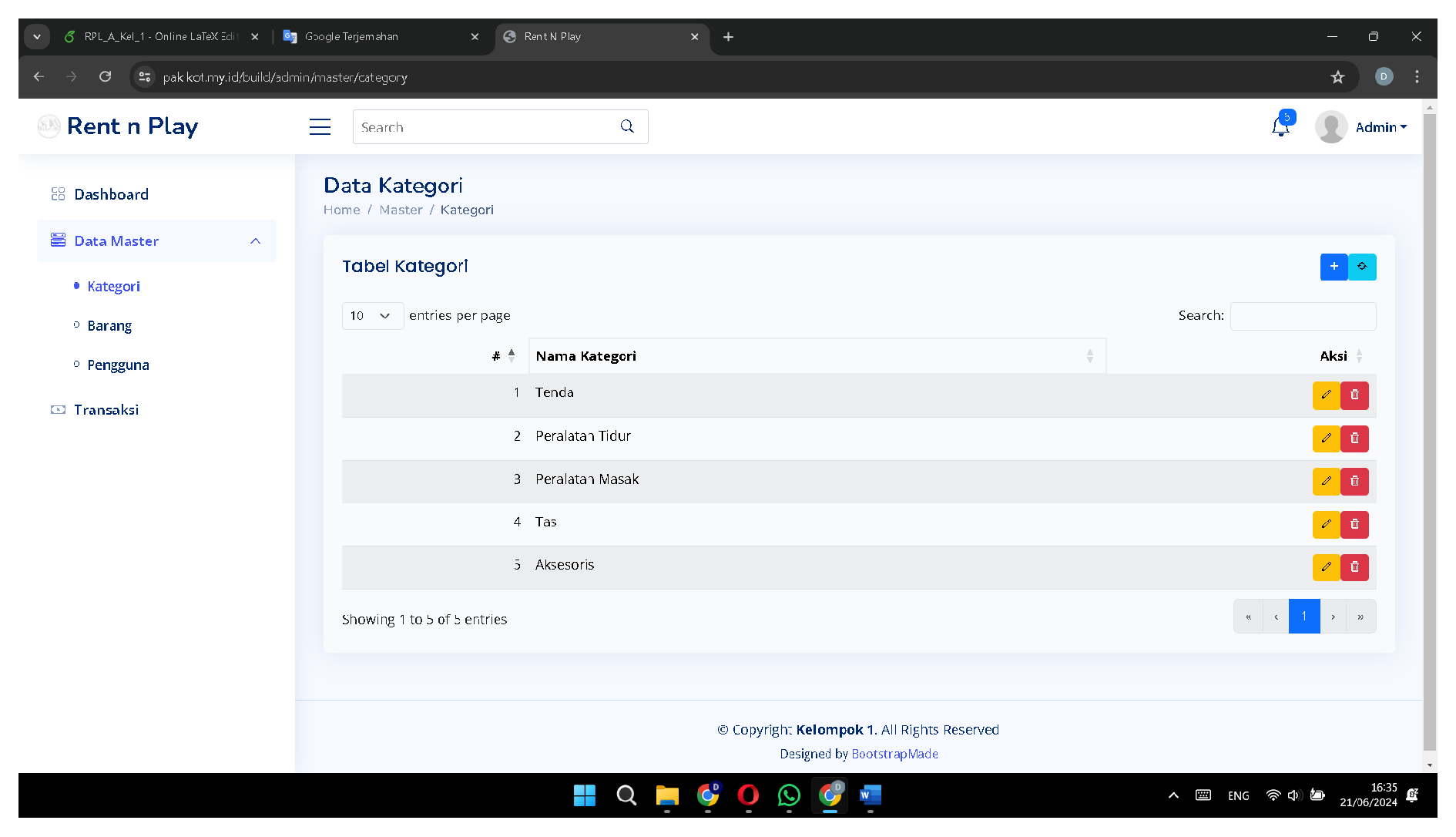
The Category Data page on the admin dashboard enables effective and efficient management of product categories, allowing admins to add, delete, and edit categories as needed. Admins can add new categories by filling in the name, description, and relevant attributes, making them immediately available for product grouping. They can also delete outdated or unnecessary categories with a confirmation step to prevent accidental deletions. Additionally, the edit feature allows admins to modify the name, description, and other attributes of existing categories, ensuring all associated products are consistently updated. These features streamline category management, enhancing navigation and user experience on the platform.
Figure 37.
Item data page (Admin)
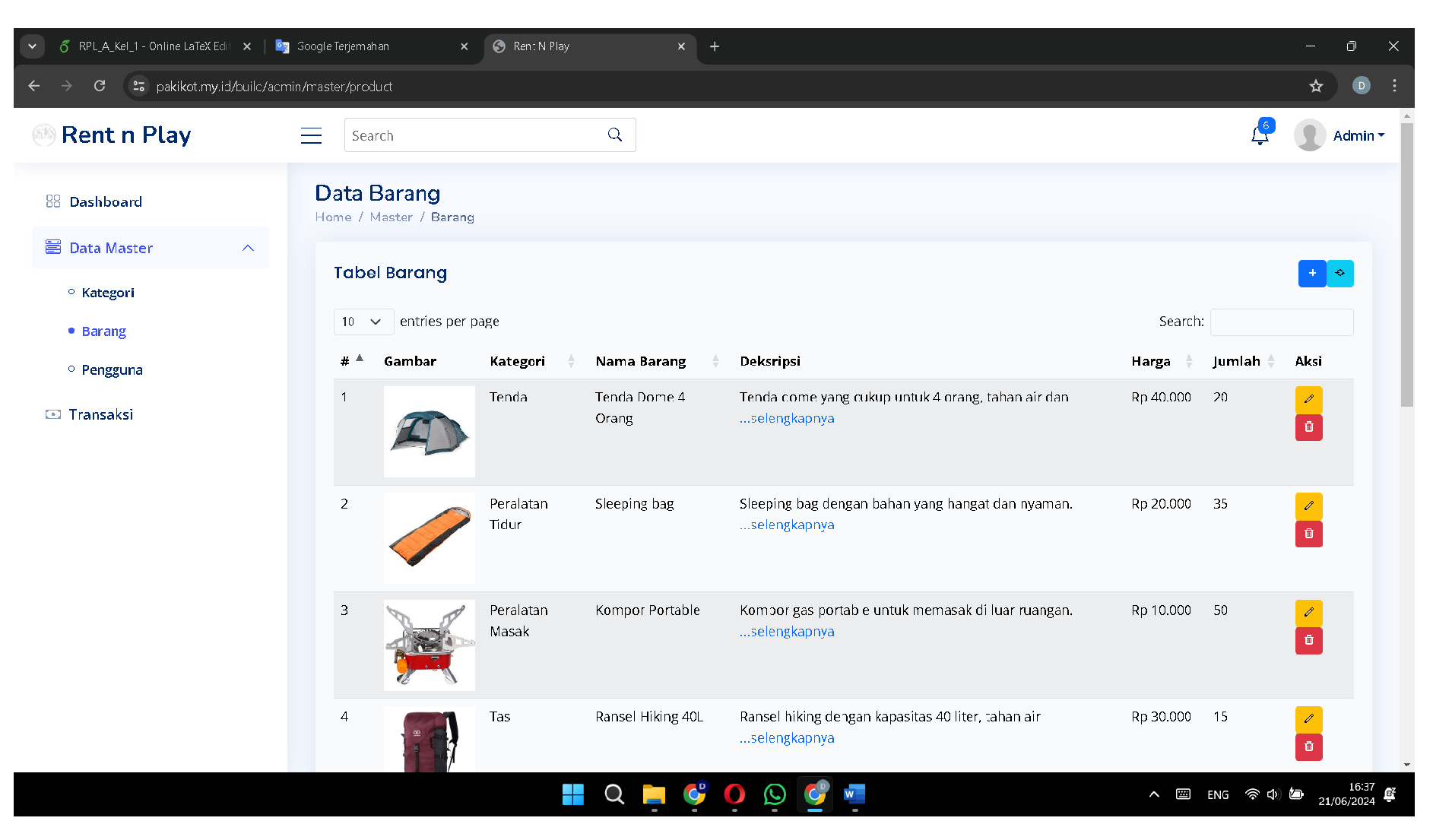
The Product Data page on the admin dashboard is designed to streamline inventory management, giving admins full control to add, delete, and edit product data as needed. Admins can easily add new products by entering detailed information such as name, description, price, stock, category, and other relevant attributes, making them available for sale on the platform. They can also delete outdated or unwanted products with a confirmation step to prevent accidental data loss. Additionally, the edit feature allows admins to update existing product details, ensuring that all information is accurate and up-to-date. These features simplify product management, enhancing inventory control and the overall user experience on the platform.
Figure 38.
User Data page (Admin)
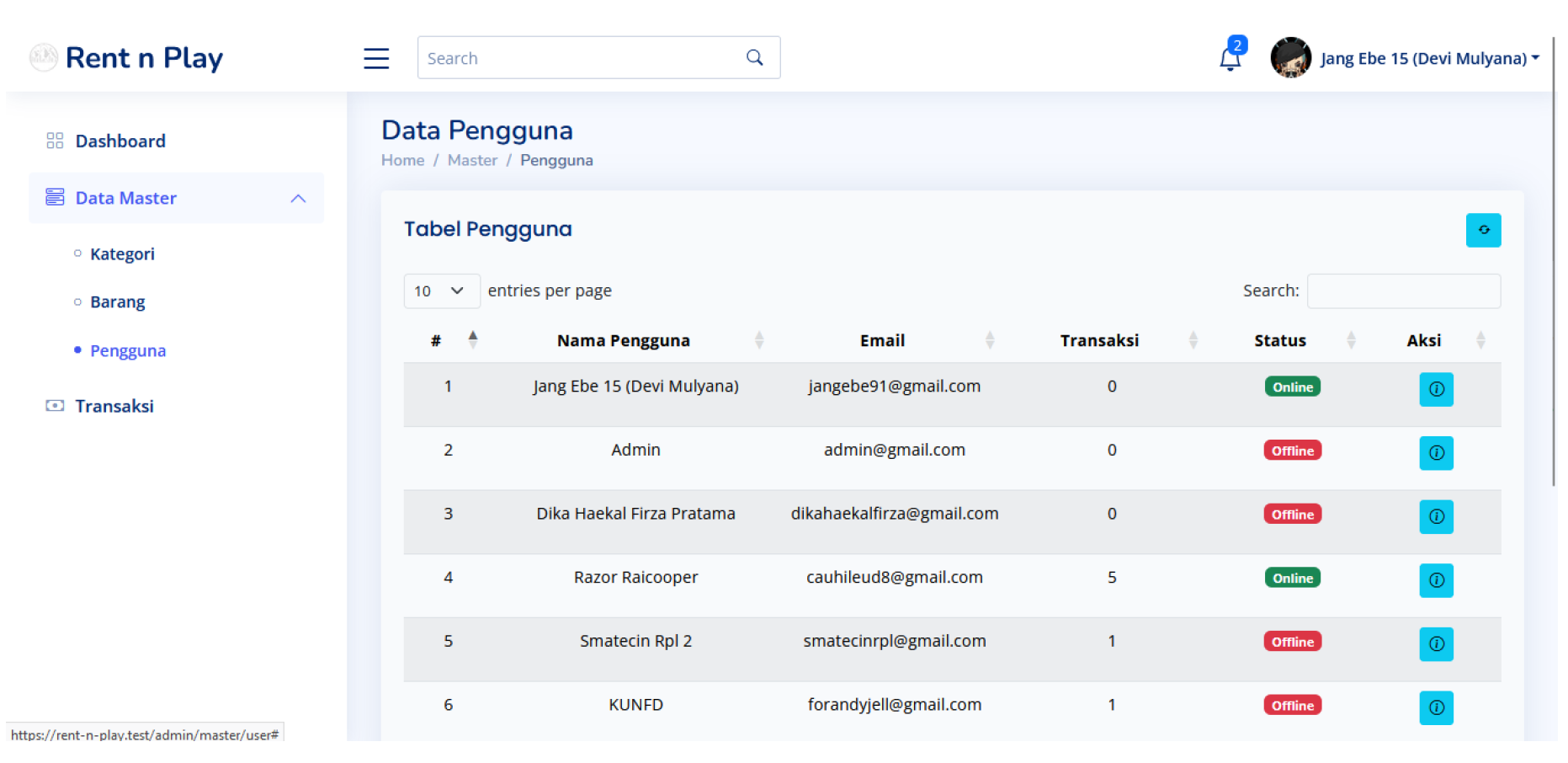
The User Data page on the admin dashboard provides comprehensive management and monitoring of user information through an interactive table. This table includes columns for username, email, transaction count, status (offline/online), and an action button. Admins can easily identify and contact users using the displayed name and email. The transaction count column shows each user’s activity level on the platform, while the status column indicates whether they are currently online or offline. The action button allows admins to view a detailed transaction history for each user, facilitating quick access to their activity data and enhancing customer service and analysis.
Figure 39.
transaction page (Admin)
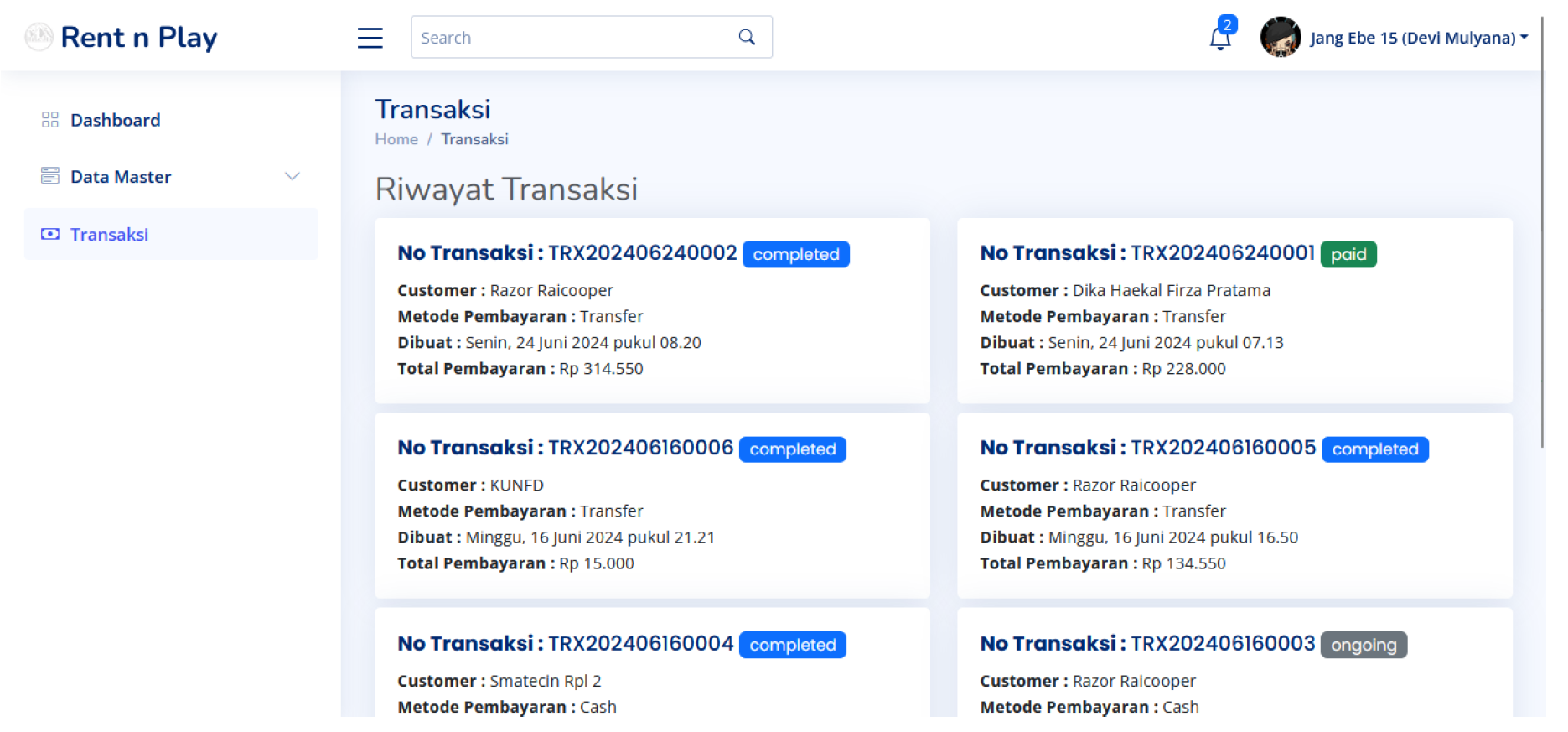
On this page, the admin can view the transaction history conducted by the customer.
Figure 40.
Transaction Detail View (Admin)
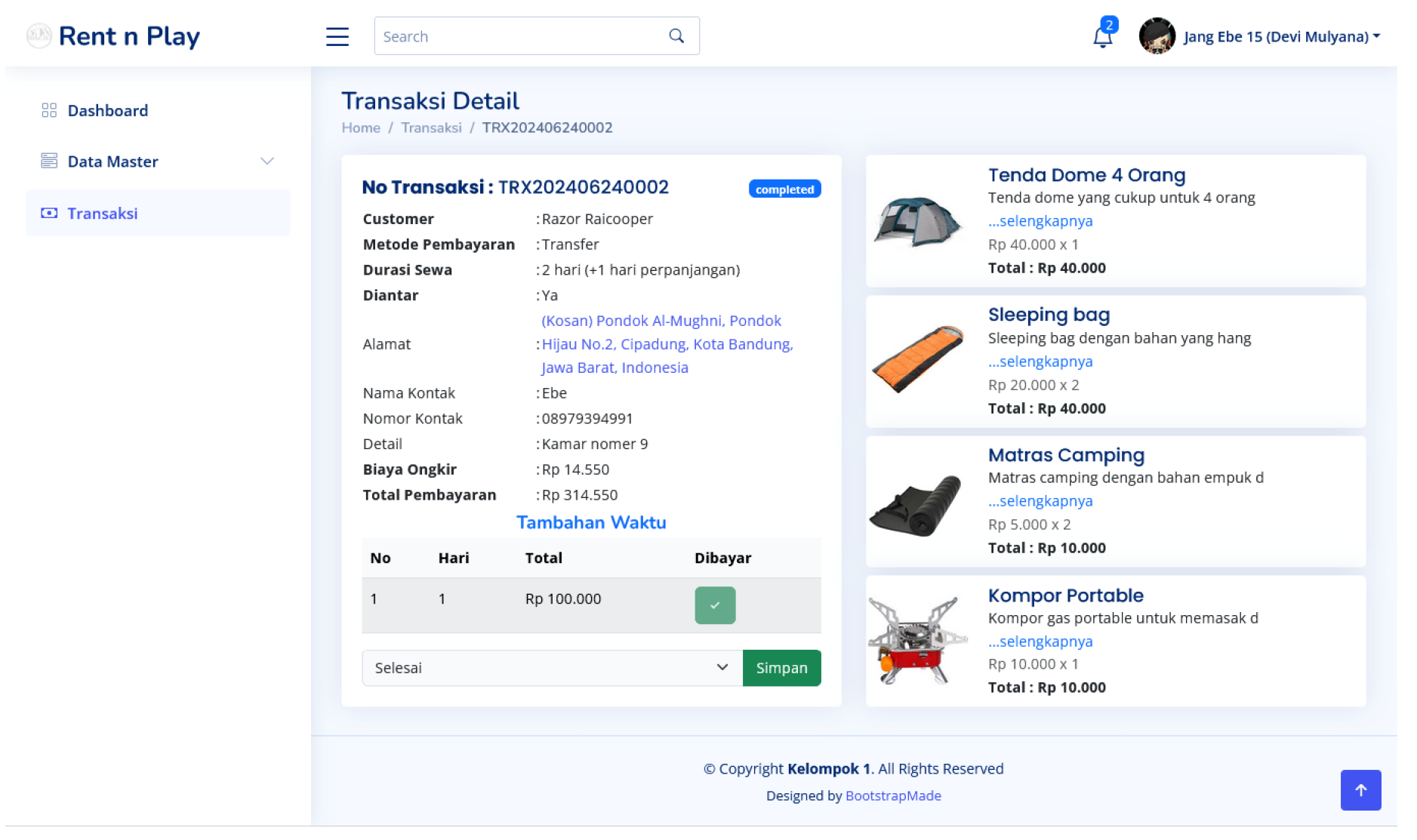
The Transactions page on the admin dashboard provides a comprehensive overview of all platform transactions, featuring a detailed transaction history. Each entry includes transaction number, customer name, payment method, date and time, total amount, and status (completed, paid, ongoing, pending). Admins can click on any transaction to view the specific items rented, enabling detailed monitoring and management. This page ensures transparency and easy access to crucial information, facilitating efficient daily operations and enhanced customer service.
5. Conclusion
Rent n Play is an online camping equipment rental system that caters to nature enthusiasts. This innovative platform is designed to enhance accessibility and the camping experience. With Rent n Play, users can rent equipment anytime, anywhere. They can choose from various cashless payment methods such as credit cards, bank transfers, or electronic wallets according to their preferences.
Furthermore, Rent n Play addresses logistical challenges by offering options for pickup at stores or direct delivery to locations, thereby reducing transportation issues. Users are also supported by a real-time admin system that provides immediate information on equipment availability, booking status, and other pertinent details.
With a focus on accessibility, convenience, sustainability, and user satisfaction, Rent n Play is poised to transform how people enjoy camping adventures, making them more inclusive, sustainable, and enjoyable.
Acknowledgments
The author’s wishes to acknowledge the Informatics Department UIN Sunan Gunung Djati Bandung, which partially supports this research work.
References
- Yunita, I.; Harahap, A.M.; others. Android Based Outdoor Equipment Rental Information System. Journal of Artificial Intelligence and Engineering Applications (JAIEA) 2024, 3, 734–739. [Google Scholar] [CrossRef]
- Chawla, S. The Website of selling camping equipment. 2003. [Google Scholar]
- Wardani, Y.T.D.K.; Rohani, I. Desktop-Based of Outdoor Tools Buying and Sales Information System. @ is The Best: Accounting Information Systems and Information Technology Business Enterprise 2022, 7, 151–165. [Google Scholar] [CrossRef]
- Malna, I.A.; Findawati, Y. Web-based Information System for Climbing Equipment Rental (Case Study of Camp 2 Shop). Procedia of Engineering and Life Science 2023, 4. [Google Scholar] [CrossRef]
- Nurdin, S.; Hamdani, D. The Design of the Building Rental Information System Uses the Prototype Method. IJISCS (International Journal of Information System and Computer Science) 2021, 5, 118–131. [Google Scholar]
- Ibrahim, N. An overview of agile software development methodology and its relevance to software engineering. Jurnal Sistem Informasi 2007, 2, 69–80. [Google Scholar]
- Charntaweekhun, K.; Wangsiripitak, S. Visual programming using flowchart. 2006 International Symposium on Communications and Information Technologies. IEEE, 2006, pp. 1062–1065.
- Mokhsin, M.; Som, M.H.M.; Suhaimi, M.F.; Halim, H.A.; Shahuddin, A.Z. The Development of a Rental Equipment Mobile Application for UiTM Shah Alam Malay and Bumiputera Students (Rent2U). Journal of Advanced Research in Applied Sciences and Engineering Technology 2023, 32, 282–295. [Google Scholar] [CrossRef]
- Plavšić, V.; Šećerov, E. Modeling of login procedure for wireless application with interaction overview diagrams. Computer Science and Information Systems 2008, 5, 87–108. [Google Scholar] [CrossRef]
- Bastos, R.M.; Ruiz, D.D.A. Extending UML activity diagram for workflow modeling in production systems. Proceedings of the 35th Annual Hawaii International Conference on System Sciences. IEEE, 2002, pp. 3786–3795.
- Riyanti, A.; Taryana, T.; Dirgantoro, G.P.; Gunawan, I.M.A.O. Development of Rental Application using Prototyping Method. TECHNOVATE: Journal of Information Technology and Strategic Innovation Management 2024, 1, 69–80. [Google Scholar] [CrossRef]
- Nurajizah, S. Application Of Web Engineering Methods In Designing A Building Rental Information System In Kemuning Building Bekasi. Jurnal Mantik 2020, 4, 1560–1567. [Google Scholar]
- Fauzan, R.; Siahaan, D.; Rochimah, S.; Triandini, E. Use case diagram similarity measurement: A new approach. 2019 12th International Conference on Information & Communication Technology and System (ICTS). IEEE, 2019, pp. 3–7.
- Song, I.Y.; Evans, M.; Park, E.K. A comparative analysis of entity-relationship diagrams. Journal of Computer and Software Engineering 1995, 3, 427–459. [Google Scholar]
- Cerović, Z. INNOVATIVE MANAGEMENT OF CAMPING ACCOMMODATION. Horizons Series A 2014, 13. [Google Scholar]
Disclaimer/Publisher’s Note: The statements, opinions and data contained in all publications are solely those of the individual author(s) and contributor(s) and not of MDPI and/or the editor(s). MDPI and/or the editor(s) disclaim responsibility for any injury to people or property resulting from any ideas, methods, instructions or products referred to in the content. |
© 2024 by the authors. Licensee MDPI, Basel, Switzerland. This article is an open access article distributed under the terms and conditions of the Creative Commons Attribution (CC BY) license (http://creativecommons.org/licenses/by/4.0/).
Copyright: This open access article is published under a Creative Commons CC BY 4.0 license, which permit the free download, distribution, and reuse, provided that the author and preprint are cited in any reuse.


