

Submitted:
16 December 2024
Posted:
17 December 2024
You are already at the latest version
Abstract
Mostly, public places are planned and designed by professionals rather engaging the community in the design process. Even if the community engaged, the engagement process was limited to hand drawings, manual mappings, or public discussions, which limited the general public to visualize and well communicate their aspirations with the professionals. Against, this backdrop, this study intends to develop a mobile application called “CityBuildAR” which uses Augmented Reality technology that allows the end user to visualize their public spaces in a way they want. CityBuildAR was developed by the authors using the Unity Real-Time Development Platform and the app was developed for an Android Operating System. The app was used to assess community interests in designing open spaces by categorizing participants into three groups: those with limited, average, and professional knowledge of space design. The open cafeteria of the University of Moratuwa served as the testbed for this study. The study findings revealed that: (a) Mobile Augmented Reality is an effective way to engage people with limited knowledge in space design to express their design thinking, (b) Compared to professionals, general public wanted to have more green elements in the public space; (a) Compared to the professionals, the general public who were not conversant with the designing skills found the app more useful to express their ideas. The study guides urban authorities in their placemaking efforts by introducing a novel approach to effectively capture community ideas for creating inclusive public spaces.
Keywords:
mobile augmented reality
; placemaking
; public spaces
; participatory planning
1. Introduction
Placemaking is a multifaceted concept that has emerged since the late 20th century [1]. Originally grounded in urban planning and design, it concentrated mostly on developing functional places that addressed certain requirements. Over time, the concept has evolved to encompass community engagement, social connection, and environmental sustainability, illustrating a more comprehensive understanding of how spaces transform into meaningful places through the active participation of their residents [1]. This shift highlights the growing importance of community involvement in designing public places [2].
The primary focus on community in placemaking has transitioned from a marginal aspect to a fundamental component of the process, highlighting the growing importance of participatory development [3,4,5]. For instance, the transformation of the Comuna 13 neighborhood―Medellin in Colombia [6], the development of an extensive public transportation system― Curitiba in Brazil [7], communities are regarded as active contributors in defining their environments, promoting ownership and collaboration in urban planning processes [8]. This shift recognizes the importance of social capital, highlighting that strong community connections are vital for successful and sustainable placemaking. As an example, “The High Line” in New York City exemplifies successful placemaking through community-driven action, where local residents, artists, and activists collectively advocated for the project, secured funding, and shaped its design, strengthening the sense of ownership that ensures its long-term sustainability [9,10].
However, despite these improvements, community engagement has not always led to positive outcomes. Superficial participation is common, where communities are invited to be involved but often only in a limited or symbolic way, leading to feelings of distrust [11]. Additionally, the flexibility of placemaking is sometimes exploited, leading to projects that mainly benefit specific groups, exacerbating social inequalities and undermining community cohesion [12,13]. These challenges highlight the ongoing struggle to effectively address community needs and ensure that participatory approaches are both sustainable and equitable.
Participatory tools such as hand-drawn sketches, cultural mapping, community meetings, participatory mapping, community surveys, public exhibitions, social media platforms, etc. play a vital role in the placemaking process by enabling citizens to actively contribute to shaping their environments [14,15,16]. However, these tools face several challenges that can limit their effectiveness in truly engaging all members of the community. For example, community surveys have been used in various urban planning projects to gather input on public space usage, but these often fail to capture the complexities of urban dynamics [17]. For instance, the redevelopment of Pruitt-Igoe in St. Louis, Missouri ― an infamous public housing project was demolished in the 1970s despite initial positive feedback from residents in surveys. However, these surveys failed to capture the social and economic realities of the residents, their deep-rooted community ties, and the negative impacts of isolation and displacement that the demolition would cause [18,19].
Similarly, hand-drawn sketches have been used in participatory design workshops to visualize community ideas, yet their lack of precision limits their integration into formal planning processes [20]. Cultural mapping, which integrates artistic approaches to explore the cultural significance of spaces, has been effective in some cases but struggles with a lack of standardized methodology, hindering its widespread adoption [21]. For example, in the Grecanic Area of Southern Italy, a culturally rich region known for its historical traditions and natural landscapes, cultural mapping was used to capture both material and immaterial heritage through community surveys and visual data representation. This approach successfully enhanced local identity and supported sustainable tourism development beyond seasonal seaside activities [22]. Community meetings, such as those held in local councils, aim to gather input from residents but can often perpetuate existing power imbalances, leading to unequal participation and marginalization of more vulnerable groups [17]. Participatory mapping has been successfully used in neighborhood planning to allow community members to mark areas of significance, yet its effectiveness can be limited by varying levels of spatial literacy [23,80].
Public exhibitions are commonly used to display public space design proposals and collect feedback, promoting transparency, though they are often constrained by the scale of participation and the type of feedback they gather [15]. Finally, social media platforms, like Facebook or X, have been used to engage a broader audience in the planning process, yet they require careful management to prevent the digital exclusion of less connected groups [24]. These tools, while valuable, face significant challenges that hinder their ability to produce inclusive and equitable outcomes. A common issue is inequality in participation, where marginalized groups are often excluded from meaningful engagement, resulting in skewed representation in the decision-making process [17].
Additionally, technological limitations, such as the lack of access to social media platforms for certain populations, reduce the inclusivity of digital tools [24]. Another significant challenge is the lack of consistency in methods, as tools like cultural mapping and hand-drawn sketches often lack standardized methodologies, limiting their ability to be integrated into broader planning practices effectively [21]. Despite these challenges, the potential for these participatory tools to enhance community engagement remains significant. Overcoming these issues, particularly related to representation and methodology, is crucial for their success in placemaking initiatives.
In response to these challenges, this study explores the use of Mobile Augmented Reality (M-AR) technology as a tool to bridge the gap between professionals and the community in designing places. By integrating real-time visualizations and interactive features, M-AR provides an opportunity for communities to actively participate in designing their public spaces in ways that were previously inaccessible. The research questions addressed by this study include: (a) How can M-AR applications enhance community engagement in placemaking? and (b) How does the City BuildAR app bridge the gap between professionals and the general public in Placemaking?
2. Literature Background
2.1. What Is M-AR and Why?
Mobile-Augmented Reality (M-AR) is a powerful interactive technology that integrates computer-generated visual, audio, and sensory data into the real-world environment through mobile devices without the support of AR goggles such as meta quest. It merges the physical and digital domains to produce an integrated and enhanced user experience [25]. The origin of AR dates back to the 1960s with Ivan Sutherland's invention of the first head-mounted display system. However, the term "augmented reality" was officially introduced by Tom Caudell in the early 1990s [26]. Initially, AR systems were confined to industrial and academic uses due to high costs and technological limitations. With advancements in mobile computing and smartphones, M-AR become popular and was become more accessible to the general population.
Today, M-AR finds applications across diverse sectors including education, healthcare, urban planning, and entertainment, enabling users to experience an interactive and immersive overlay of digital content in their real environments [27,28]. In M-AR interfaces, three-dimensional virtual images and objects are integrated into real-world scenes through mobile phone cameras, allowing users to interact with both simultaneously [29]. For example, M-AR enables architects and planners to visualize urban designs in realistic settings and support better communication of ideas easily through their hand-held device at any time [30]. This capability not only enhances comprehension and decision-making but also democratizes participation by making complex design concepts understandable to non-experts.
M-AR technology can be classified into different types, each providing unique functionality and applications across diverse industries. They are: (a) Marker-Based AR, (b) Projection-Based AR, and (c) Superimposition-Based Augmented Reality. Marker-Based Augmented Reality utilizes visual markers, such QR codes, to overlay digital content onto the physical environment. It is extensively employed in education to develop engaging and problem-solving-oriented learning experiences [31,32]. For instance, the "HoloHuman" AR application enables medical students to visualize and interact with 3D models of the human body by scanning markers on anatomical charts, allowing them to rotate, zoom, and dissect virtual models for a deeper understanding of complex structures [33]. Similarly, "Quiver Vision" enhances language learning by bringing children's colored artwork to life with 3D animations and sounds, creating an interactive way to learn vocabulary, grammar, and cultural concepts [34]. Markerless augmented reality, in contrast, does not necessitate predefined markers; it utilizes GPS, accelerometers, and digital compasses to provide adaptable and immersive experiences, rendering it especially efficacious for gaming, navigation, and urban planning applications [35,36,81]. For example, Pokemon Go, which is primarily a gaming application, demonstrated the potential of devisor’s sensors to encourage exploration and increase foot traffic in urban areas [37].
Projection-Based AR superimposes virtual pictures onto tangible surfaces, enabling users to engage with digital material directly within real-world environments. This is particularly advantageous in design and architecture for visualizing concepts in realistic contexts [38,39]. Superimposition-Based Augmented Reality augments or substitutes aspects of the physical environment with digital overlays, frequently utilized in medical training and maintenance activities to deliver real-time, contextually relevant information [40]. These classifications demonstrate AR's varied capabilities and its transformational potential across numerous fields.
2.2. M-AR as a Participatory Tool
M-AR is widely recognized as an effective participatory tool, enhancing interaction, engagement, and understanding across multiple fields by integrating digital components onto physical situations [41]. This technology improves the capacity of individuals and groups to visualize and engage with complex information, particularly beneficial in collaborative and decision-making contexts through mobile devices such as mobile phones, tablets etc. M-AR is revolutionizing individual and community engagement in projects, conversations, and solutions across sectors such as education, healthcare, design, and public participation [42]. With the extensive use of mobile phones, M-AR transforms conventional decision-making tools into contemporary digital solutions, integrating AR, Virtual Reality (VR), and Geographic Information Systems (GIS) to create interactive, portable platforms for collaborative engagement [30]. Despite its potential, M-AR remains less popular due to technical challenges such as limited device compatibility, high computational demands, and the need for robust internet connectivity [43]. Additionally, its adoption is hindered by a lack of user familiarity, high development costs, and the absence of standardized frameworks, which collectively restrict its widespread implementation and scalability.
M-AR has found applications across various fields, including education, retail, healthcare, tourism, military, entertainment, automotive industries, urban planning etc. In education, AR enhances learning by offering immersive, interactive experiences, for instance the “HoloHuman” AR app designed for anatomy visualizations for medical students, which have become integral to contemporary medical school curricula [44]. The “Google Expeditions” which is an educational platform that uses AR to take students on virtual field trips to various locations around the world [45]. Retailers use AR for virtual product trials, like IKEA’s furniture placement app, improving customer satisfaction [46]. Tourism also benefits from AR through apps that enhance visitor experiences, such as interactive historical site tours [47]. Military and defense applications use AR for real-time situational awareness, with systems like the U.S. military's IVAS helmets [48]. AR’s influence in entertainment, particularly gaming, is evident in games like Pokémon GO, which merges virtual and real environments for player engagement [49]. In automotive industries, AR improves navigation and car design through systems like BMW’s augmented HUDs [50]. Although AR is less frequently utilized in disciplines like philosophy, literary studies, and traditional sociology, there is growing potential for its use in areas like philosophical simulations, interactive literary experiences [51].
M-AR has emerged as a powerful participatory planning tool, enabling a more inclusive, interactive, and accessible approach to urban and spatial planning. By overlaying digital elements onto the physical environment, AR enhances visualization, interaction, and comprehension for planning professionals, stakeholders, and community participants [42]. Traditional participatory methods, reliant on static tools like paper maps, drawings, and physical models, often fall short in conveying the complexity and spatial dynamics of urban projects. For instance, MIT’s CityScope project integrates AR with 3D physical models to allow stakeholders to collaboratively explore urban scenarios, such as transportation network changes or housing developments, in an understandable format [52]. However, this approach often requires expert assistance for setup and operation, as it involves technical devices like projectors or tablets. This complexity makes it less community-friendly compared to more accessible tools like M-AR platforms, which are easier to use and require minimal technical expertise.
AR has been widely used as a participatory tool to engage communities in the urban planning process, providing an interactive platform for understanding and contributing to urban planning initiatives. In Amsterdam, numerous grassroots projects have utilized digital tools, including websites and interactive applications, to enhance citizen engagement in urban development. These technologies empower communities to address urban challenges, cooperate on solutions, and see project outcomes, thereby improving their capacity to provide informed feedback [53]. In Oslo, Norway, AR was used to support community-driven planning for urban green initiatives, including the proposal of planting 100,000 trees. This initiative incorporated participatory activities such as visual presentations, drawings, and AR-enhanced simulations, allowing community members to see and interact with proposed changes in real-time [54], highlighted that AR facilitated community understanding and participation, encouraging meaningful contributions to urban planning processes. Similarly in Bandung City, Indonesia, where community members actively participated in data collection and research to identify and address urban planning issues in their local environment [55].
Out of the 33 AR applications found in literature (Table 1), 5 are relevant to urban planning and community engagement. These applications aim to improve urban design, facilitate community participation, and enhance planning processes through interactive and immersive technologies. A detailed review of these applications is as follows. In-Citu AR allows users to visualize urban proposals in real time, improving communication between planners and residents, though it relies on accurate mapping data and faces accessibility challenges. The CitySense App provides real-time data visualization on urban metrics such as air quality and traffic, fostering greater awareness but risking information overload and limited user comprehension [56]. The ARPP engages the public in the planning process by enabling interactive participation in urban design, enhancing transparency, but is resource-intensive and may face challenges related to digital literacy and device access [57] Urban Sketcher encourages community creativity in urban design, promoting collaboration, though it may lack the professional tools necessary for detailed planning [58]. Wikitude overlays data on real-world environments, enriching public understanding of urban spaces, yet its reliance on accurate data and potential privacy concerns may limit its effectiveness [59]
Despite advancements, AR applications face critical limitations. High production costs restrict accessibility and scalability for community-driven initiatives [60] Technical challenges such as battery drain, GPS inaccuracies, and network failures compromise AR reliability in dynamic outdoor environments, for an example in EduPARK App [61]. Marker-based tracking is often less effective in natural settings, where moving elements and sunlight interference hinder performance [62]. Moreover, AR tools frequently focus on visualization overactive co-creation of public spaces, limiting their utility in placemaking. Inclusivity remains another major concern, with barriers such as digital literacy, device accessibility, and technological complexity marginalizing underrepresented voices in participatory processes, for an example the Urban Co Builder AR tool [63]. Privacy concerns and dependency on high-quality data further complicate AR implementation [59]
To fully harness AR’s potential, several key challenges must be addressed. Enhancing accessibility through affordable, intuitive solutions compatible with common devices and resolving connectivity issues is essential for real-time collaboration. Developing standardized frameworks for AR tools that integrate features for continuous community feedback can bridge the gap between visualization and active participation. Furthermore, addressing technical performance issues, such as GPS reliability and marker tracking, will improve AR’s applicability in diverse urban contexts
2.3. Placemaking and AR
As placemaking is a multifaceted process that transforms public spaces into meaningful places, the concept is built around three primary attributes: sociability, physical setting, and image [11,64]. Sociability refers to the degree to which a place promotes interpersonal relationships and social interactions. The environment's layout and design determine the physical setting, which makes sure the area is safe, usable, and accessible. A space character and emotional appeal are derived from its identity, history, and aesthetic attributes. Together, these attributes contribute to a place’s overall sense of belonging, functionality, and emotional significance, playing a crucial role in creating spaces that serve the needs of the community.
2.3.1. Sociability and M-AR
The sociability aspect of placemaking emphasizes the promotion of social interactions in public settings. Placemaking seeks to establish situations that facilitate engagement, communication, and relationship-building among individuals. AR technology amplifies social interaction by enabling users to engage with their environment in a more dynamic and immersive manner [65]. M-AR can enhance participatory design by enabling people to use their smartphones or tablets to view and interact with digital overlays of urban environments in real-time. Further it fosters social cohesion by providing immersive, interactive experiences that enhance individuals' understanding and connection with their environment and one another in a more engaging way [15,23].
2.3.2. Physical Setting and M-AR
The physical setting attribute in placemaking involves the design of the space to ensure it is functional, accessible, and welcoming [11]. A well-designed physical space promotes comfort, safety, and usability, which are essential for encouraging people to engage with it. M-AR technology enhances the physical setting by allowing users to visualize proposed changes in real-time and interact with 3D models of the space in a more flexible way. This helps community members and planners understand how new designs will look and feel in the real world, leading more informed decision-making. With AR, public spaces can be tested and adjusted before implementation, ensuring they meet the community's needs and enhance usability [23]
2.3.3. Image and M-AR
The image of a place is deeply tied to its identity, which emerges from cultural and social engagement, as well as emotional connections [66] It encompasses the visual attributes of the environment, as well as the memories and associations it evokes in the people who use it. AR plays a significant role in enhancing the image of public spaces by integrating cultural, historical, and artistic elements through digital overlays [67,68]. By providing an interactive platform for displaying local history, art, and cultural narratives, AR helps strengthen the emotional connection between the community and the space. It also enables residents to visualize how proposed changes will impact the image of the area, ensuring that new designs align with the cultural and symbolic significance of the place [15]. Through AR, communities can actively participate in shaping the image of their environment, contributing to a more meaningful and inclusive placemaking process.
3. Research Design
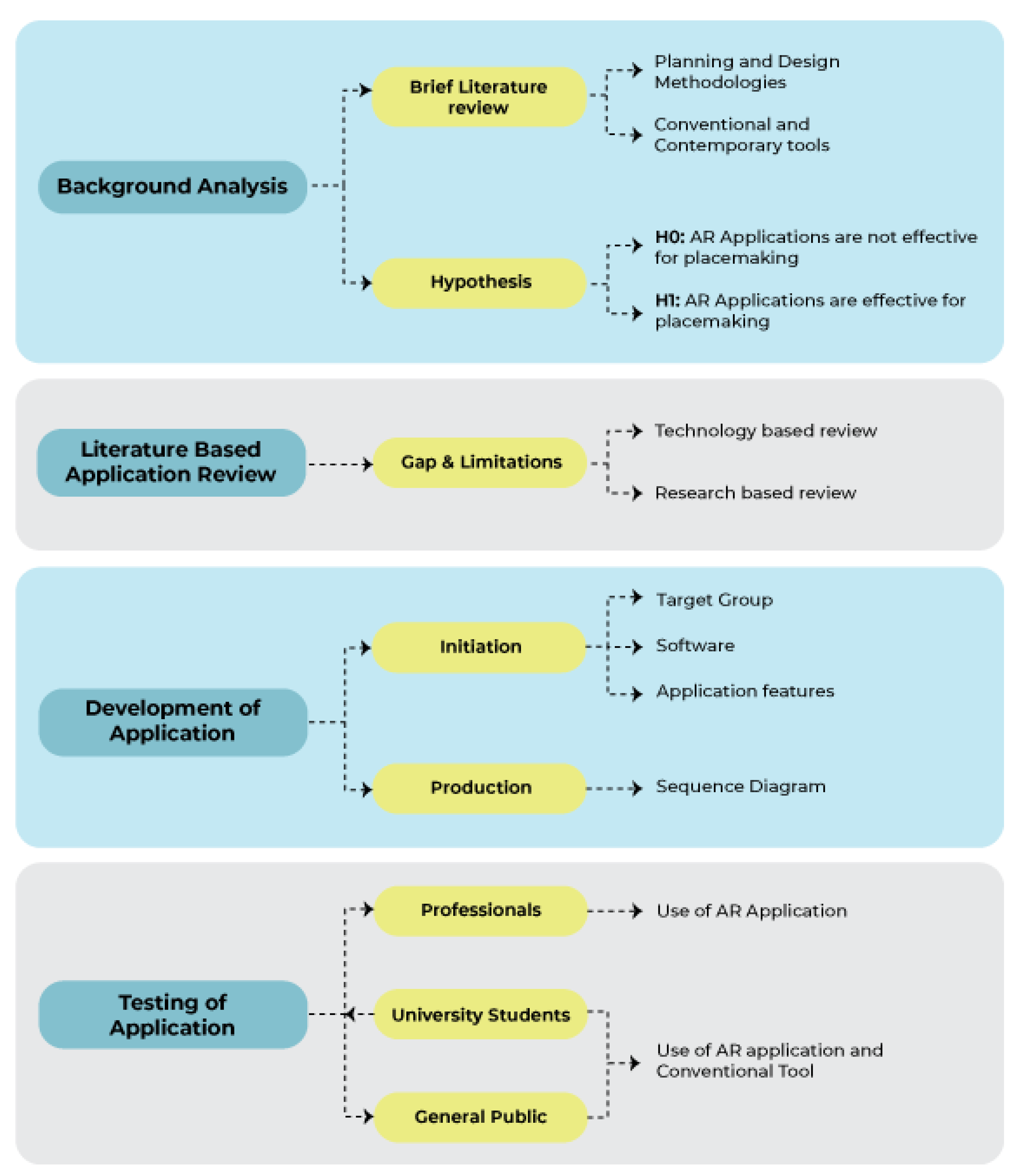
This research utilizes a systematic approach consisting of four key phases. Initially, a background analysis provides a fundamental comprehension of planning methods and formulates the research hypothesis. Secondly, an examination of applications based on literature highlights technological and scientific deficiencies to anchor the study in relevant results. The development and testing of application encompass iterative design, production, and evaluation with various stakeholder groups, ensuring the practical validation of AR tools for placemaking.
Figure 1.
Methodology flowchart.
3.1. Background Analysis
This phase entails performing a brief literature analysis to examine existing planning and design methods, encompassing conventional as well as contemporary tools. To guarantee thorough coverage, pertinent keywords such as public participation, urban planning, and participatory tools were employed to search academic databases, including Google Scholar, ScienceDirect, and Scopus.
3.2. Literature-Based Application Review
The literature review concentrated on discovering AR applications pertinent to participatory urban planning by the utilization of certain keywords, including 'Participation,' 'Augmented Reality,' 'Planning,' and 'Public Spaces.' The criteria for selecting research papers were restricted to peer-reviewed articles, journal publications, and conference proceedings authored in English.
Academic databases like Google Scholar, Scopus, and ScienceDirect were employed to guarantee thorough coverage in the search. Furthermore, the snowballing technique was employed to broaden the review's scope. This involved scrutinizing reference lists (backward snowballing) and evaluating citations (forward snowballing) to uncover supplementary articles of interest.
A total of 33 AR applications were discovered, of which only 13 expressly focused on participatory urban planning components, including traffic planning, disaster visualization, infrastructure planning, and digital placemaking. Table 1 provides an overview of 33 AR applications, categorizing them by type (Mobile/Web), focus areas, and developers. The majority of these applications are mobile-based, while a few are web-based. Developers range from individual creators to research institutions, reflecting a wide array of AR innovation across various sectors, including urban planning, tourism, education, and business. The results underscore considerable deficiencies and constraints in the existing realm of AR tools for urban planning, establishing the foundation for the development of CityBuildAR―application.

Table 1.
Overview of 33 AR applications.
| No | AR Application | Type | Focus | Developer | Reference |
|---|---|---|---|---|---|
| 1 | ways2gether | Mobile | Traffic Planning | Jauschneg & Stoik | http://www.junaio.com |
| 2 | Augmented Reality UJI (ARUJI) | Mobile | AR guiding app for the students and visitors around the University of Jaume I and available for Android devices as an unsigned application | Francisco Ramos, Sergio Trilles, Joaquín Torres-Sospedra and Francisco J. Perales |
https://www.mdpi.com/journal/ijgi/special_issues/safety_security |
| 3 | Green Living Augmented + virtual ReAlity (GLARA) | Mobile | Microclimatic effects | Fluxguide | https://play.google.com/store/apps/details?id=com.Fluxguide.GLARA&pcampaignid=web_share |
| 4 | Smart [AR] Mini-Application | Mobile | Digital placemaking app | Samaneh Sanaeipoor; Khashayar Hojjati Emami | https://doi.org/10.1109/SCIOT50840.2020.9250208 |
| 5 | City 3D-AR | Web / Mobile |
Provide 3D object placement in real space for enhanced visualization |
Arnis Cirulisa, Kristaps Brigis Brigmanisb |
http://dx.doi.org/10.1016/j.procs.2013.11.009 |
| 6 | Junaio | Mobile | Create, explore and share information in a completely new way using augmented reality |
Metaio | http://www.junaio.com/ |
| 7 | Change Explorer | Watch / mobile / web | A smartphone app that notifies the public when they are close to an area that has plans for redevelopment. |
Alexander Wilson | https://doi.org/10.1177/2399808317712515 |
| 8 | In-Citu AR | Mobile | City Governments. Make urban development accessible and visible using AR, city-wide | Dana Chermesh-Reshef | https://www.incitu.us/ |
| 9 | CitySense App | Mobile | Co-creation of buildings, spaces | H2020 European Projects | https://re.public.polimi.it/handle/11311/1175121 |
| 10 | Augmented Reality Participatory Platform (ARPP) | Mobile | Platform uses mobile augmented reality (M- AR) to engage residents, particularly in under-resourced communities, in identifying the design improvements necessary to enhance neighborhood walkability | Saeed Ahmadi Oloonabadi, Perver Baran | https://doi.org/10.1016/j.cities.2023.104441 |
| 11 | Tinmith-Metro | Mobile | Visualisation of designed buildings |
Thomas, Piekarski, and Gunther, 1999 | http://dx.doi.org/10.1145/2071536.2071538 |
| 12 | StudierStubeES software(StbES) |
Mobile | Tracking and visualisation framework | Schmalstieg and Wagner, 2007 | http://dx.doi.org/10.1145/2071536.2071538 |
| 13 | City View AR | Mobile | Disaster Visualization – Earthquake | Mark Billinghurst, Gun Lee, Jason Mill, Rob Lindeman, Adrian Clark, Thammathip Piumsomboon, Rory Clifford, Shunsuke Fukuden | https://www.hitlabnz.org/wp-content/uploads/2021/03/cityviewar_qrcode.png |
| 14 | Architeque – 3D & AR | Mobile | Platform for Product Presentations in 3D & Augmented Reality |
Architeque LLC | http://www.ar-chiteque.com/ |
| 15 | Vidente | Mobile | Demonstrating underground infrastructure virtualization in the field. |
Schall, Mendez et al. (2009) | http://dx.doi.org/10.1145/2071536.2071538 |
| 16 | Urban Sketcher | Computer Based | Users can directly alter the real scene by sketching 2D images which are then applied to the 3D surfaces of the augmented scene | Sareika and Schmalstieg (2007) | http://dx.doi.org/10.1145/2071536.2071538 |
| 17 | Wikitude | Mobile | M-AR application which captures images from the surrounding environment (e.g. sights, restaurants, streets, and shops) and displays relevant information, on the screen of the mobile device. |
Wikitude GmbH | http://wikitude.com/ |
| 18 | Nokia city lens | Mobile | Uses your device’s camera to display nearby restaurants, stores, and other notable locations in augmented reality style | Andrew Webster | http://www.windowsphone.com/s?appId=93301a45-5849-4aad-a68e-c7c95df83ca1 |
| 19 | ARQuake game | Computer Based | ARQuake is an Augmented Reality (AR)version of the popular Quake game. Augmented Reality is the overlaying of computer-generated information onto the real world | Thomas et al(2000) | http://www.tinmith.net |
| 20 | Archeoguide | Mobile | Augmented Reality based Cultural Heritage On-site GUIDE | Vlahakis V., et al. 2002 | http://dx.doi.org/10.1145/584993.585015 |
| 21 | Mentira | Mobile | Example of location-based M-AR for Albuquerque city. The purpose of the game is learning Spanish as a foreign language and addresses visitors among others | Prof. Chris Holden, Prof. Julie Sykes | http://www.mentira.org/ |
| 22 | GUIDE & Augmenting the Visitor Experience | Mobile | Location based M-AR applications for the residents and the tourists, developed for the area of Keswick of Lake District, Cumbria, UK | University of Nottingham, University College London and Leicester University constitute | |
| 23 | Frequency 1550 | Mobile | City mobile game enabling students to learn about the history of Amsterdam. | Montessori Scholengemeenschap Amsterdam, IVLOS, Uva -ILO, OSB Open Schoolgemeenschap, Bijlmer | https://waag.org/en/project/frequency-1550 |
| 24 | Dow Day | Mobile | Uses a journalistic narration genre and player takes the role of a news reporter and investigate the different perceptions of virtual characters who participated in protests against Dow Chemical Corporation for making napalm for the war in 1967. | Aris Games | http://arisgames.org/featured/dow-day/ |
| 25 | Road of Rhodes game | A game application which introduces the user in the cultural history of the island, and it was created using the ARIS authoring tool |
Aris Games | ISBN 978-960-99791-2-2 | |
| 26 | CityScope | Mobile | Community engagement platform | MIT Media Lab’s Changing Places Group (CPG) | 10.1016/j.procs.2017.08.180 |
| 27 | Urban CoBuilder | Mobile | Outdoor urban simulation tool based on AR. | Hyekyung Imottesjo, Jaan-Henrik Kai | https://imottesjo.se/Urban-CoBuilder |
| 28 | EduPARK | Mobile | Use image-based AR, with marker-based tracking, to display mainly botanical content. | Lúcia Pombo, Margarida Morais Marques | http://edupark.web.ua.pt/mobile_app?lang=en |
| 29 | ARGarden | Mobile | Enabling AR handheld device with multi-user interaction to create 3D outdoor designs. | F E Fadzli, M A Mohd Yusof, A W Ismail, M S Hj Salam and N Aismail | http://dx.doi.org/10.1088/1757-899X/979/1/012001 |
| 30 | Vítica | Mobile | Reactivation of Cisneros Market Square’s cultural heritage and its surroundings using GPS and augmented reality. | Mauricio Hincapi, Christian Díaz, Maria-Isabel Zapata-Cardenas, Henry de Jesus Toro Rios, Dalia Valencia, David Güemes-Castorena | http://dx.doi.org/10.1145/2827856 |
| 31 | Magical Park | Mobile | Encourages children to explore the park and run around, by engaging them in games played inside a blended virtual environment | GEO AR Games | https://www.geoar.com/magical-park |
| 32 | Minecraft Earth | Mobile | This game brings the blocky construction set into the physical world. Minecraft Earth users do not pursue any specific goal; they can merely create, build, and explore in freedom while playing alone or cooperatively in a real territory or in an environment created by the players | Mojang Studios in 2009 | https://www.minecraft.net/en-us/article/new-game--minecraft-earth |
| 33 | Geocaching | Web Based/ | This high-tech treasure hunting game, users hide a cache (typically a small waterproof container) in some location and post its coordinates along with some clues on the Internet. | Stuart Aldrich, Erika Zhou, Thomas M., Thomas Manoka, Ruhais Li | https://www.geocaching.com/plan/lists/BM58MPC |
3.3. Development of Application
3.3.1. Initiation
This includes establishing target user demographics, selecting appropriate software, and delineating application feature to address identified gaps. This phase guarantees congruence between user requirements and technical competencies.
3.3.2. Target Group
The primary target demographic for this application is the general public. The program seeks to be user-friendly and accessible, enabling non-technical users to interact with its features and meaningfully participate to urban planning processes.
3.3.3. Software
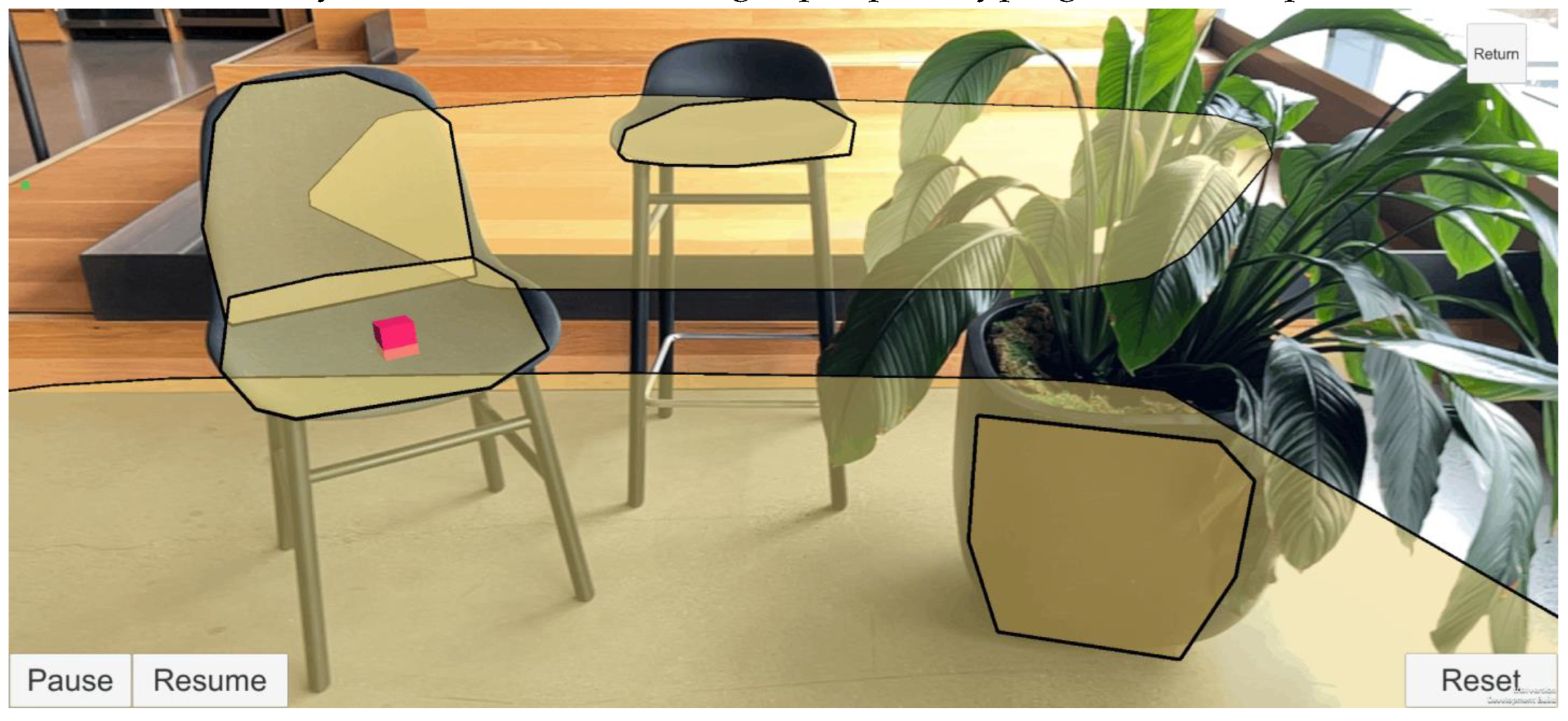
The application is made using Unity 3D, selected for its intuitive interface, which is suitable for novice developers. Unity's capability to export projects across several platforms, such as iOS, Android, and web, renders it appropriate for engaging a wide audience. The program encompasses essential tools for developing AR-based apps, including the AR Foundation package, which offers comprehensive support for AR functions. Moreover, 3D models necessary for the application were procured from the Unity Asset Store, facilitating rapid prototyping and development.
Figure 2.
Use of AR foundation in Unity for plane detection. (Source: https://docs.unity3d.com/Packages/com.unity.xr.arfoundation@5.0/).
Figure 2.
Use of AR foundation in Unity for plane detection. (Source: https://docs.unity3d.com/Packages/com.unity.xr.arfoundation@5.0/).
3.3.4. Application Features
The application includes various features to facilitate participatory urban planning and placemaking. The study identified crucial placemaking elements, including trees, benches, tables, lamp posts, dustbins, and bushes, as determined by the literature review. These components enable users to construct and see urban environments interactively in AR. The application allows users to record photographs of their designs, facilitating documentation and sharing of their ideas. This feature improves user involvement and facilitates collaborative planning by offering a visual documentation of suggested ideas.
Figure 3.
Used placemaking elements in the application.

3.3.5. Production
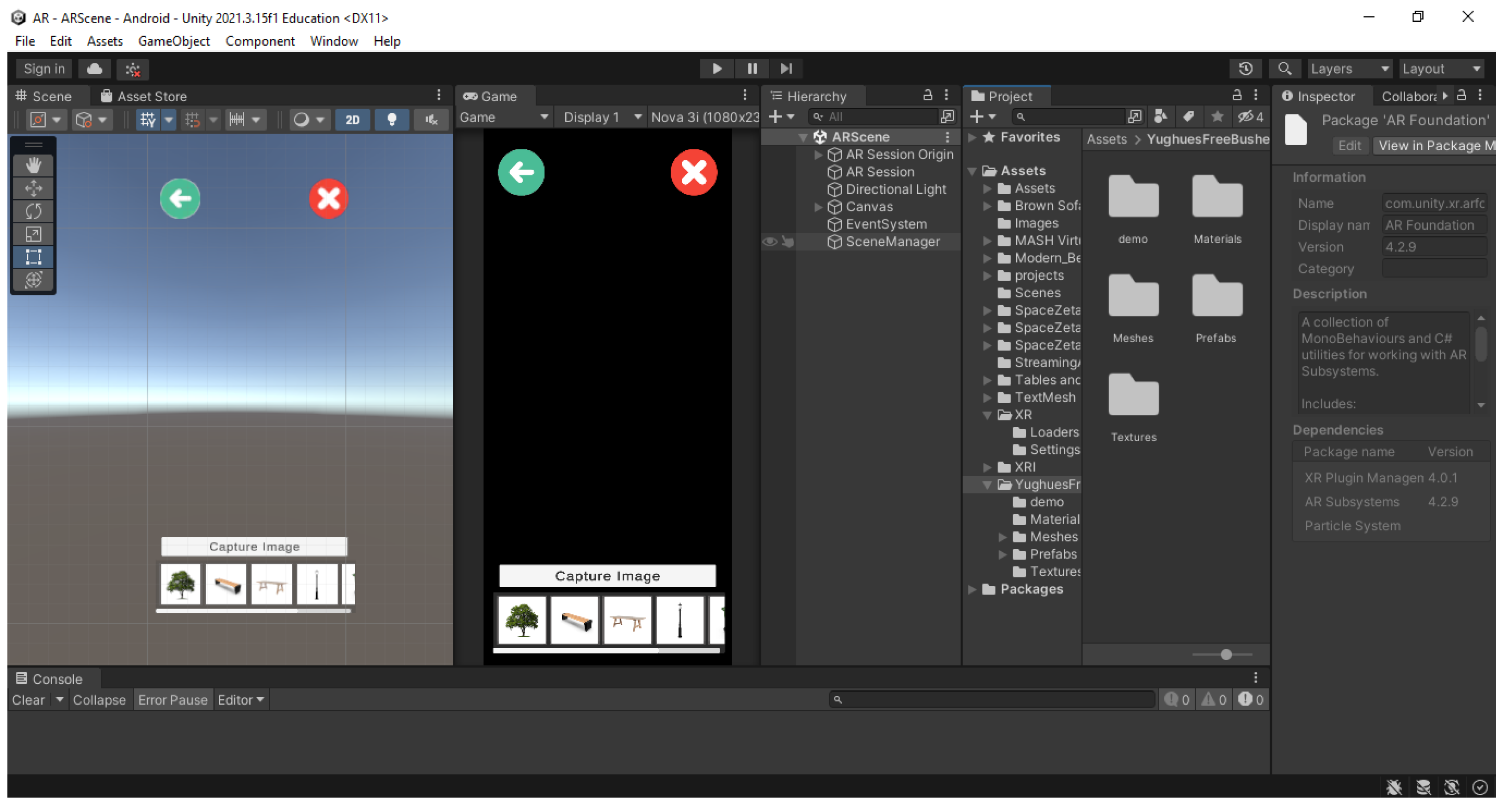
The production phase entails developing the application prototype, built specifically for the Android operating system. The application was created utilizing Unity Engine version 2021.3.15f1, capitalizing on its strong features for AR developing. Multiple Unity packages were included to facilitate AR functionality: AR Foundation version 4.2.9, ARCore XR Plugin version 4.2.9, ARKit XR Plugin version 4.2.9 and XR Interaction Toolkit version 2.0.4.
These tools permitted the incorporation of sophisticated AR features and guaranteed interoperability among AR-capable devices. Sequence diagrams were employed in the development process to delineate user interactions and application operations, hence facilitating a seamless and intuitive user experience.
Figure 4.
Unity 3D interface.
The app sequence diagram was initially created, followed by the development of the app prototype based on it.
The author initially created the sequence diagram on top of the deficiencies and constraints identified from the reviewed 33 AR applications. The current AR applications designed for placemaking encountered technological issues, including location retrieval failures, absence of a personalized user platform, and restricted functionalities in certain applications, such as displaying information on screen and enabling comments instead of facilitating substantial contributions to placemaking. The 'CityBuildAR' application was built to address these concerns, functioning as a crowdsourcing platform that allows users to create personal accounts, join up or log in, and participate in placemaking by constructing locations according to their preferences. Figure 5 illustrates that the application was designed in three primary phases: user registration/login, placemaking utilizing provided elements, and saving the design for reference by other users or professionals.
The prototype development has been finalized, and all user interfaces have been built to improve the app's user-friendliness. The colors selected for the user interfaces and the intended placemaking components aim to increase interaction with the application.
Figure 6.
Prototype development.
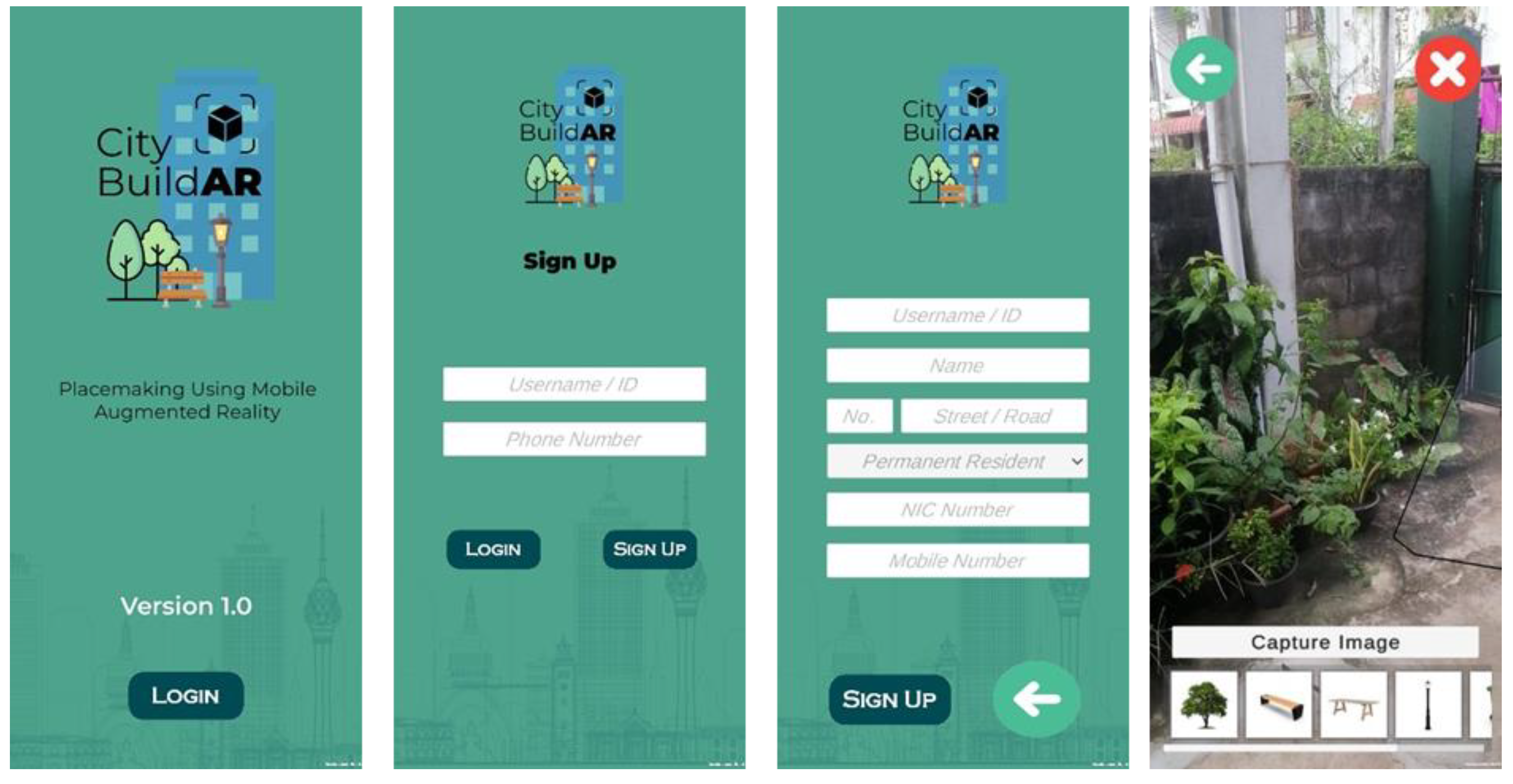
In the subsequent phase, a preliminary demonstration was executed to evaluate the application's functions, its compatibility with the Sri Lankan setting, and the efficacy of employing a M-AR application as a placemaking instrument.
3.3.6. Testing the Application
The application underwent testing with three separate user groups: professionals (with an experience in urban design for more than 5 years), university students from the Architecture Faculty, and the general populace ― individuals from no university degree with no or limited knowledge on place making. The groups were chosen according to age, experience, and familiarity with urban spaces, guaranteeing a varied array of perspectives for assessing the application's usability and efficacy. To attract a broader audience, all individuals interested in placemaking using M-AR were encouraged to join through a Facebook event (Figure 7) and further information was disseminated via WhatsApp groups. The open café area of University of Moratuwa (Figure 8) was chosen as the location of the study, offering a familiar and approachable setting for participants.
The study was performed in two sessions. Session A was for the university students and the general public. The session B was for the professionals. During session A, a registration form was given to the participants, which collected the details of participant’s age, gender, present role/status at the university, and subject of study/profession. The form collected data regarding their expertise and experience in placemaking and AR, their acquaintance with the study location, their readiness to utilize AR for placemaking purposes and their preference in sketching ―hand sketch, use of 3D SketchUp software or other. Then, as demonstrate in Figure 9(a) and (b) they were asked to design the open café area of the university using the preferred sketching method.
Secondly, they were asked to use the City BuildAR application to redesign the same area. Finally, feedback was collected. An overview of the feedback form is given in Table 2.
Unlike to the session A, session B did not go with an initial sketching exercise as all the professionals are experienced architects or urban planners with sketching skills. Therefore, the CityBuildAR app was directly introduced to them and asked to design the open café areas. Similarly, the feedback form was given to professionals at the end the session.
4. Analysis and Results
4.1. Overview
23 undergraduates between the 18-34 age group participated in the session A. The participants were from different educational backgrounds including urban planning (57.6%), architecture (12.1%), business studies (18.2%), engineering (6.1%), and quantity surveying (6.1%). The majority of the participants were somewhat familiar (54.5%) with the placemaking concept as most of them heard about it through academic modules or studies (80%), from professionals or authorities (32%), and also from social media (40%). In comparison, 24.2% of the participants were unfamiliar with the concept.
The non-academic staff members, including technical assistants, drivers, and the cleaning staff, attended session A to represent the general public's perspective on using AR for placemaking. A total of 24 individuals including 13 non-academic members, 6 cleaning service members, and 5 others of age group 35-54 participated in the demonstration. Among them, only 3 participants have heard about placemaking and only one participant has engaged in placemaking activity by coordinating a placemaking workshop.
Academic staff from urban planning, architecture, landscape architecture, and engineering fields were taken as professionals to evaluate the CityBuildAR application for designing the university cafeteria at the University of Moratuwa in session B. A total of 24 academic staff members participated in the demonstration, with the majority representing the fields of urban planning, landscape architecture, and architecture, respectively. According to their feedback, a majority of them familiar with placemaking (84.6%) through academic modules (68.1%), from professionals and authorities in the field (81.3%), through stakeholder meetings and workshops (56.3%), and some of them through media (18.8%).
The professionals' role in the previous placemaking activities was described as an actively contributing to the design and planning of green and recreational spaces by integrating community input, providing technical guidance for infrastructure improvements, and collaborating with stakeholders through workshops and urban planning projects, refined through academic modules and practical experiences. Commonly used placemaking methodologies are participatory mapping, stakeholder meetings, and discussions while the tools used to design are hand sketching, AutoCAD, SketchUp modeling, physical models, and GIS tools.
The participants' familiarity with the selected location (university cafeteria) for the study has been evaluated. The majority of the university students (78.8% - 18), general public (92.86% - 13), and professionals – (78.57% - 11) participated, were familiar with the location, while the rest of the participants also responded as somewhat familiar with it. The university students and professionals responded to the use of cafeteria space for dining, gathering, using ATM, and other recreational activities while the general public responded to dining and cleaning the space. Additionally, the willingness to engage in placemaking through AR has been considered, and the majority (55.9%) of university students were very interested, while the professionals (52.6%) and general public (51.5%) responded as somewhat interested.
4.2. Comparing Hand Sketching, Software with CityBuildAR
Figure 10 and Figure 11, shows the responses for Q1-Q3, which examined the university students' opinions in using hand sketches in visualizing and designing the open café areas during session A.
Accordingly, most university students selected the hand sketching option and most felt comfortable (43.5%) while some were uncomfortable (17.4%) with sketching. However, 60.9% of them identified sketching as an accessible method that provides artistic freedom and encourages creativity without any technical constraints (56.5%). Nevertheless, as shown in Figure 10, participants highlighted challenges such as difficulty in visualization (65.2%), limitations with making edits to the design (60.9%), time-consuming (47.8%), and lack of drawing skills (69.6%).
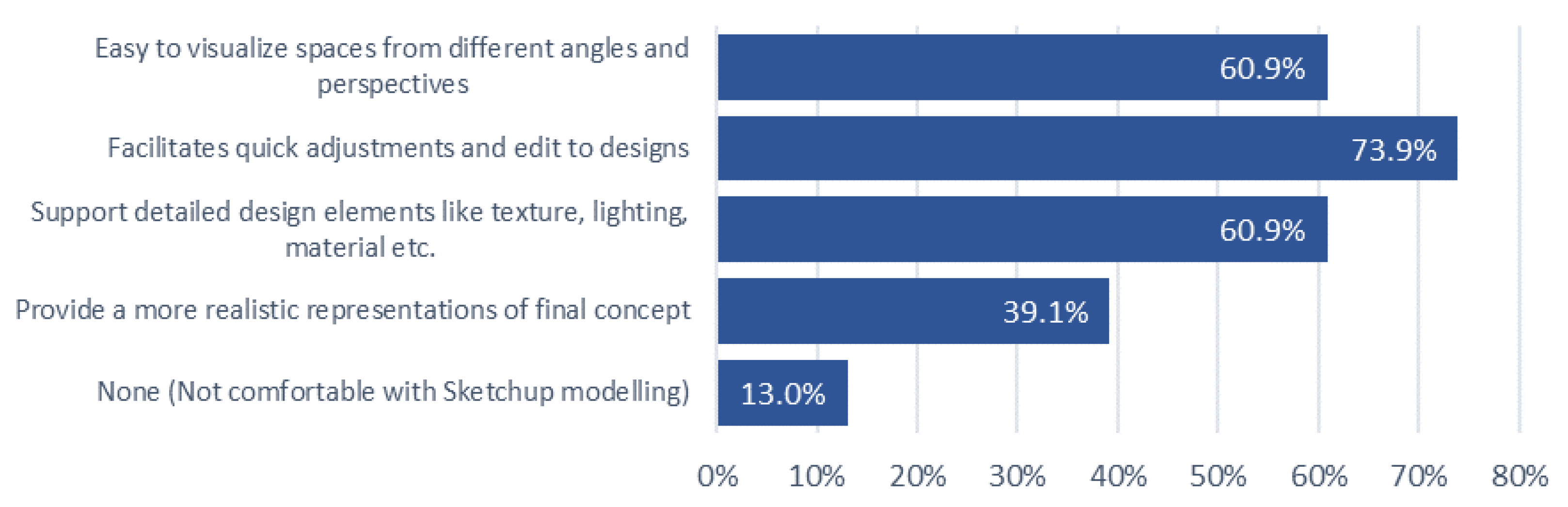
Q4-Q6 examined university students’ feedback for 3D modelling using the SketchUp software during the study. Even though university students identified the positive aspects of 3D modelling compared to hand sketching such as the ability to visualize design from different perspectives (60.9%), facilitate quick adjustments and changes (73.9%), and support detailed elements (texture, lighting, etc.) (60.9%), they mentioned the challenges they faced while using Sketch Up 3D modelling at the demo as shown in the Figure 9.
Figure 12.
Positive aspects of using 3D modelling—university students.
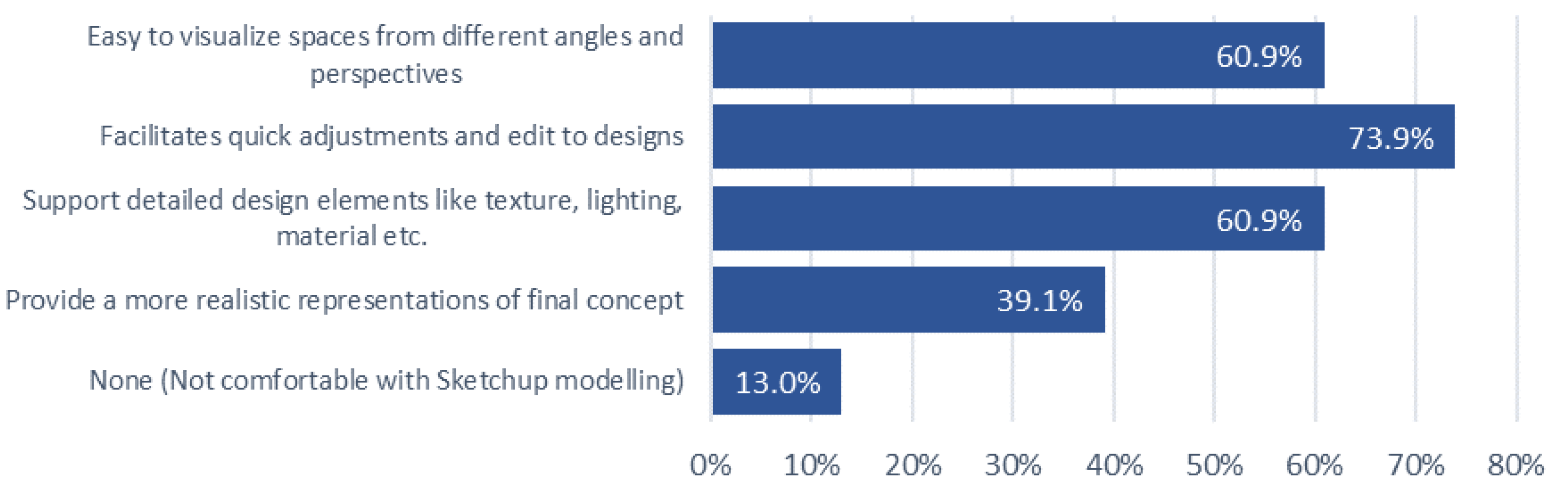
Figure 13.
Challenges of using 3D modelling—university students.
However, none of the participants from the general public category were comfortable with two alternatives provided at session A― hand sketching and SketchUp 3D modeling. As indicated in Figure 14, most of them responded about lack of personal drawing skills and identified it as a time-consuming activity. Further, they have never participated in placemaking activities using these tools which was a challenge for them.
Although the study initially excluded Session A for professionals with placemaking experience, assuming their proficiency in sketching, the participants highlighted challenges stemming from their limited drawing skills to effectively illustrate and customize designs ―Figure 15. Additionally, the 15.4% of professionals emphasized the need for specialized software for designing, noting that existing tools pose challenges when used for placemaking.
4.3. Place-Making with CityBuildAR
In the feedback form shared after session A, Q7-Q13 discussed the participants' experience regarding placemaking using CityBuildAR.
The university students' feedback indicated that the majority considered the AR application easy (43.5%) or very easy (17.4%) to navigate and use for placemaking, while the rest of them answered neutrally (39.1%). As shown in Figure 16, the ability to visualize designs in real-time, the immersive experience in the real context, and ability to design multiple scenarios within a limited time were identified as positives. Yet, according to Figure 17, University students identified technical issues with the app, including app instability, loading, and performance issues, as well as difficulties in aligning virtual objects with the real-world environment while using the AR app for placemaking.
Out of 14 individuals which represented the general public group, 7 have used AR apps previously for gaming (Pokemon Go), advertisements (Dilma Tea, CocaCola) and other (University Vesak Lantern App). All 14 participants agreed that the ease of use and accessibility of AR apps serves as a strong motivation to utilize AR in placemaking.
As shown in Figure 18, the general public has identified using AR as an opportunity to see designs in real-time and it’s easy to handle with minimal expertise and knowledge about the field. However, after using the CityBuildAR app all of them have identified challenges as negatives including the difficulty in understanding the app elements, and functionality (rotate, delete) and they need time to get familiar with the app before designing.
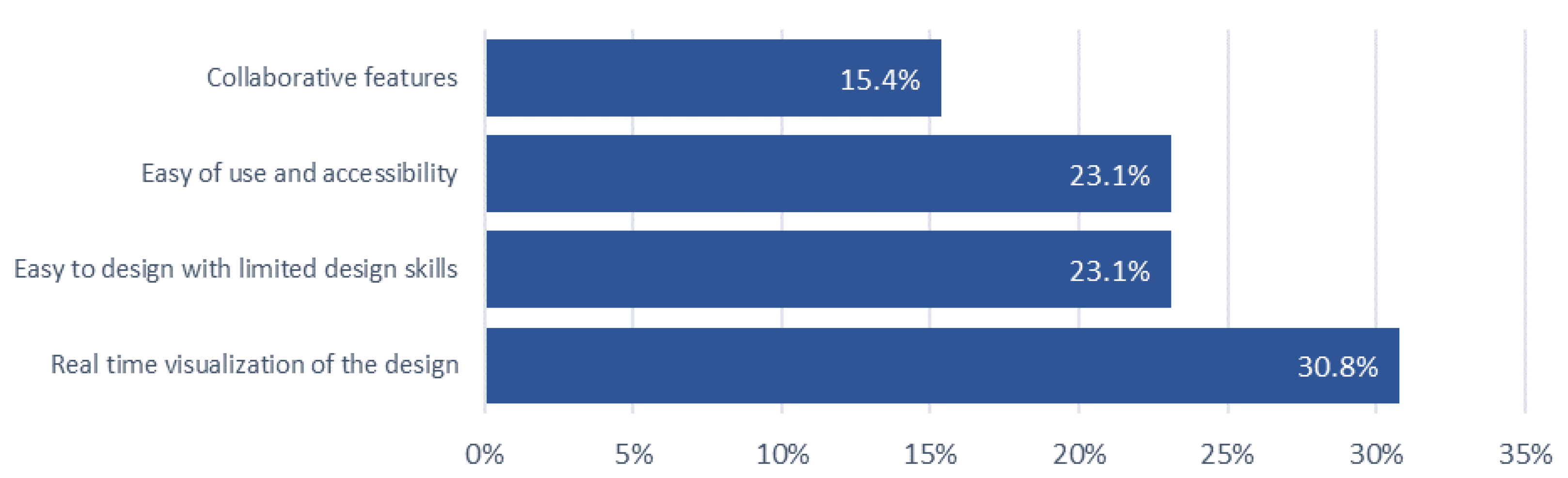
Among the professionals who participated, a total of 10 has used AR apps previously for gaming, advertising, infrastructure project simulations, and storytelling (DEVAR app). Therefore, the motivating factors for professionals to use AR for placemaking has been identified as the ability to visualize the designs real-time, ability to design a space with limited skills, ease of use and accessibility and collaborative features of the app as indicated in Figure 17.
Figure 19.
Motivations for using AR—professionals.
Nevertheless, after using the AR app the professionals responded with the challenges, they faced such as technical issues (app stability, loading, performance), difficult to align virtual objects with the real ground situation and most of them highlighted that they need more time to be familiar with the app before starting the design. In overall, professionals evaluated the app's features, including user interface (colors, graphics), functionalities (rotate, remove), and design components (tables, chairs, trees, benches, garbage bins, etc.), as good (64.23%), poor (15.38%), and neutral (15.38%).
Based on the app demonstration conducted with three groups—professionals, university students, and the general public—it was observed that professionals mostly preferred existing tools such as 3D software over the AR application due to its limited features, which restrict the ability to create unique designs. However, university students identified AR as more convenient tool for placemaking as it is easily accessible and do not require technical expertise or drawing skills. Also, highlighted its ability to collaborate and visualize the design real time. The general public indicated that using AR app for placemaking is inclusive and accessible for everyone rather than the existing methodologies. All three groups have responded that they need more time to get familiar with the app before designing and the app needs modifications including more design elements and functionality (scaling, moving etc.).
4.4. Image Analysis
The aim of the image analysis is to identify similarities and differences in design methodologies among different groups and evaluate the impact of M-AR technology on design outputs. Figure 20, Figure 21 and Figure 22 indicate the visualizations of university cafeteria designs created by the three groups during the app demonstration.
As of Table 3 the designs were classified into three categories and evaluated according to certain criteria: use of element, functionality, user Interaction, and incorporation of AR features. Table 3 presents a detailed breakdown of the element counts for each design criterion, providing insights into the specific elements utilized in every individual design.
Table 3 indicated that professionals used limited components in the designs such as one garbage cans in all designs and only a few (15) lamp posts, bench (37) and tables (10) as well. Comparatively University students included more elements in the design such as trees (45), bushes (104), table (26), benches (87), lamp post (35) and garbage (15). General public added elements comparatively higher than professionals and lower than university students.
Greenery was added in 7 (53.8%) designs of professions without changing the existing setting of the cafeteria. However, the university students’ designs highlight their requirements such as more seating (100%) and lighting (82.6%) in the space. Use of shady trees is emphasized in commonly in all designs while the bushes have been placed for visual appeal. Comparatively, the general public’s designs indicate familiar layouts such as having seating under shades with garbage bins near to them that are replicating existing patterns. University students prioritized their requirements to gather in visually appealing and comfortable surroundings.
As shown in Table 3, the functionality including seating, walking paths, lighting, and greenery has been considered by the university students when designing, but when it comes to the general public the functionality was comparatively not considered, because the existing paths were covered and used for the design and no shades provided for the seating area. However, the university students have prioritized visual appeal and comfort except for the existing real ground context, but the professionals highly considered the existing layout by not adding many elements in the design. The general public considered functionality by having usual requirements such as seating in this space.
User interaction with the placemaking, and community engagement aspects while designing the space has been evaluated under the attributes of physical setting, sociability and imageability. According to the analysis, professionals considered the existing setting more than attractiveness, and physical and social comfort. However, university students have considered the physical setting including aspects such as accessibility, walkability, climate comfort, and spatial characteristics. Additionally, the visual appeal, attractiveness, and comfort which represent the imageability is also highlighted in the designs. But the general public group have neglected the accessibility and walkability of the space. The sociability aspect was considered by university students by incorporating density, diversity of space, furniture availability but the professionals did not add many inputs towards enhancing diversity or density to the place. The general public moderately considered sociability by incorporating density and functionality to the design. But the general public did not consider the imageability aspect in the designs.
All three groups have incorporated AR elements and features in both designing and visualizing the space while the general public visualized elements slightly. University students used AR to create transformative and experimental designs while the general public used AR for visualizing a familiar pattern.
This image analysis revealed diverse design methodologies influenced by participants' backgrounds and the role of AR in as a placemaking tool to aid visualizing the design ideas.
4.5. Opinion Analysis
The participants feedback included insights replated to their placemaking exercise using the CityBuildAR app. Out of all the participants 81% have expressed their insights. The study considered all the open-ended responses and classified them into three themes based on the response nature. Out of them 43% have expressed positive sentiments about the app.
4.5.1. Ability to Visualize and Design with Limited Skills
Some participants identified CityBuildAR app as an effective tool for visualizing and it enables users to design spaces with limited drawing skills, technical expertise and less hardware/software requirements.
- Participant 1 - “I have limited drawing skills, so I usually engaged in collaborating with ideas as a group member while another member will visualize. But using this AR app I can do my own design by myself. But the list of elements and features should expand to make a unique design.”
- Participant 2 - “I really liked the interface and elements of the app. It creates a nice design of myself with limited skills. Wish I had more time to get familiar with this app.”
- Participant 3 - “Simple and effective for non-designers.”
4.5.2. Impact on Creativity of Users
Majority of the participants indicated that the restricted elements and options available have constrained the individual design and unique qualities of one another. Additionally, the app crashes have interrupted the design process often.
- Participant 1 - “Great concept for enhancing placemaking through real-time visualization. However, the limited design options and occasional bugs limit its potential in professional landscape projects. Expanding its feature set would make it more versatile.”
- Participant 2 - “App doesn’t allow to create & visualize unique designs. It generalizes the designs and with the given elements, it’s limited to create my own design. Realtime visualization is interesting somehow.”
- Participant 3 - “Expanding the range of features and addressing performance concerns would make it a highly effective tool for professional urban planning and participatory processes.”
As indicated in the above opinions, the AR app has limited the creativity of participants and it requires modifications in the app elements, features and scaling to enhance the uniqueness of designs.
4.5.3. Technical Constraints
Apart from the limited features and elements mentioned above, a majority of them shared their opinion about the lack of time given to familiarize with the app before designing. According to their responses, the app familiarity is significant to develop a proper design.
- Participant 1 - “App elements are difficult to understand in the beginning, needed assistance to understand. I had the ability to do a design for cafeteria using this app, which I wouldn't be able to do with sketching or other software.”
- Participant 2 - “Expanding the range of features and addressing performance concerns would make it a highly effective tool for professional urban planning and participatory processes.”
- Participant 3 - “Using app for designing is good for me because I have poor drawing skills. However, it is difficult to understand and design within this limited time given.”
Participants feedback highlighted the app potential as a placemaking tool specifically for enhanced engagement of communities in different levels of knowledge and expertise. However, technical issues need to be addressed to get more creative and unique designs.
5. Findings and Conclusions
5.1. To What Extent Does the CityBuildAR App Bridge the Gap Between Professionals and the General Public in Placemaking?
The CityBuildAR app allows the general public to design and visualize public spaces using their mobile phones similar to a professional, which significantly enhances their ability to participate in placemaking. The conflict between community preferences and the preferred engagement techniques of the public has caused a lack of public participation in urban planning with existing conventional methods [69].
Furthermore, real-time visualization encourages users to redefine spatial designs with limited time and expertise because realistic visualizations are more effective than abstract presentations, especially when it comes to engaging a non-specialist audience like the general public [70]. AR models can influence people to participation in the planning process and to provide immediate feedback using AR [71]. Especially, CityBuildAR app enables users to engage in placemaking using high-tech software with limited technical expertise and experience which enhances more public participation in the process. Therefore, utilizing AR for placemaking has the potential to bridge the gap between planning practitioners and the general public when it comes to design and visualization. Use of technologically advanced applications (AR, VR) can support professionals in creating an inclusive and accessible participatory planning methodology for all citizens including students [72,80].
However, despite its advantages, the application reveals an important gap in the design process which is the rationale for designs. During the app demonstration, the professionals considered the existing layout of the university cafeteria. They added features to the existing layout without replacing it or ignoring the existing setting. In contrast, university students were innovative and transformative, which they ignore the existing setting in imposing their design. The general public used the app to visualize existing patterns and spatial layouts with minimum requirements. It indicates that knowledge and expertise have a direct impact on the design when using CityBuildAR. Further, it highlights the app’s flexibility to adapt and address the needs of different layers in the society in expressing their design thinking.
Overall, the CityBuildAR app allows professionals and the general public to equally engage in placemaking activities using the application and bridge the gap in terms of visualization and conceptualization. However, the app allows the users to visualize their requirements and interests through design. Therefore, the designs are biased to each individual's personal preferences and in some cases, the design might not meet the significant placemaking attributes such as physical setting, imageability, and sociability. On some occasions, important aspects such as walkability, accessibility, comfort, and density of activities might not be considered as discussed under image analysis (Figure 20, 21, 22). The university students' designs and visualizations consist of a total transformative layout that requires the replacement of the existing elements (concrete pavements).
The general public only focused on their basic requirements such as seating and shading while the professional designs were more focused on keeping the same layout by adding a few elements. Therefore, the necessity of incorporating the knowledge of placemaking to the app using other alternatives such as incorporating gamified elements (scoring, leaderboard) can be emphasized.
5.2. Can Mobile-AR Tools Like CityBuildAR Replace Traditional Participatory Planning Methods?
The strengths of this app such as real-time visualization, interactive platform, and accessibility eliminate the barriers associated with traditional methods like discussions, public hearings, and stakeholder meetings enabling the ability to be used as a contemporary tool for placemaking.
In comparison with the 34 apps reviewed in the literature review, CityBuildAR avoids location-based errors and GPS inaccuracy [61,73] as this app does not require location fetching to do the design. CityBuildAR app enables any individual from any part of the world to create a design and then save the image to the cloud database which is handled by the relevant authorities in that area. Other constraints like technical complexity, and high costs of other AR apps [60,72] were eliminated by this app as it requires a smartphone to install the app and then do the design and save to the cloud. In addition to that, the AR apps identified in the review do not support citizen engagement in the planning context directly. Even though 13 apps are related to the urban planning context, only the Smart AR mini-application [74] and ChangeExplorer app [74] enable the real-time engagement of citizens in the real-world context. Other apps such as City View AR, Wikitude, etc. support only visualization. Meanwhile, the rest of the 21 apps discussed in the literature are not directly relevant to the urban planning context, yet they enable community engagement in other fields such as construction.
Yet, the CityBuildAR app does not provide the capability to replace traditional participatory methods completely. As discussed above, this app allows each individual to do their own, unique design and enhance their level of engagement and understanding in placemaking. But according to the image analysis (Table 3), the consideration of significant aspects such as physical setting, sociability, and imageability in placemaking was not highlighted in the designs when using the app. However, the limited time allocated, and the limited space used to design, the characteristics of the space (cement pavements, existing table, bench layout) have influenced the professionals' designs. Therefore, the feedback highlights that collaboration between planning practitioners and the community using AR is essential for effective placemaking.
According to [76], decisions can be made by incorporating the public's knowledge into the decision's calculus. As an example, the local community knows about crimes or traffic problems in a particular area, and that knowledge can be taken into consideration by the planners through participatory planning [77]. The collaboration of traditional aspects and AR apps is effective in communicating the placemaking knowledge with participants easily. Based on the app demonstration, the CityBuildAR app is somewhat difficult for people to understand and navigate and also this app only enables individual experience of users which causes the lack of dialogue and collaborative designing of spaces.
Accordingly, mobile AR applications like CityBuildAR can be considered as complementary tools rather than a replacement for traditional tools. This AR app excels in visualization and enhancing accessibility to the design process, but it should be leveraged with the professionals' interpretation before the actual implementation process. The study highlights that CityBuildAR has the potential to enhance community engagement. However, when considering placemaking, the necessity of incorporating professional insights into the general public’s designs is necessary. It can avoid neglect of important aspects like inclusivity to place, density and diversity of activities, and so on.
5.3. Conclusion
This research investigated the potential of M-AR technology through the CityBuildAR app, to bridge the gap between professionals and the general public in placemaking. By analyzing the experiences of university students, general public members, and professionals, the study revealed that AR can significantly enhance public participation and engagement in the design process. Study reveals that the general public and university students are more flexible to use novel technologies compared to the professionals who were in active in place making for years. Further, study reveals that the general public and the university students are concerned about green and seating arrangements, where the professionals have considered walking as a fact to think in designing the open space. However, university students have identified green as a key component in designing open spaces compared to both professionals and general public.
As most of results emphasized, the CityBuildAR app empowers individuals with limited design skills to visualize and create spatial designs, fostering a sense of ownership and agency in shaping their surroundings. By combining the strengths of traditional participatory methods with the innovative capabilities of AR, a more inclusive and effective approach to placemaking can be achieved.
Future research should explore ways to establish an interactive login within the app for multiple users to work interactively in designing spaces. Additionally, investigating the long-term impact of AR-enabled placemaking on community satisfaction and well-being is essential to assess its full potential. By embracing the transformative power of M-AR, more inclusive, vibrant, and resilient communities can be created where everyone has a voice in shaping the spaces around the cities.
5.4. Limitations
CityBuildAR app has technical limitations such as limited elements provided, the inability to design without being familiar with the app, and the lack of knowledge shared through the app have been identified as major concerns. The constant addition of new versions, and tools to the applications, rewarding participants by recognizing each input, and continuous responsiveness are required to enhance user motivation in using these tools and applications for urban planning [78]. Also, the app does not provide any guidance to the users before the design process, which needs to be addressed before officially launching the app.
The AR application is presently in the development phase and contains several technological bugs and constraints that affect its performance.
- Plane detection problems: The program necessitates the completion of plane detection before object placement, as it is incapable of identifying additional planes after objects have been positioned.
- Restricted design elements: Participants were given a limited array of items for space design, perhaps hindering their creativity and design alternatives
- Scaling limitations: Users cannot resize items, constraining design flexibility.
- Deletion errors: Specific elements experience faults during deletion, resulting in difficulties in altering the design.
Notwithstanding these constraints, the program functions as a prototype for participatory placemaking utilizing augmented reality. Insights garnered from the testing sessions will inform subsequent enhancements, rectifying these concerns and augmenting its usability and functionalities.
Author Contributions
“Conceptualization, D.R. N.K and C.D.S.; methodology, DR, N.K. and R.M.; software, R.M.; validation, D.R., R.M. and N.K. (Nuwani Kangana).; formal analysis, D.R.; N.K. (Nuwani Kangana) and N.K. (Nayomi Kankanamge); investigation, D.R.. R.M.; writing—original draft preparation, D.R.; writing—review and editing, D.R.; N.K. (Nuwani Kangana), N.K. (Nayomi Kankanamge), and T.Y. visualization, D.R., R.M. and N.K. (Nuwani Kangana); supervision, N.K. (Nayomi Kankanamge) and ,C.D.S. project administration, N.K. (Nayomi Kankanamge) and C.D.S.; funding acquisition, N.K. (Nayomi Kankanamge) and C.D.S All authors have read and agreed to the published version of the manuscript.”.
Funding
This research received no external funding.
Data Availability Statement
Data are available upon request to the corresponding author.
Acknowledgments
Authors acknowledge the reviewers and journal editors.
Conflicts of Interest
The authors declare no conflicts of interest.
References
- Akbar, P.N.G. Placemaking. In Encyclopedia of Tourism Management and Marketing; Edward Elgar Publishing: 2022; pp. 515–517. [CrossRef]
- Amirzadeh, M.; Sharifi, A. The evolutionary path of place making: From late twentieth century to post-pandemic cities. Land Use Policy 2024, 141, 107124. [Google Scholar] [CrossRef]
- Palmer, L. New inroads on community-centric placemaking. Nature Cities 2024, 1, 2–4. [Google Scholar] [CrossRef]
- Wichowsky, A.; Gaul-Stout, J.; McNew-Birren, J. Creative Placemaking and Empowered Participatory Governance. Urban Affairs Review 2023, 59, 1747–1774. [Google Scholar] [CrossRef]
- Tzanidou, A.; Vlachokyriakos, V. Participatory, location-based systems in community place-making. In Proceedings of the 7th South-East Europe Design Automation, Computer Engineering, Computer Networks and Social Media Conference (SEEDA-CECNSM), Ioannina, Greece, 23–25 September 2022; IEEE: 2022; pp. 1–8. [CrossRef]
- Naef, P. Touring the ‘comuna’: Memory and transformation in Medellin, Colombia. Journal of Tourism and Cultural Change 2018, 16, 173–190. [Google Scholar] [CrossRef]
- Prestes, O.M.; Ultramari, C.; Caetano, F.D. Public transport innovation and transfer of BRT ideas: Curitiba, Brazil as a reference model. Case Studies on Transport Policy 2022, 10, 700–709. [Google Scholar] [CrossRef]
- Hamdi, N. The Placemaker’s Guide to Building Community; Routledge: 2010. [CrossRef]
- Song, Y.; Yang, R.; Lu, H.; Fernandez, J.; Wang, T. Why do we love the high line? A case study of understanding long-term user experiences of urban greenways. Computational Urban Science 2023, 3, 18. [Google Scholar] [CrossRef]
- Loughran, K. Imbricated Spaces: The High Line, Urban Parks, and the Cultural Meaning of City and Nature. Sociological Theory 2016, 34, 311–334. [Google Scholar] [CrossRef]
- Ellery, P.J.; Ellery, J. Strengthening Community Sense of Place through Placemaking. Urban Planning 2019, 4, 237–248. [Google Scholar] [CrossRef]
- Hale, V. Good Places Through Community-Led Design. In Sustainable Development and Planning IX; WIT Press: 2018; pp. 155–164. [CrossRef]
- Fingerhut, Z.; Alfasi, N. Operationalizing Community Placemaking: A Critical Relationship-Based Typology. Sustainability 2023, 15, 6371. [Google Scholar] [CrossRef]
- Abesinghe, S.; Kankanamge, N.; Yigitcanlar, T.; Pancholi, S. Image of a City through Big Data Analytics: Colombo from the Lens of Geo-Coded Social Media Data. Future Internet, 2023, 15(1), 32. [CrossRef]
- Kangana, N.; Kankanamge, N.; De Silva, C.; Goonetilleke, A.; Mahamood, R.; Ranasinghe, D. Bridging Community Engagement and Technological Innovation for Creating Smart and Resilient Cities: A Systematic Literature Review. Smart Cities, 2024, 7(6), 3823-3852. [CrossRef]
- Pesce, M.F.; Bove, L.; Punzo, S.; Romano, M. Participatory Place-based Storytelling: A Tool to Beat Stereotypes and Unlock the Power of Communities. Procedia CIRP 2024, 12, 52–58. [Google Scholar] [CrossRef]
- Sokolaj, U. Understanding Inclusive Placemaking Processes through the Case of Klostergata56 in Norway. The Journal of Public Space 2022, 7, 193–204. [Google Scholar] [CrossRef]
- GĄSOWSKA-KRAMARZ, A. PRUITT IGOE VS CITY OF THE FUTURE. Architecture, Civil Engineering, Environment 2020, 12, 15–21. [Google Scholar] [CrossRef]
- Pınar, E. Entangled histories of Architecture and Dispossession in The Pruitt-Igoe Myth (2011). GRID - Architecture Planning and Design Journal 2024. [CrossRef]
- Beckus, A.; Atia, G.K. Sketch-based community detection in evolving networks. Physical Review E 2022, 106, 044306. [Google Scholar] [CrossRef] [PubMed]
- Abeynayake, T.; Meetiyagoda, L.; Kankanamge, N.; Mahanama, P. K. S. Imageability and legibility: cognitive analysis and visibility assessment in Galle heritage city. Journal of Architecture and Urbanism, 2022. 46(2), 126-136. [CrossRef]
- Assumma, V.; Ventura, C. Role of Cultural Mapping within Local Development Processes: A Tool for the Integrated Enhancement of Rural Heritage. Advanced Engineering Forum 2014, 11, 495–502. [Google Scholar] [CrossRef]
- García-Esparza, J.A.; Nikšić, M. Revealing the Community’s Interpretation of Place: Integrated Digital Support to Embed Photovoice into Placemaking Processes. Urban Planning 2024, 9. [Google Scholar] [CrossRef]
- Yigitcanlar, T.; Kankanamge, N. Urban Analytics with Social Media Data: Foundations, Applications and Platforms. Chapman and Hall/CRC, 2022,.
- Carmigniani, J.; Furht, B. Augmented Reality: An Overview. In Handbook of Augmented Reality; Springer: New York, NY, USA, 2011; pp. 3–46. [Google Scholar] [CrossRef]
- Azuma, R.T. A Survey of Augmented Reality. Presence: Teleoperators and Virtual Environments 1997, 6, 355–385. [Google Scholar] [CrossRef]
- Kesim, M.; Ozarslan, Y. Augmented Reality in Education: Current Technologies and the Potential for Education. Procedia – Social and Behavioral Sciences 2012, 47, 297–302. [Google Scholar] [CrossRef]
- Shalender, K.; Singla, B. Augmenting Reality (AR) and Its Use Cases. In Proceedings of the Augmented Reality Applications Conference; 2024; p. 1. [Google Scholar] [CrossRef]
- Singh, S. Designing AR Interfaces for Enhanced User Experience. Journal of Advances and Scholarly Researches in Allied Education 2024, 21, 96–102. [Google Scholar] [CrossRef]
- Cirulis, A.; Brigmanis, K.B. 3D Outdoor Augmented Reality for Architecture and Urban Planning. Procedia Computer Science 2013, 25, 71–79. [Google Scholar] [CrossRef]
- Shree, N.; Selvarani, G. Mobile Marker-Based AR Children App for Learning Map. In Proceedings of the 7th International Conference on Circuit Power and Computing Technologies (ICCPCT), IEEE: 2024; pp. 60–64. [CrossRef]
- Blazhko, O.; Shtefan, N. Development of Marker-Based Web Augmented Reality Educational Board Games for Learning Process Support in Computer Science. In Proceedings of the 6th Experiment@ International Conference (exp.at’23), IEEE: 2023; pp. 146–151. [CrossRef]
- Dhar, P.; Rocks, T.; Samarasinghe, R.M.; Stephenson, G.; Smith, C. Augmented reality in medical education: Students’ experiences and learning outcomes. Medical Education Online 2021, 26. [Google Scholar] [CrossRef]
- Kisno, B.; Wibawa, K.; Khaerudin. Digital Storytelling for Early Childhood Creativity: Diffusion of Innovation ‘3-D Coloring Quiver Application Based on Augmented Reality Technology’ in Children’s Creativity Development. International Journal of Online and Biomedical Engineering (iJOE) 2022, 18, 26–42. [Google Scholar] [CrossRef]
- Antoro, M.F.A.P.; Anistyasari, Y. Implementasi Markerless Location-Based Dalam Aplikasi Peta Augmented Reality Fakultas Teknik Unesa Berbasis Android. Journal of Informatics and Computer Science (JINACS) 2022, 4, 117–130. [Google Scholar] [CrossRef]
- Messi, L.; Spegni, F.; Vaccarini, M.; Corneli, A.; Binni, L. Infrastructure-Free Localization System for Augmented Reality Registration in Indoor Environments: A First Accuracy Assessment. In Proceedings of the IEEE International Workshop on Metrology for Living Environment (MetroLivEnv), 2024; pp. 110–115. [CrossRef]
- Chong, Y.; Sethi, D.; Loh, C.Y.; Lateef, F. Going forward with Pokemon Go. Journal of Emergencies, Trauma, and Shock 2018, 11, 243. [Google Scholar] [CrossRef] [PubMed]
- Prananta, A.W.; Biroli, A.; Afifudin, M. Augmented Reality for Science Learning in the 21st Century: Systematic Literature Review. Jurnal Penelitian Pendidikan IPA 2024, 10, 38–44. [Google Scholar] [CrossRef]
- Uhrík, M.; Kupko, A.; Krpalová, M.; Hajtmanek, R. Augmented reality and tangible user interfaces as an extension of computational design tools. Architecture Papers of the Faculty of Architecture and Design STU 2022, 27, 18–27. [Google Scholar] [CrossRef]
- Aggarwal, R.; Singhal, A. Augmented Reality and its effect on our life. In Proceedings of the 9th International Conference on Cloud Computing, IEEE: 2019, Data Science & Engineering (Confluence); pp. 510–515. [CrossRef]
- Jindal, A. Augmented Reality Applications in Mechanical System Design and Prototyping. Darpan International Research Analysis 2024, 12, 1–13. [Google Scholar] [CrossRef]
- Reinwald, F.; Berger, M.; Stoik, C.; Platzer, M.; Damyanovic, D. Augmented Reality at the Service of Participatory Urban Planning and Community Informatics—A Case Study from Vienna. The Journal of Community Informatics 2014, 10. [Google Scholar] [CrossRef]
- Braud, T.; Bijarbooneh, F.H.; Chatzopoulos, D.; Hui, P. Future Networking Challenges: The Case of Mobile Augmented Reality. In Proceedings of the 37th IEEE International Conference on Distributed Computing Systems (ICDCS), Atlanta, GA, USA, 5–8 June 2017; IEEE, 2017; pp. 1796–1807. [Google Scholar] [CrossRef]
- Boyanovsky, B.B.; Belghasem, M.; White, B.A.; Kadavakollu, S. Incorporating Augmented Reality Into Anatomy Education in a Contemporary Medical School Curriculum. Cureus 2024. [Google Scholar] [CrossRef]
- Cardullo, V.; Wang, C. Pre-service Teachers Perspectives of Google Expedition. Early Childhood Education Journal 2022, 50, 173–183. [Google Scholar] [CrossRef]
- Ozturkcan, S. Service Innovation: Using Augmented Reality in the IKEA Place App. Journal of Information Technology Teaching Cases 2021, 11, 8–13. [Google Scholar] [CrossRef]
- Kounavis, C.D.; Kasimati, A.E.; Zamani, E.D. Enhancing the Tourism Experience through Mobile Augmented Reality: Challenges and Prospects. International Journal of Engineering Business Management 2012, 4. [Google Scholar] [CrossRef]
- Tanwar, V.; Anand, V.; Aggarwal, P.; Kumar, M.; Kumar, G.R. Revolutionizing Military Training: A Comprehensive Review of Tactical and Technical Training through Augmented Reality, Virtual Reality, and Haptics. In Proceedings of the 9th IEEE International Conference for Convergence in Technology (I2CT), Pune, India, 7–9 April 2024; IEEE, 2024; p. 1. [Google Scholar] [CrossRef]
- Qin, Y. Attractiveness of Game Elements, Presence, and Enjoyment of Mobile Augmented Reality Games: The Case of Pokémon Go. Telematics and Informatics 2021, 62, 101620. [Google Scholar] [CrossRef]
- Boboc, R.G.; Gîrbacia, F.; Butilă, E.V. The Application of Augmented Reality in the Automotive Industry: A Systematic Literature Review. Applied Sciences 2020, 10, 4259. [Google Scholar] [CrossRef]
- David, R.S. Immersive Learning Experiences: Technology-Enhanced Instruction, Adaptive Learning, Augmented Reality, and M-Learning in Informal Learning Environments. i-Manager’s Journal of Educational Technology 2019, 15, 17. [Google Scholar] [CrossRef]
- Baeza, J.L.; Stephenson, G.; Samarasinghe, R.M.; Rocks, T.; Smith, C. CityScope Platform for Real-Time Analysis and Decision-Support in Urban Design Competitions. International Journal of E-Planning Research 2021, 10, 121–137. [Google Scholar] [CrossRef]
- Niederer, S.; Priester, R. Smart Citizens: Exploring the Tools of the Urban Bottom-Up Movement. Computer Supported Cooperative Work 2016, 25, 137–152. [Google Scholar] [CrossRef]
- Reaver, K. Augmented Reality as a Participation Tool for Youth in Urban Planning Processes: Case Study in Oslo, Norway. Frontiers in Virtual Reality 2023. [Google Scholar] [CrossRef]
- Argo, T.A.; Prabonno, S.; Singgi, P. Youth Participation in Urban Environmental Planning through Augmented Reality Learning: The Case of Bandung City, Indonesia. Procedia—Social and Behavioral Sciences 2016, 227, 808–814. [Google Scholar] [CrossRef]
- Mao, Y.; Zhang, Z.; Sun, H.; Chen, Y. CitySense. In Proceedings of the 16th ACM Conference on Embedded Networked Sensor Systems, Shenzhen, China, 4–7 November 2018; ACM, 2018; pp. 379–380. [Google Scholar] [CrossRef]
- Ahmadi Oloonabadi, S.; Baran, P. Augmented Reality Participatory Platform: A Novel Digital Participatory Planning Tool to Engage Under-Resourced Communities in Improving Neighborhood Walkability. Cities 2023, 141, 104441. [Google Scholar] [CrossRef]
- Allen, M.; Regenbrecht, H.; Abbott, M. Smart-Phone Augmented Reality for Public Participation in Urban Planning. In Proceedings of the 23rd Australian Computer-Human Interaction Conference, Canberra, Australia, 28 November–2 December 2011; ACM, 2011; p. 11. [Google Scholar] [CrossRef]
- Amin, D.; Govilkar, S. Comparative Study of Augmented Reality SDKs. International Journal on Computational Science & Applications 2015, 5, 11–26. [Google Scholar] [CrossRef]
- Silva, C.; Zagalo, N.; Vairinhos, M. Towards Participatory Activities with Augmented Reality for Cultural Heritage: A Literature Review. Computers & Education: X Reality 2023, 3, 100044. [Google Scholar] [CrossRef]
- Pombo, L.; Marques, M.M. Marker-Based Augmented Reality Application for Mobile Learning in an Urban Park: Steps to Make It Real Under the EduPARK Project. In Proceedings of the 2017 International Symposium on Computers in Education (SIIE), Lisbon, Portugal, 6–8 November 2017; IEEE, 2017; p. 1. [Google Scholar] [CrossRef]
- Goudarznia, T.; Pietsch, M.; Krug, R. Testing the Effectiveness of Augmented Reality in the Public Participation Process: A Case Study in the City of Bernburg. Journal of Digital Landscape Architecture 2017, 2, 244–251. [Google Scholar] [CrossRef]
- Imottesjo, H.; Kain, J.-H. The Urban CoBuilder—A Mobile Augmented Reality Tool for Crowd-Sourced Simulation of Emergent Urban Development Patterns: Requirements, Prototyping and Assessment. Computers, Environment and Urban Systems 2018, 71, 120–130. [Google Scholar] [CrossRef]
- Ali, A.S.; Baper, S.Y. Assessment of Livability in Commercial Streets via Placemaking. Sustainability 2023, 15, 6834. [Google Scholar] [CrossRef]
- Cocchia, L.; Spegni, F.; Vaccarini, M.; Corneli, A.; Binni, L. The Impact of Social Environment and Interaction Focus on User Experience and Social Acceptability of an Augmented Reality Game. In Proceedings of the 16th International Conference on Quality of Multimedia Experience (QoMEX), Ghent, Belgium, 18–20 June 2024; IEEE, 2024; pp. 160–166. [Google Scholar] [CrossRef]
- Hammack, P.L. Narrative and the Cultural Psychology of Identity. Personality and Social Psychology Review 2008, 12, 222–247. [Google Scholar] [CrossRef]
- Zhang, M. Research on the Application of AR Technology in Reconstructing the Digital Presentation of Urban Identity. In Proceedings of the 15th International Conference on Digital Image Processing, Beijing, China, 6–8 May 2023; ACM: 2023; pp. 1–7. [CrossRef]
- Khor, C.Y.; Mubin, S.A. AR Mobile Application for Enhancing National Museum Heritage Visualization. International Journal of Software Engineering and Computer Systems 2024, 10, 1–19. [Google Scholar] [CrossRef]
- Caldeira, T.; Holston, J. Participatory urban planning in Brazil. Urban Studies, (2015). 52(11), 2001–2017. [CrossRef]
- Al-Kodmany, K. Visualization Tools and Methods for Participatory Planning and Design. Journal of Urban Technology, 2001. 8(2), 1–37. [CrossRef]
- Othengrafen, F.; Sievers, L.; Reinecke, E. Using augmented reality in urban planning processes: Sustainable urban transitions through innovative participation. GAIA - Ecological Perspectives for Science and Society,. (2023). 32(1), 54–63. [CrossRef]
- Sabah, S., Hossain, I., Weiss, D., & Tillmann, A. Towards Increasing Active Citizen Involvement in Urban Planning through Mixed Reality Technologies. (2023).
- Santana, J. M. , Wendel, J., Trujillo, A., Suárez, J. P., Simons, A., & Koch, A. (2017). Multimodal location based services—semantic 3D city data as virtual and augmented reality. Lecture Notes in Geoinformation and Cartography, 329–353. [CrossRef]
- Sanaeipoor, S.; Emami, K. H. Smart [AR] Mini-Application: Engaging Citizens in Digital Placemaking Approach. Proceeding of 4th International Conference on Smart Cities, Internet of Things and Applications, SCIoT 2020, 84–90. [CrossRef]
- Wilson, A.; Tewdwr-Jones, M.; Comber, R. Urban planning, public participation and digital technology: App development as a method of generating citizen involvement in local planning processes. Environment and Planning B: Urban Analytics and City (2019). Science, 46(2), 286–302. [CrossRef]
- Innes. J; Booher D..; Planning with Complexity: An Introduction to Collaborative Rationality for Public Policy. [CrossRef]
- Pissourios, I.; Top-Down and Bottom-Up Urban and Regional Planning: Towards a Framework for The Use of Planning Standards. European Spatial Research and Policy. (2014) 21. [CrossRef]
- Gordon, E. , Baldwin-Philippi, J. and Balestra, M.; 'Why We Engage: How Theories of Human Behavior Contribute to Our Understanding of Civic Engagement in a Digital Era,(2013)'SSRN Electronic Journal [Preprint]. [CrossRef]
- Yigitcanlar, T. Australian local governments' practice and prospects with online planning. URISA Journal 2006, 18, 7–17. [Google Scholar]
- Hunter, M.; Soro, A.; Brown, R.; Harman, J.; Yigitcanlar, T. Augmenting community engagement in city 4.0: Considerations for digital agency in urban public space. Sustainability 2022, 14, 9803. [Google Scholar] [CrossRef]
- Yigitcanlar, T.; Degirmenci, K.; Butler, L.; Desouza, K. What are the key factors affecting smart city transformation readiness? Evidence from Australian cities. Cities 2022, 120, 103434. [Google Scholar] [CrossRef]
Figure 5.
Sequence diagram.
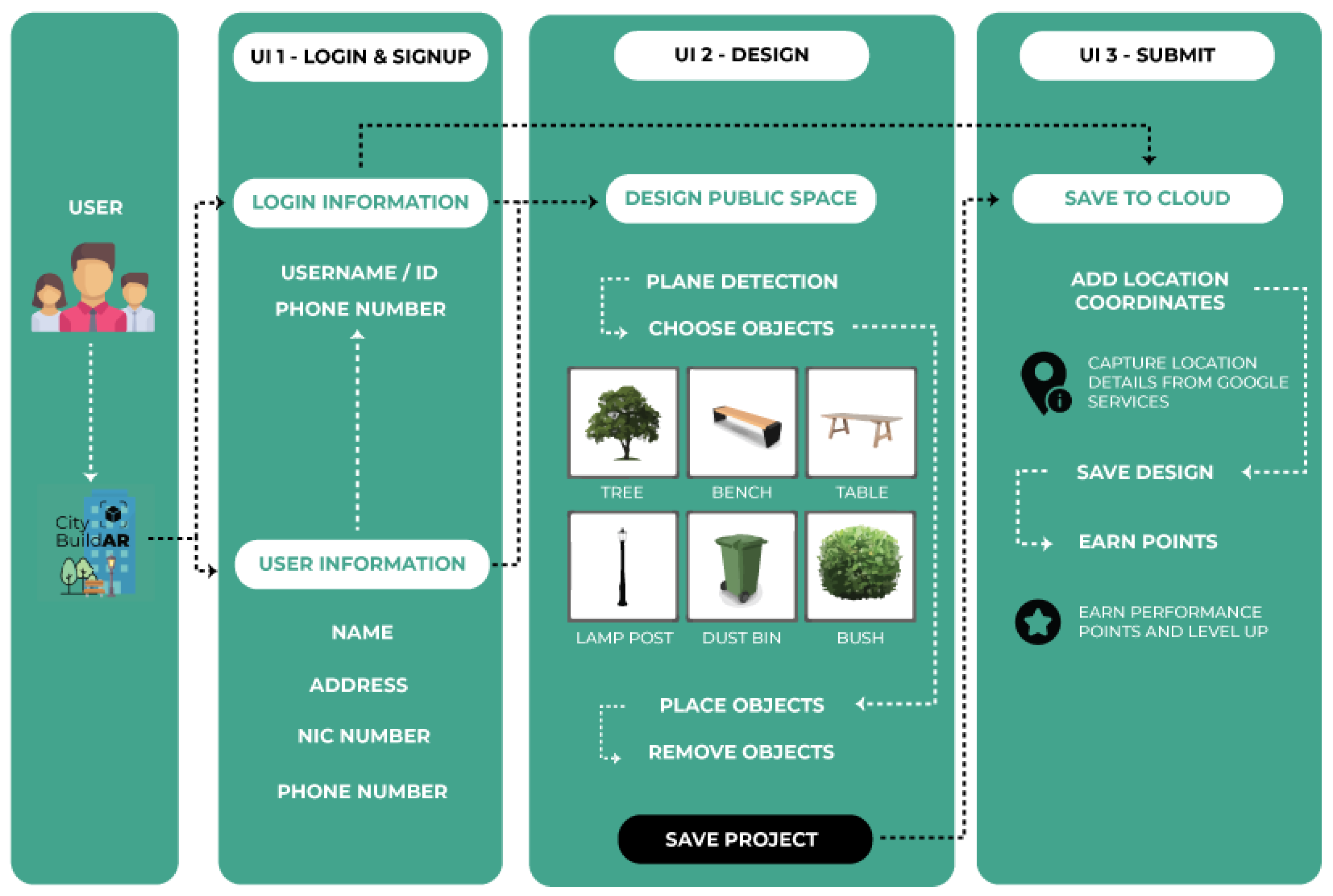
Figure 7.
Invitation through Facebook.
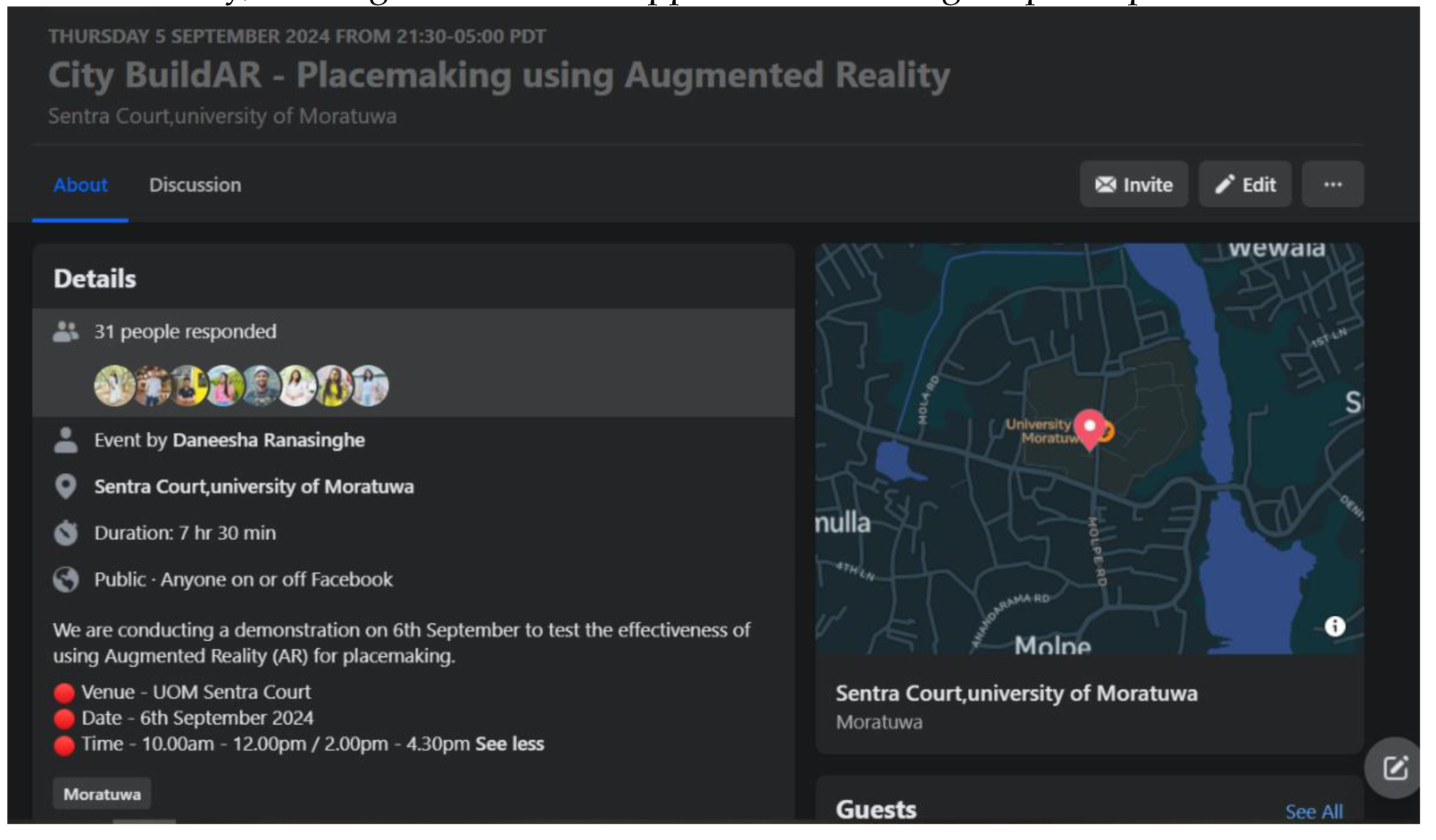
Figure 8.
Case study area.
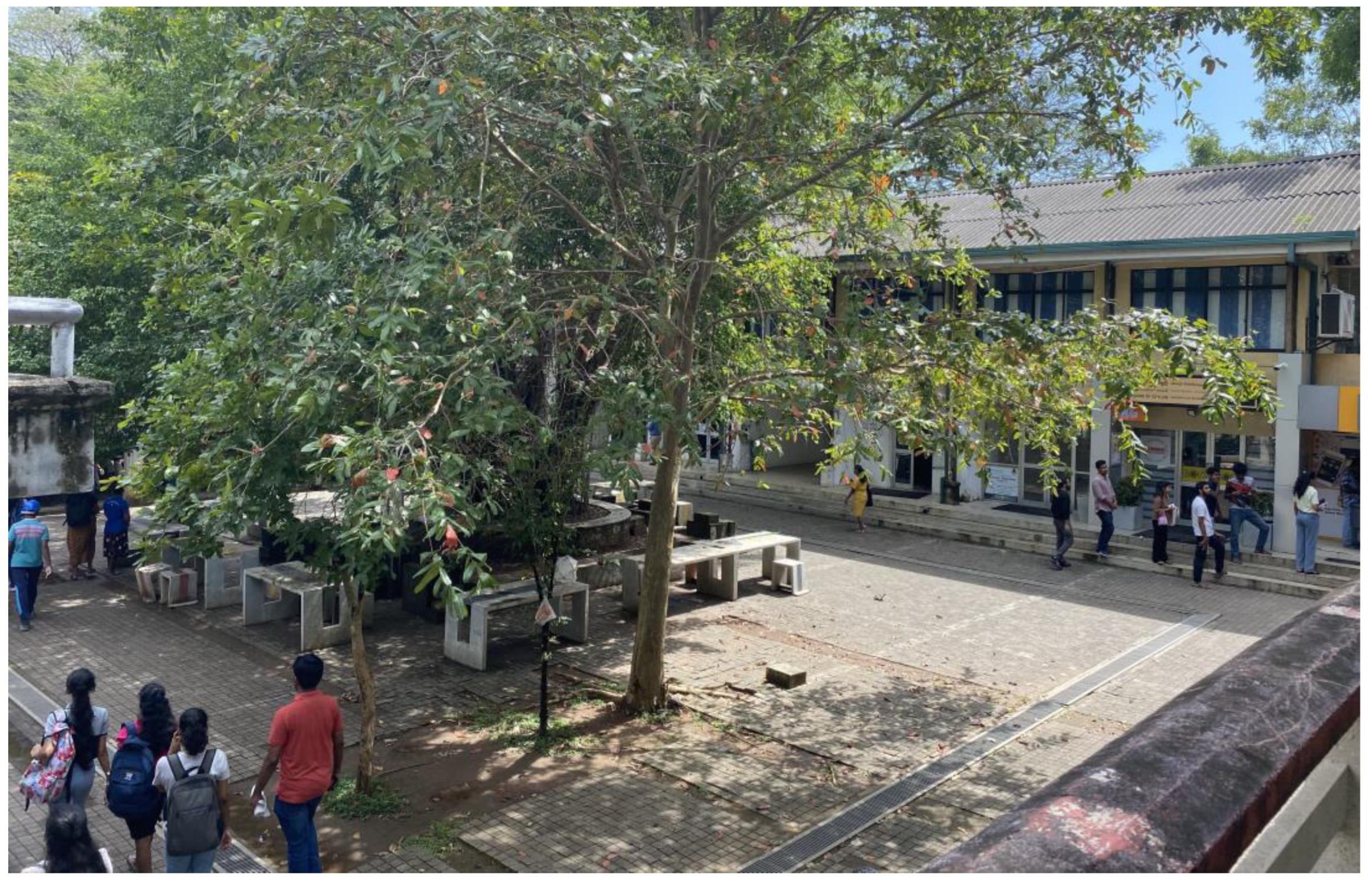
Figure 9.
Designing using: (a) Sketchup Modelling and (b) Hand-sketching.
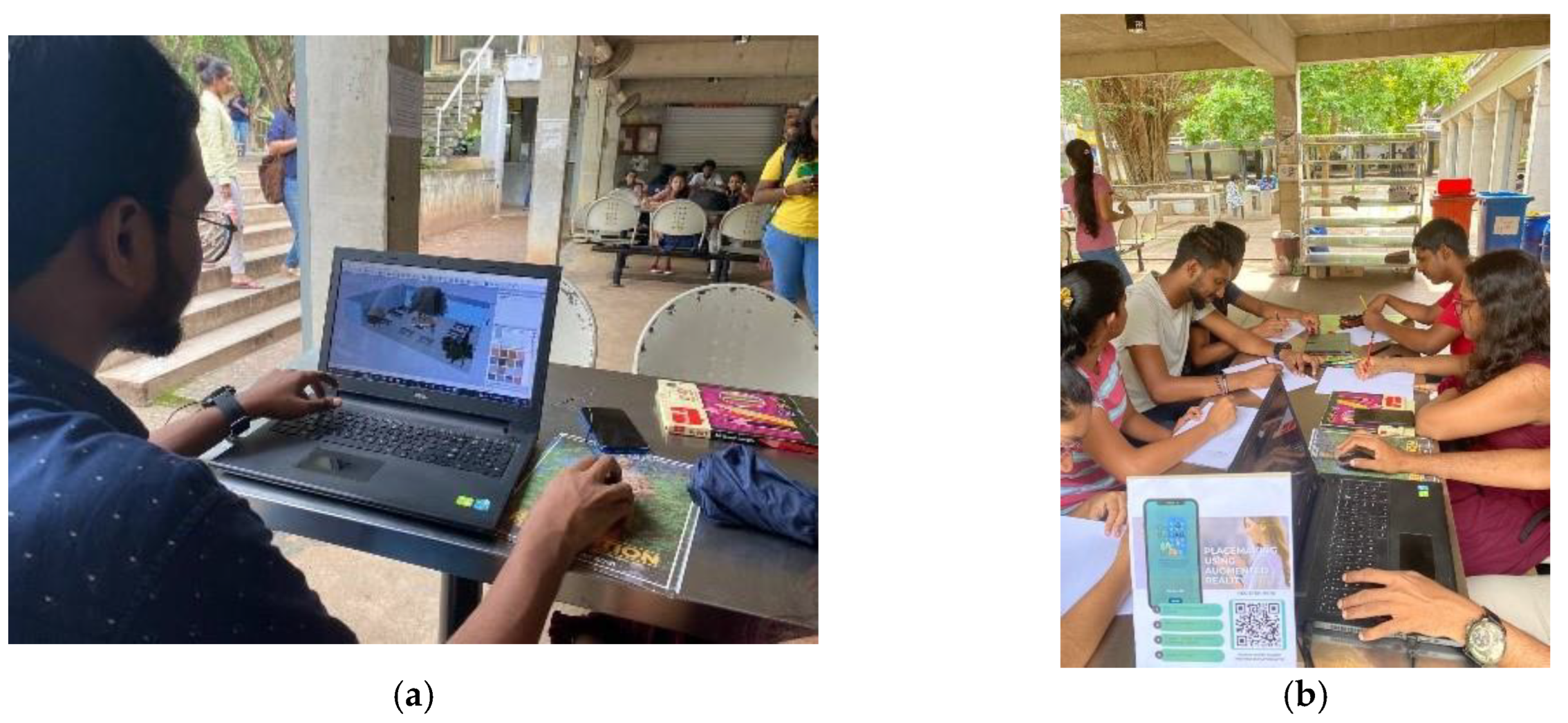
Figure 10.
Positive aspects of using hand sketching for placemaking—university students.
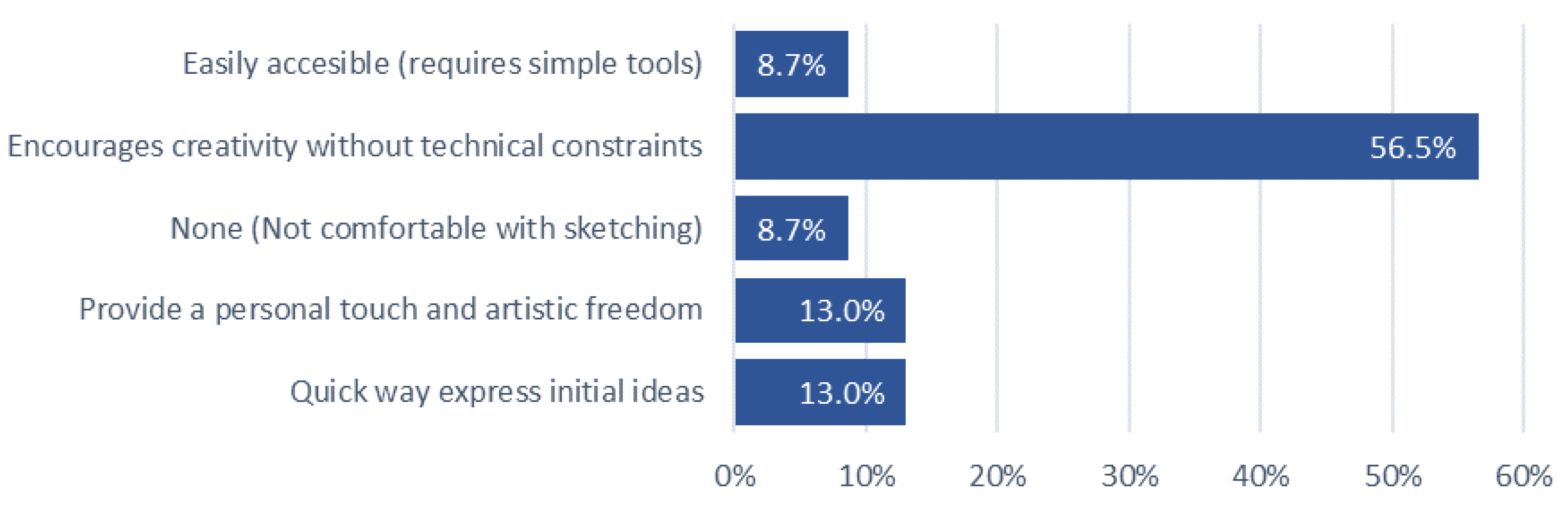
Figure 11.
Challenges of using hand sketching for placemaking—university students.
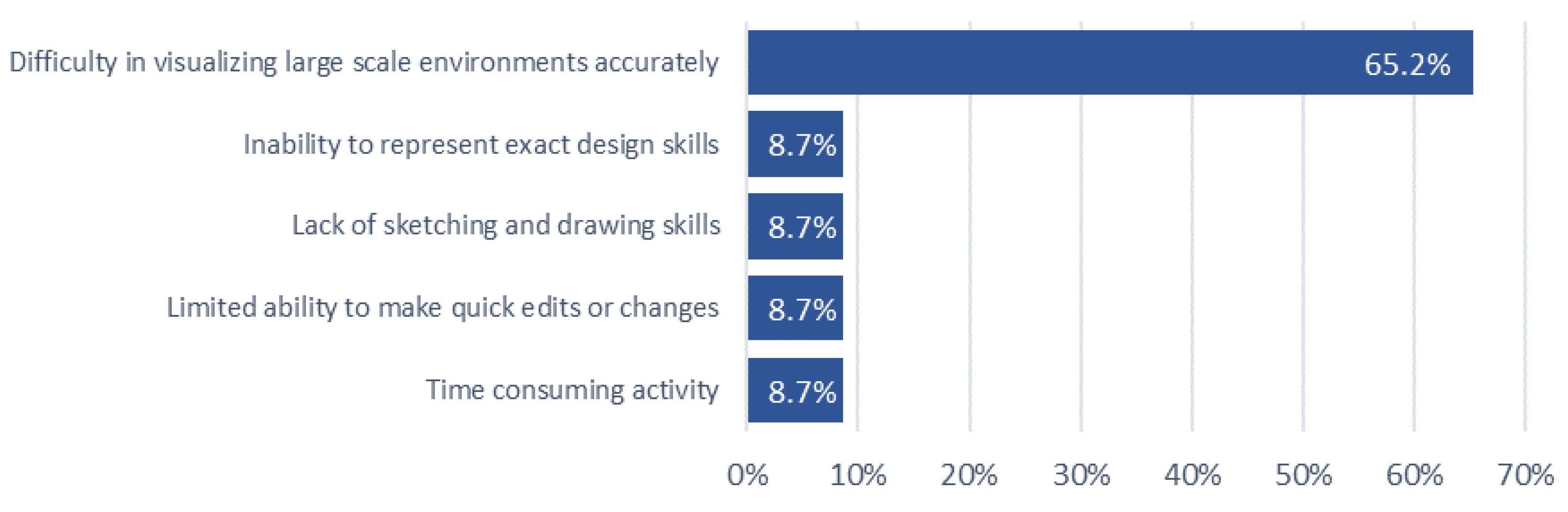
Figure 14.
Challenges of using hand sketching for placemaking—general public.
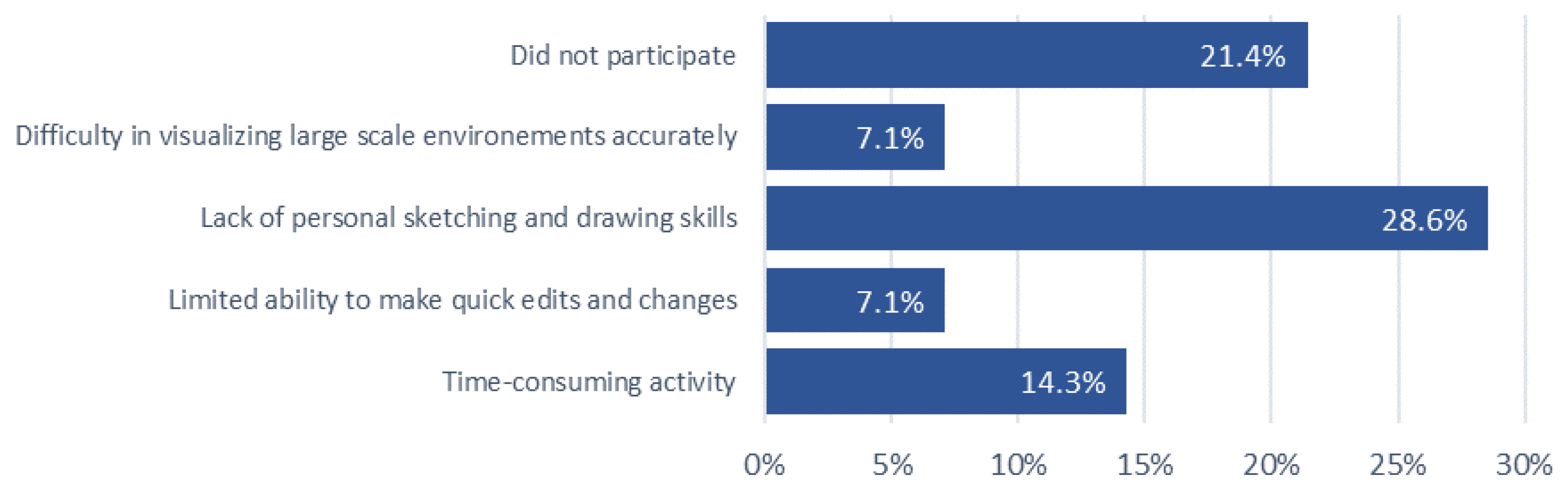
Figure 15.
Challenges of using existing tools for placemaking—professionals.
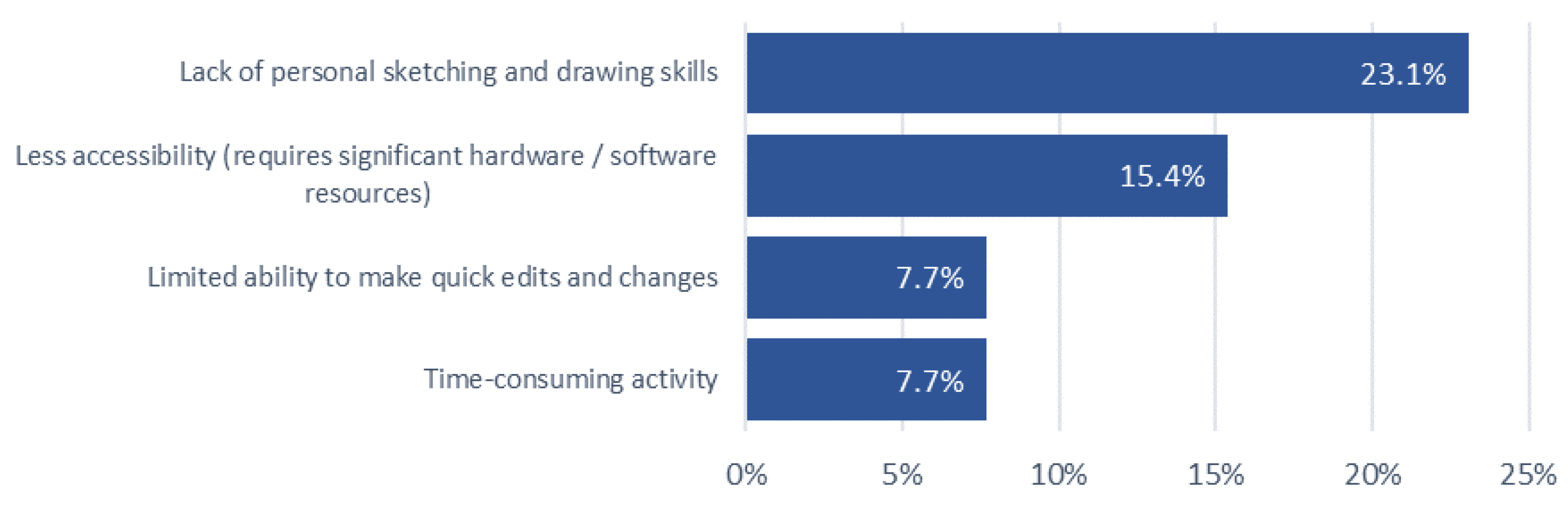
Figure 16.
Positive aspects of using AR—university students.
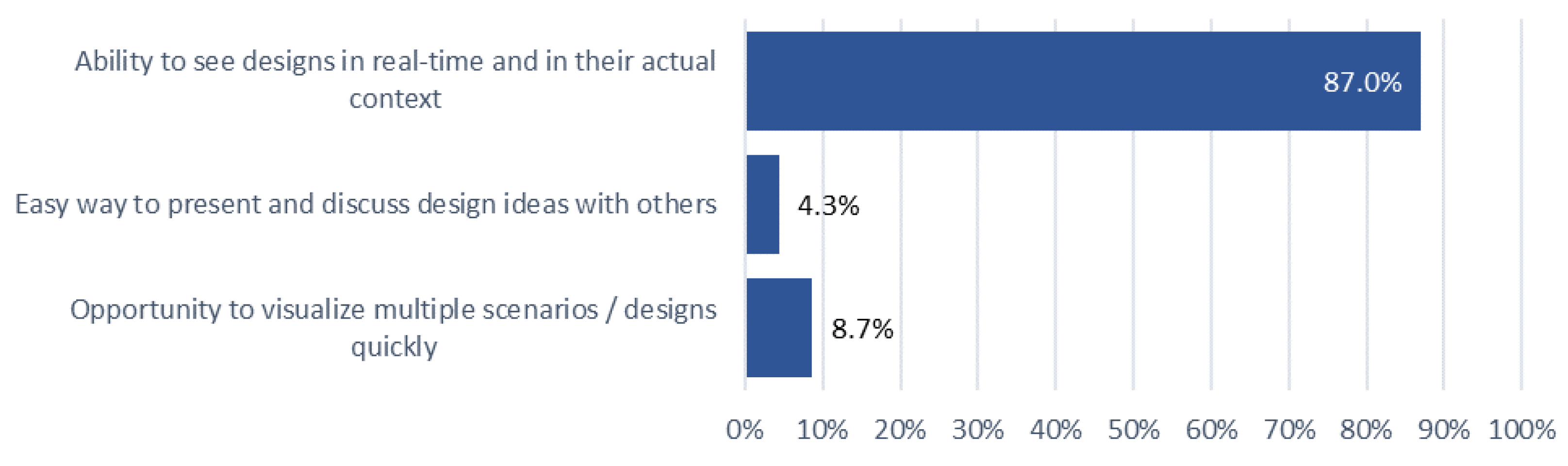
Figure 17.
Challenges of using AR—university students.
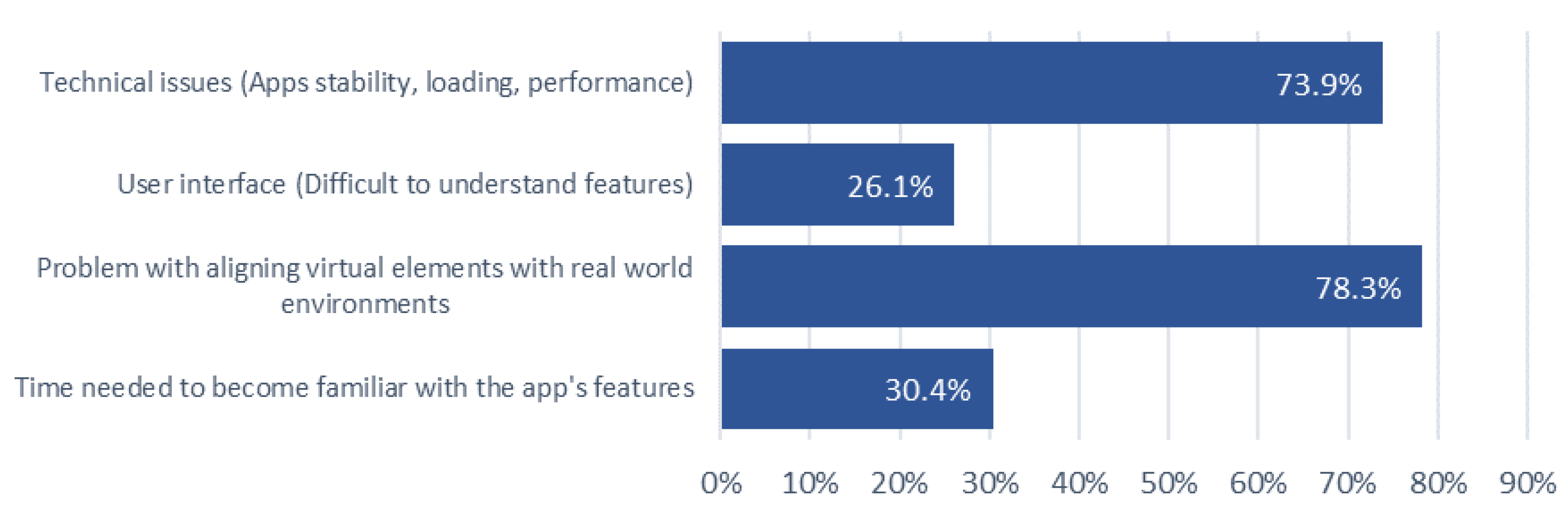
Figure 18.
Positive aspects of using AR—general public.
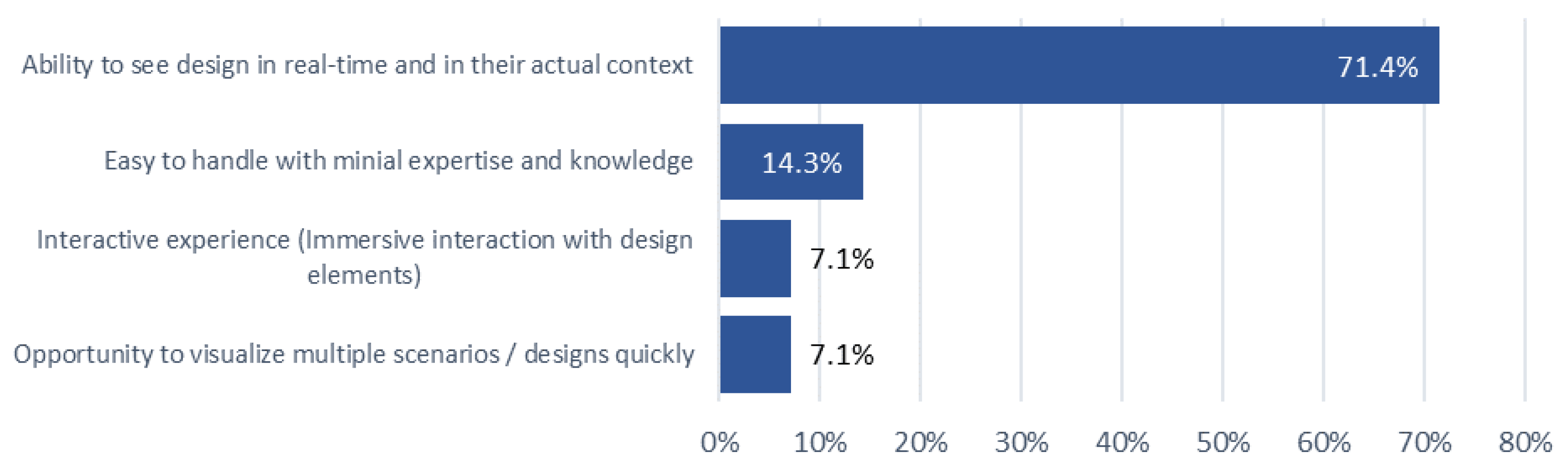
Figure 20.
Exemplary visualizations completed using CityBuildAR by Professionals (a) Design 1; (b) Design 2; and (c) Design 3.
Figure 20.
Exemplary visualizations completed using CityBuildAR by Professionals (a) Design 1; (b) Design 2; and (c) Design 3.
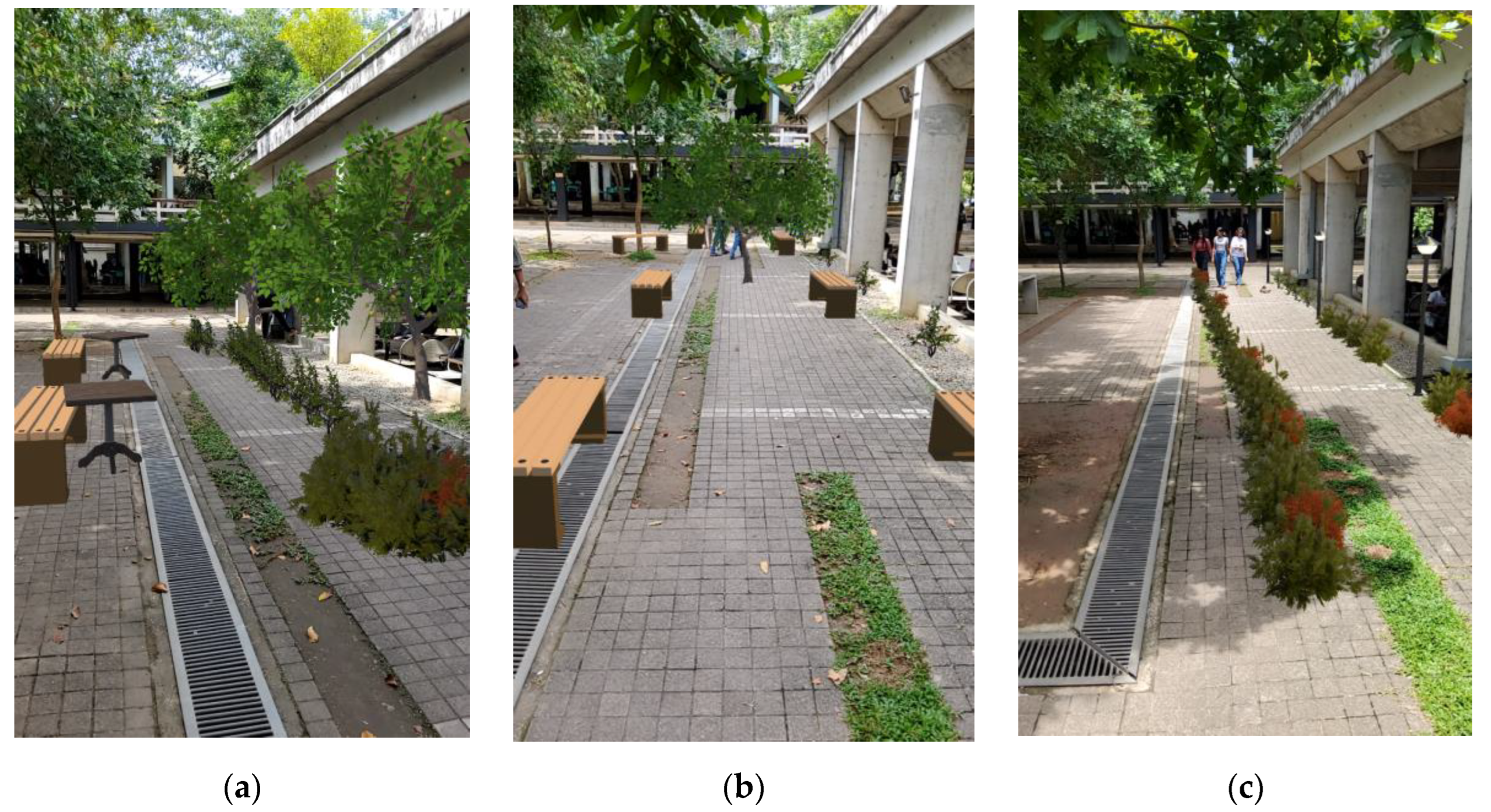
Figure 21.
Exemplary visualizations completed using CityBuildAR by Undergraduate (a) Design 1; (b) Design 2; and (c) Design 3.
Figure 21.
Exemplary visualizations completed using CityBuildAR by Undergraduate (a) Design 1; (b) Design 2; and (c) Design 3.
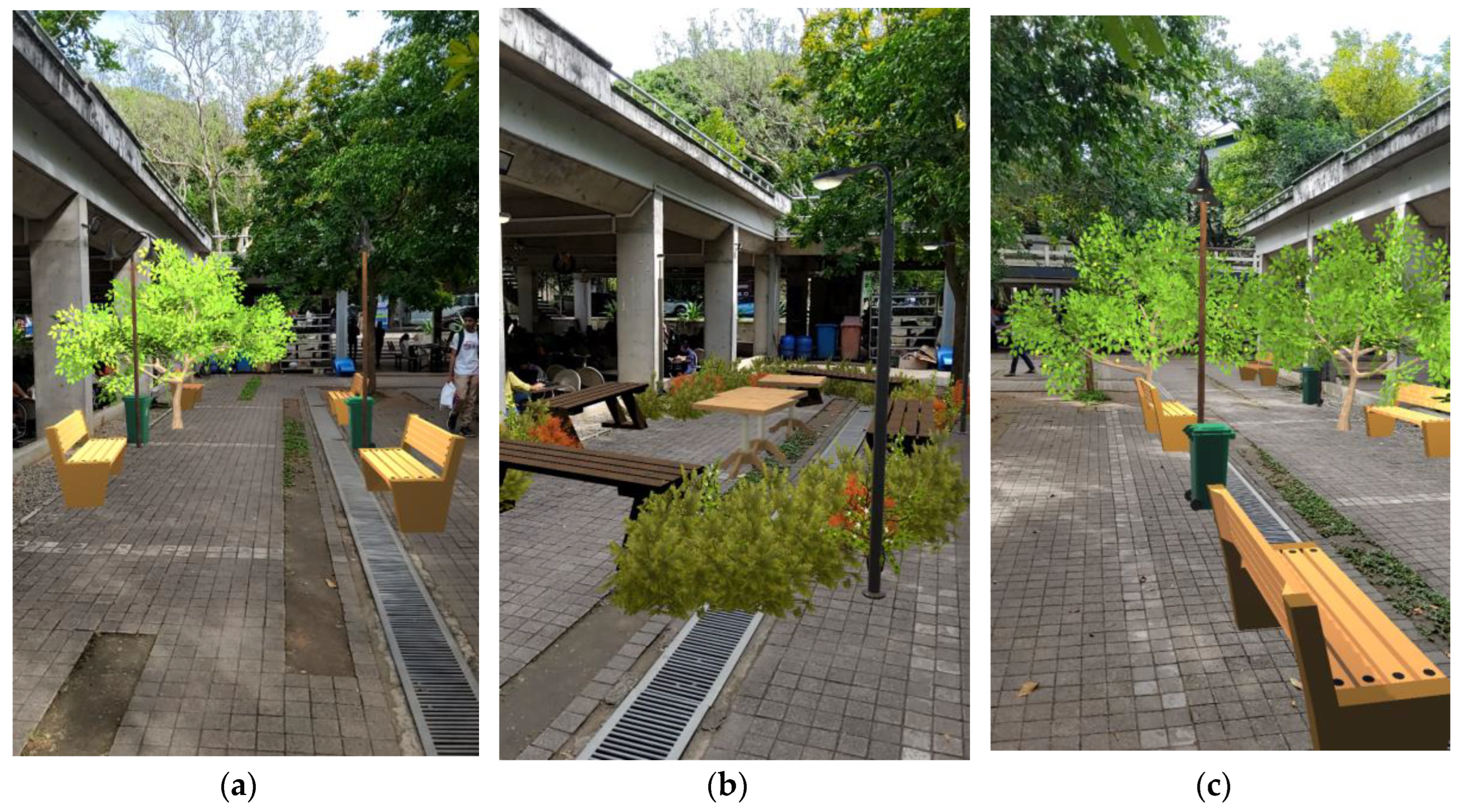
Figure 22.
Exemplary visualizations completed using CityBuildAR by General Public (a) Design 1; (b) Design 2; and (c) Design 3.
Figure 22.
Exemplary visualizations completed using CityBuildAR by General Public (a) Design 1; (b) Design 2; and (c) Design 3.
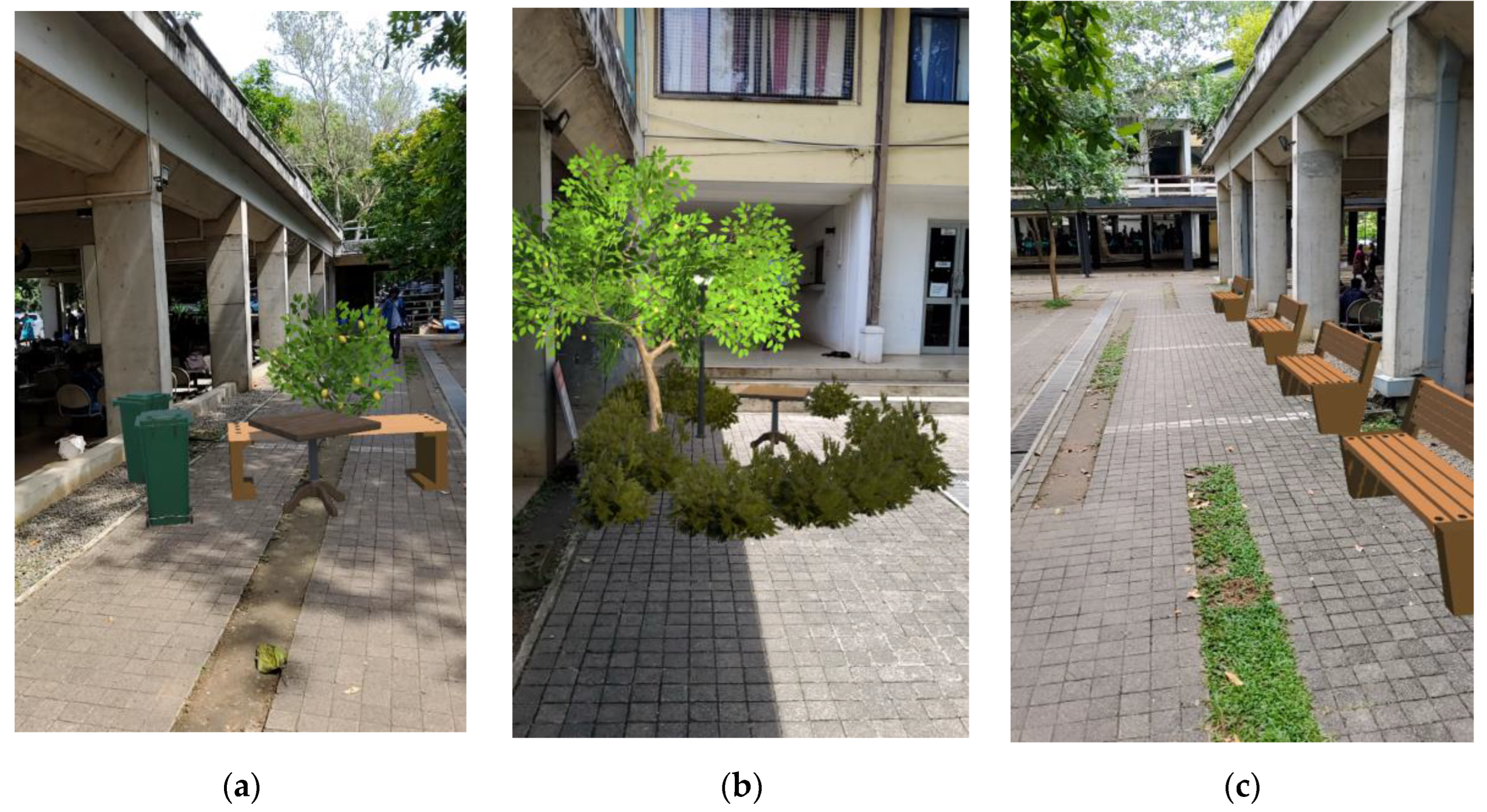
Table 2.
Overview of the feedback form.
| No | Question Type | Question | Metric |
|---|---|---|---|
| Q1 | Closed-ended | How comfortable were you using hand sketching (2D drawing) techniques for placemaking? | 5-Point Likert Scale |
| Q2 | Mixed | What are the positives you experienced while using hand sketching (2D drawing) for placemaking? | Multiple checkboxes and text |
| Q3 | Mixed | What challenges did you face while using hand sketching (2D drawing) for placemaking? | Multiple checkboxes and text |
| Q4 | Closed-ended | How comfortable were you using SketchUp software (3D modelling) techniques for placemaking? | 5-Point Likert Scale |
| Q5 | Mixed | What are the positives you experienced while SketchUp software (3D modelling) for placemaking? | Multiple checkboxes and text |
| Q6 | Mixed | What challenges did you face while using hand sketching (2D drawing) / SketchUp software (3D modelling) for placemaking? | Multiple checkboxes and text |
| Q7 | Closed-ended | To what extent do you think AR is effective in visualizing and understanding placemaking concepts? | 5-Point Likert Scale |
| Q8 | Closed-ended | How easy was it to navigate and use the AR application for placemaking? | 5-Point Likert Scale |
| Q9 | Mixed | What challenges did you face, and positives did you experience while using the AR app for placemaking? | Multiple checkboxes and text |
| Q10 | Closed-ended | Compared to hand sketching / 3D modelling software, do you find AR to be a better tool for placemaking? | 5-Point Likert Scale |
| Q11 | Closed-ended | Do you believe that AR can enhance your involvement in urban planning and placemaking? | 5-Point Likert Scale |
| Q12 | Closed-ended | Rate your interaction and experience with "Activities - Diversity, People's activities, Cafes etc." during placemaking activity using these tools. | 3-Point Likert Scale |
| Q13 | Closed-ended | Rate your interaction and experience with "Physical Setting - Human & Building scale, walkability, accessibility etc." during placemaking activity using these tools. | 3-Point Likert Scale |
| Q14 | Closed-ended | Rate your interaction and experience with "Imageability - attractiveness, physical comfort, attachment etc." during placemaking activity using these tools. | 3-Point Likert Scale |
| Q15 | Closed-ended | Rate app features according to your experience | 3-Point Likert Scale |
| Q16 | Open-ended | Are there any features you believe should be added or modified in the AR app? | Text |
| Q17 | Closed-ended | How willing are you to use AR applications for placemaking activities in the future? |
5-Point Likert Scale |
Table 3.
Image analysis.
| Criteria | Professional | University Student | General Public | |
|---|---|---|---|---|
| Use of element | Tree | 23 (1.77) 1 | 43 (1.87) | 33 (2.36) |
| Bushes | 55 (4.23) | 104 (4.52) | 30 (2.14) | |
| Table | 10 (0.77) | 26 (1.13) | 13 (0.93) | |
| Benches | 37 (2.85) | 87 (3.78) | 28 (2.00) | |
| Lamp posts | 15 (1.15) | 35 (1.52) | 11 (0.79) | |
| Garbage bins | 1 (0.08) | 15 (0.65) | 7 (0.50) | |
| Functionality | Seating | Y – 11, N - 2 | Y – 23, N – 0 | Y – 11, N – 3 |
| Walking | Y – 13, N - 0 | Y – 17, N – 6 | Y – 8, N – 6 | |
| Lighting | Y – 7, N – 6 | Y – 19, N – 4 | Y – 8, N – 6 | |
| Greenery | Y – 7, N – 6 | Y – 20, N – 3 | Y – 11, N – 3 | |
| Physical Setting | Y – 13, N – 0, M – 0 | Y – 23, N – 0, M – 0 | Y – 6, N – 0, M – 8 | |
| User Interaction | Sociability | Y – 10, N – 0, M – 3 | Y – 18, N – 0, M – 5 | Y – 2, N – 4, M – 8 |
| Imageability | Y – 7, N – 0, M – 6 | Y – 21, N – 0, M – 2 | Y – 5, N – 8, M – 1 | |
| Incorporating AR features | Designing | Y – 9, N – 0, M – 4 | Y – 23, N – 0, M – 0 | Y – 5, N – 0, M – 8 |
| Visualizing | Y – 0, N – 0, M – 13 | Y – 23, N – 0, M – 0 | Y – 5, N – 0, M – 8 | |
1Count (Mean), Y = Yes/ N = No / M = Moderate.
Disclaimer/Publisher’s Note: The statements, opinions and data contained in all publications are solely those of the individual author(s) and contributor(s) and not of MDPI and/or the editor(s). MDPI and/or the editor(s) disclaim responsibility for any injury to people or property resulting from any ideas, methods, instructions or products referred to in the content. |
© 2024 by the authors. Licensee MDPI, Basel, Switzerland. This article is an open access article distributed under the terms and conditions of the Creative Commons Attribution (CC BY) license (http://creativecommons.org/licenses/by/4.0/).
Copyright: This open access article is published under a Creative Commons CC BY 4.0 license, which permit the free download, distribution, and reuse, provided that the author and preprint are cited in any reuse.


