

Submitted:
23 February 2025
Posted:
24 February 2025
You are already at the latest version
Abstract
The aim of the research was to develop the digital pedagogical competencies framework of teachers based on the existing literature or developed framework. The existing literature were reviewed by synthesis methods. The developed model covers eight key skills as (1) learning and sharing tools (2) internet surfing and communication tools, (3) course management and evaluation tools, (4) audio and visual document development tools (5) writing and presentation tools, (6) AI tools (7) subject related applications, and (8) data analysis and visualization tools including policy and ethical awareness of teachers with twenty-six sub skills. All skills were developed based on the necessary digital supports to the teachers of 21st century. This model provides a structured approach to integrating digital tools into education while emphasizing ethical and policy awareness. It highlights the importance of using technology to enhance teaching, learning, and research through collaboration, analysis, and content creation. By fostering responsible digital citizenship and adherence to ICT policies, educators can create more effective and inclusive learning environments. Ultimately, this framework ensures that digital resources are used efficiently, ethically, and in alignment with transformative pedagogical practices.
Keywords:
21st century skills
; digital pedagogy
; digital competency
; digital tools
; 21st Century Teachers
Introduction
Different developed and developing countries have been adopting diverse educational technology in their instructional practices and have practices of different instructional modalities and blended mode of learning, distance learning, flipped learning as well as problem and project-based learning (Ni She et al., 2019; OECD, 2019). Hence teachers must understand and respect diverse cultural backgrounds (Engen, 2019) and possess ethical (Khanal et al., 2021), cognitive, and technological skills (Calvani et al., 2010). So, they need knowledge of both synchronous and asynchronous learning systems for effective content delivery (Ni She et al., 2019). Also, different countries and institutions have their own requirements (Caena & Redecker, 2019), statuses (Taddeo et al., 2016), and models (UN, 2016) to measure digital competencies of teachers and learners (Hatlevik et al., 2015).
Key 21st-century skills for educators include contextual skills (Microsoft, 2017), communication, collaboration, digital tools and technology usage (Dore et al., 2015), digital literacy (Joynes et al., 2019), critical thinking, creativity, and digital citizenship (Ontario, 2016) (DoEL, 2015). Effective pedagogy supports learners' educational goals (Entz, 2006) and promotes effective learning environments (Hirschman & Wood, 2018; Joshi et al., 2025). Teacher training and communication strategies, as part of the theory of change (Westbrook et al., 2013), emphasize the need for teachers to stay updated with new innovations, knowledge, and skills. Integrating technology into teacher training and instructional practices is essential (Kovshikova et al., 2019). Modern learners are self-driven and digitally savvy (Hirschman & Wood, 2018). Self-regulated learning (LLLP, 2019; Joshi et al., 2023) is becoming prevalent, and using digital resources supports this concept. Digital competency is built on four pillars: foundation, participation, citizenship, and production, with core components being cognitive, critical, collaborative, communicative, creative, cultural, and civic (Sinay & Graikinis, 2018).
Digital pedagogical competencies refer to the skills, knowledge, and attitudes that educators need to effectively integrate digital technologies into their teaching practices (Kiryakova & Kozhuharova, 2024). Digital pedagogical skills, digital pedagogical competency, and digital pedagogical literacy are terms that refer to the digital ICT competencies of teachers (Gallardo-Echenique et al., 2015; Spante et al., 2018; Joshi et al., 2021), playing a crucial role in their professional development (Mirete et al., 2020). Digital pedagogical competency involves teachers' ability to use various digital resources for instructional activities such as planning, material development and management, student evaluation, result analysis, and further instructional planning (Prakash, 2014; Kimura et al., 2017). Furthermore, digital pedagogical skills include engaging in professional development activities with an awareness of academic ethics and policies (Joshi et al., 2021) hence every teacher must have abilities of using such resources (Ottestad et al., 2014). Digital pedagogy or technology literacy and its application are integrated into various institutional activities (Maderick et al., 2015; Joynes et al., 2019; United Nations, 2019). It involves learners' ability to use and integrate suitable technology at the appropriate time (Dangwal & Srivastava, 2016) and supports learners in adapting to technology-based cultures and contexts (UNICEF, 2019). ICT offers new opportunities and pressures for educators to adopt innovative instructional methods (Pons, 2010), necessitating that teacher stay current with new technologies (Levano-Francia et al., 2019). Use of such resources enhances the professional standards of teachers (Avdeeva et al., 2016; Kuzminska et al., 2018).
Literature review
There are several digital pedagogy related frameworks has been developed by different organizations and researchers. Detail of some frameworks are presented in Table 1.
The existing literature has focus on the digital competencies however how these competencies can be explored by using which digital tools or applications are missing hence the proposed model has been developed for fulfilling these gaps of the literature.
Process of Framework modification and development
The updated DEPSWALIC Digital Competency Framework for Teachers (DDCFT) has been meticulously developed to address the evolving needs of educators in integrating digital technology into instructional practices. This framework is grounded in two primary foundations: comprehensive literature review and the essential skills requisite for teachers to fully embrace digital technology. The literature review encompassed a broad range of keywords, including digital pedagogy, digital competency of teachers, digital literacy of teachers, ICT competency, ICT competency framework for teachers, 21st-century skills of teachers, and ICT literacy of teachers. These keywords facilitated the identification and inclusion of pertinent resources in the literature section of the framework.
Furthermore, the framework acknowledges the dynamic nature of educational technology by incorporating essential skills not extensively covered in existing literature. These additional competencies are categorized based on the nature of the items to ensure a holistic approach to digital competency. Recognizing teachers as pivotal change agents in society, the framework emphasizes the necessity for educators to continually update their knowledge and skills. Consequently, ethical and policy awareness are considered foundational elements of the framework, ensuring responsible and effective use of digital resources. This comprehensive approach not only equips teachers with the requisite digital competencies but also fosters a culture of continuous professional development and ethical awareness, ultimately enhancing the quality of education in the digital age.
Framework for Digital Pedagogical Skills of Teachers
The framework is developed for teachers’ digital pedagogical skills enhancement. This framework has updated version of DEPSWALIC digital competency framework developed by author in 2021. This new framework consists eight key skills with twenty-six subskills including policy and ethical awareness. All skills and sub-skills are included based on the use of digital resources in different purposes including related tools for promoting these skills. The detail of the framework is presented in Figure 2.
Details of the components of framework with their implications
Internet surfing and communication tools
Internet surfing
Internet surfing represents the searching resources in the internet by the support of different search engines. Many teachers at school to university level may facing different problems for searching needful resources hence this concept is important for all teachers. Use of specific keywords, use of advanced search operators like Quotes (" "), Minus (-), Site (site:), and Filetype (filetype:), and use Boolean operators like AND, OR, and NOT are major internet surfing strategies while searching single and multiple documents in the internet. There are some specific sites for searching resources for example Google Scholar, ResearhGate, Scopus, Academica, Web of Science and other sites are important for surfing research articles and books, Play Store for surfing mobile application, Getintopc and other official sites for surfing subject and general software, different YouTube channels and online resources for different sites.
The reading behavior of online readers is evolving with the rise of Internet surfing. This shift has led to an increase in non-sequential, interactive, superficial, and extensive reading habits. Simultaneously, it has contributed to a decline in concentrated and in-depth reading. Moreover, Internet surfing has amplified the consumption of news, general knowledge, specialized fields, sexual content, and spiritual or religious texts, while reducing engagement with literature (Loan,2012). Internet surfing and communication tools are digital platforms which simplify information searching and team collaboration. These include email services, video conferencing applications, instant messaging, and team collaboration platforms. From WhatsApp and Viber to email and virtual telephony, people can connect within minutes, irrespective of how far they're located. Teachers leverage internet surfing and communication tools in various ways. For research and resource gathering, they explore educational websites and online libraries. Lesson planning benefits from access to creative ideas and multimedia resources. Professional development occurs through webinars and virtual conferences. Communication tools like email, discussion forums, video conferencing, and collaboration platforms enhance interaction with students, parents, and colleagues.
Internet surfing is the act of navigating the internet using a web browser to explore websites and web pages. To start web surfing, you need a device such as a computer, smartphone or tablet with an internet connection. To surf the internet, first you can open a web browser, then enter the URL in the browser’s address. The browser then sends a request to a web server, which sends back the requested webpage's data. The browser interprets the data and displays it as a web page with text, images, and interactive elements.
Email (electronic mail) is a method of exchanging digital messages and resources (files and folders) from one computer user to one or more recipients over the internet or computer networks. It consists of an email address, subject line, body, and attachment. Key protocols include Simple Mail Transfer Protocol (SMTP) for sending and Post Office Protocol 3 (POP3) or Internet Message Access Protocol (IMAP) for retrieving emails. It is basic communication tool for researchers and students for sharing their information and resources. It has several features like attachments, CC/BCC, folders, and labels enhance email functionality. It’s widely used for personal and professional communication, as well as mailing lists and newsletters. Email clients (e.g., Microsoft Outlook) and web-based services (e.g., Gmail) facilitate access. Security measures like encryption protect against spam and phishing, ensuring safe communication.
Video conferencing tools
Video conferencing is a technology that allows people in different locations to hold face-to-face meetings without having to be in the same place physically. Video conferencing is a live meeting between two or more people in different locations that uses a video-enabled device to transmit audio, video, text, and presentations in real time over the internet. Software like Zoom, Microsoft Teams, Google Meet facilitate virtual meetings with features such as screen sharing, chat, and recording. These tools are mainly used for remote work, virtual meeting, online education, and personal communication, offering benefits like saving travel time and costs, and enhancing collaboration. However, it requires a stable internet connection and raise privacy and security concerns. These tools are highly applicable in blended and synchronous learning modalities.
Chat and discussion board
Chat or discussion involves exchanging text-based message in real-time or asynchronously through platform like instant messaging apps, discussion forums, and social media. Features include text messaging, file sharing multimedia attachments, and group chat. Viber and WhatsApp are popular peer and group messaging apps offering text messaging, voice and video calls and multimedia sharing. Both provide end-to-end encryption for security. Both Viber and WhatsApp are valuable for educational purposes offering group chat, facilitating class discussions, resource distribution and virtual learning.
Collaboration Platform
A collaboration platform is a digital workspace that integrate tools for teamwork and communication, enabling efficient collaboration regardless of location. Key features include instant messaging, video conferencing, file sharing, project management, and collaborative document editing. These platforms, like Microsoft Teams, Slack, also offer seamless integration with other software and service, along with secure access control. Multiple users working, editing, and sharing features are also available in Google Apps for collaboration like Google Docs, Slides, Jamboards.
Learning and sharing tools
In education, learning communities have become transformative, extending beyond traditional classrooms. Central to this change is knowledge sharing, which enhances individual learning and fosters a collaborative environment. Modern education emphasizes collaborative learning, highlighting the need for effective knowledge-sharing methods and strategies (Rahman et al., 2014). Learning and sharing tools refer to technologies and platforms used to facilitate knowledge exchange and collaboration in educational settings. Digital platforms offer diverse tools for content creation and sharing; for instance, web blogs like Blogger facilitate content publishing, while platforms like Google Drive and OneDrive enable document sharing. Video tutorials can be uploaded to YouTube, and online courses are available on platforms like Coursera and Edx. The effectiveness of knowledge transfer in distance education is influenced by learners' preferences for these tools. Teachers employ learning tools to enhance classroom experiences through interactive presentations, digital whiteboards, and online quizzes. Virtual labs and adaptive platforms offer personalized learning by engaging students. For sharing, learning management systems (LMS), cloud storage, blogs, and social media facilitate resource distribution.
Web Blogs
Web blogs are online platforms where individuals or organizations regularly publish articles on various topics. They typically display content in sequential order, include text, images, and videos, and allow reader comments for interaction. Blogs can be hosted on platform like WordPress, Blogger, and are used for personal expression, professional insights. They provide a space for ongoing content sharing and audience engagement. Web blogs also, allow teachers to extend learning beyond the classroom by posting resources (text, video, audio, and images), and updates resources, making education resources more accessible and engaging. From the students' side, blogs offer a valuable tool for accessing learning materials anytime, participating in discussions, and receiving timely feedback.
Resource sharing tools
Resource sharing is the voluntary sharing of resources between two or more entities for mutual benefit. Teachers use tools like, Google Drive, OneDrive, and TeraBox to facilitate this process by storing and sharing lesson plan, assignments, and multimedia resources. Google Drive allows real-time collaboration through Google Docs, Sheets, and slides, while OneDrive integrates with Microsoft Office tools for seamless content creation and sharing. TeraBox offers large storage capacity for sharing extensive files and backing up materials. From the students' side, resource sharing provides easy access to learning materials anytime and anywhere, supporting their studies and fostering independent learning. These tools modernize distribution and retrieval of educational content, enhance student collaboration, ensure accessibility to resources, and help teachers maintain organized and secure storage, thereby creating an efficient and interactive learning environment.
Online course platforms
An online course is a form of education that allows students to attend lectures and do homework via the internet. These courses often include video lectures, reading materials, assignments, quizzes and interactive forums for discussion. Teachers use platform like YouTube, edX, Coursera, and EdTech tools to enhance their teaching and reach a broader audience. On YouTube, teacher allow to create and upload video lectures, engage with students through comments and live streams, and provide supplemental materials for classroom teaching. On edX teachers design complete courses with video lectures, reading materials, and assessments, offering certificates for course completion. Coursera enables teachers to partners with institutions to offer accredited courses and specializations, integrating interactive content and providing blended learning experiences. EdTech tools allow for personalized learning paths, analytics on student performance, and collaboration through group project and peer interaction. For students, online courses provide the opportunity to learn at their own pace, access a vast array of subjects, and gain skills beyond the traditional classroom. These platforms make education more accessible, engaging, and scalable, supporting lifelong learning and enabling teachers to have a greater educational impact.
Classroom interaction tools
Classroom interaction refers to the interaction between the teacher and learners, and amongst the learners, in the classroom. It can include conversation, collaborative activities, and discussions that aim to convey ideas. Teachers use tools like Mentimeter, Padlet, Slido, and Poll everywhere to facilitate this interaction. Mentimeter allows for real-time polling, quizzes, and anonumous Q&A session, while Padlet offers collaborative boards for brainstorming and project collaboration. Slido enables live polls, quizzes, and prioritized Q&A and Poll Everywhere creates interactive polls with options for anonymous participation. These tools increase engagement, provide real-time feedback, encourage inclusivity, and foster collaboration, resulting in a more interactive and effective classroom environment.
Data/result analysis tools
Data Analysis involves examining, cleaning, transforming, and modeling data to discover useful information, patterns, and insights. Conversely, Data Visualization is the practice of displaying data through charts, graphs, and others visual format. It makes complex information more understandable and engaging. Tools for data analysis and visualization such as qualitative software (ATLAS.ti, NVivo) for non-numerical data and quantitative tools (Excel, R) for statistical analysis, are essential for interpreting and presenting data effectively. Teachers leverage data analysis and visualization to enhance student learning. By examining performance data, they tailor instruction, personalize learning experiences, and identify areas for improvement. These tools also aid in curriculum design, early intervention, and effective communication with students and parents. Additionally, teachers use data to inform their professional development and refine teaching strategies.
Qualitative data analysis tools
Qualitative data describes qualities or characteristics. Qualitative research involves collecting and analyzing non-numerical data to understand concepts, opinions, or experiences, focusing on detailed and descriptive data. Teachers use qualitative analysis tools like ATLAS.ti, NVivo, MaxQDA, and QDA Miner to enhance their research and teaching. ATLAS.ti helps organize the visualize data, NVivo manages large volumes of qualitative data and offers advanced coding tools, MaxQDA supports mixed methods and multimedia analysis, and QDA Miner facilitates content analysis and integrates with statistical software. These tools provide detailed insights into complex issues, improve research quality, support collaboration, and help teachers incorporate finding into their teaching, enriching the learning experience with real-world data.
Quantitative data analysis tools
Quantitative research is the process of collecting and analyzing numerical data. It can be used to find patterns and averages, make predications, test casual relationships and generalize results to wider populations. Teachers use quantitative analysis tools like Google Sheets, R-Studio, Excel, SAS, STATA, JASP, SPSS and AMOS to enhance their research and teaching. Google Sheets offers data management and real-time collaboration; R-studio provides advanced statistical analysis and reproducibility, Excel is known for its data analysis and visualization capabilities, SAS excels in advanced analytics and handling large datasets; STATA is popular for econometric analysis; JASP offers an easy-to-use interface for statistical analysis, SPSS is comprehensive and user-friendly for various statistical methods; and AMOS specializes in structural equation modeling and integrates with SPSS. These tools enable teachers to derive meaningful insights from data, streamline analysis processes, visualize data effectively, enhance research quality, and incorporate quantitative findings into their teaching, enriching the curriculum with data-driven content.
Subject Related Application
A Subject Related Application refers to a system or method tailored to a specific subject or task, utilizing various features and functionalities to achieve its objectives. Application for developing interactive educational games (scratch application) and puzzles, which enhance learning through engaging activities. Additionally, subject-related resources encompass specific software and apps (MIT App Inventor) tailored to particular subjects, providing focused and relevant content to support teaching and learning. Teacher can utilize digital tools for creating games and puzzles, as well as subject-related resources to enhance student engagement and learning outcomes. By incorporating tools like scratch, puzzle for practice-oriented training, educators can develop student’s professional competencies and readiness for self-education in inclusive setting. Teacher dynamically generates games that improve vocabulary and linguistics skills within specific subject area.
Digital games and puzzles
Digital games are games played on a computer, or mobile device. Digital games and puzzles are interactive, electronic versions of traditional games and puzzles that can be played on various digital devices, involving problem-solving, strategic thinking, and skill development. Teachers use tools like scratch, word puzzles, 2048, scrabbleGO, Wordscapes, chess and sudoku to enhance learning and engage students. scratch helps students learn coding and computational thinking through creating games and animations, while word puzzles and games like scrabbleGO and Wordscapes build vocabulary and critical thinking. Games like 2048 and sudoku improve mathematical skills and logical reasoning, and chess enhances strategic thinking and problem-solving. These digital tools keep students motivated through gamified learning, support cognitive development, and provide differentiated instruction catering to various learning styles, creating an engaging and interactive educational environment.
Course management and evaluation tools
Course management and evaluation tools encompass a range of digital resources used to facilitate and assess educational activities. Reference and library tools, such as Zotero and Mendeley, facilitate the organization and citation of research materials. Survey and evaluation platforms like Google Forms and Microsoft Forms enable the creation and distribution of assessments as well as gathering feedback too. Learning Management Systems (LMS) such as Moodle and Google Classroom provide comprehensive platforms for course management, including content delivery, assignment submission, and student tracking. Teachers can effectively use reference and library tools like Zotero and Mendeley to organize and manage academic sources for research project, enhancing student’s information literacy skills. Survey tools such as google form and Microsoft form can be utilized by teachers to gather feedback from students, assess their understanding, and tailor instruction to meet their needs. By integrating these tools into their teaching practices, educators can promote students’ engagement collaboration and academic success
Learning Management System (LMS) tool
LMS is a software application that helps organizations manage, deliver, and tract online learning environment. Teachers use LMS platform like Moodle, Google Classroom, and Edmodo to streamline their teaching and administrative tasks. Moodle allows for comprehensive course management, interactive activities, and extensive customization, while google classroom simplifies assignment distribution, integrates with google workspace tools, and facilitates communication between teachers and students. Edmodo supports classroom management, resource sharing, and student engagement through discussion boards and collaborative tools. These LMS platforms centralize educational resources enhance communication, streamline resource management and support interactive and collaborative learning experiences, making it easier for teachers to manage their classes and support student learning effectively.
Survey/evaluation tool
Survey and evaluation tools are digital platforms used to collect feedback and assess various aspects of educational activities. Teachers use tools like Quizlet, Kahoot, Google Form, Microsoft Form, and SurveyMonkey to enhance their teaching and gather valuable insights. Quizlet enables the creation of flashcards and quizzes for knowledge assessment and practice. Kahoot offers interactive game-based quizzes that boost student engagement and provide instant feedback. Google Forms and Microsoft Form allow teachers to design customizable surveys and quizzes, analyze responses, and generate reports to assess student feedback and performance. SurveyMonkey provides advanced survey tools and data analysis features for in-depth insights. These tools help teacher gather feedback, assess understanding, make data-driven improvement, and engage students through interactive assessments.
Reference and digital library tool
A reference and digital library provide access to a wide array of academic resources, including books, journal articles, and research papers, serving as a central repository for managing and retrieving scholarly materials. Teachers use tools like Zotero, Mendeley, and EndNote to efficiently manage and organize their research. Zotero allows for the collection and organization of references from various sources and generates citations and bibliographies in multiple styles, while also facilitating collaboration through shared libraries. Mendeley helps organize research papers and notes, generates citations and bibliographies, and connects researchers for knowledge sharing. EndNote offers comprehensive reference management, customizable citation styles, and integration with online databases, simplifying the management of references and citations. These tools enhance the efficiency of organizing research materials, ensure accurate citation formatting, and support collaboration, thereby streamlining the academic writing and research processes for teachers.
Audio and visual document development tools
Audio and visual document development tools are used to create and edit multimedia content. Screen recording tools, such as Loom and Camtasia, allow users to capture screen activity, often used for creating tutorials or instructional videos. Additionally, video and audio editing tools, such as Filmora and Camtasia, provide functionalities for refining and enhancing multimedia content. Teacher can utilize screen recording tools for creating short recording to provide personalize feedback to individual or groups, enhancing instructor presence in online classrooms and reducing the virtual distance between instructor and students. These tools used to improve teaching effectiveness in online and flipped classroom settings.
Video and audio editing tools
Video and audio editing is the process of manipulating and combining different elements to create a final piece of video or audio. Teachers use tools like Filmora, Camtasia, CapCut, and VSDC to enhance their educational content. Filmora offers a user-friendly interface for basic editing tasks and adds effects and transitions to instructional videos. Camtasia allows for screen recording and includes powerful editing features, such as annotations and interactive quizzes, to create comprehensive tutorials and demonstrations. CapCut provides a mobile-friendly platform for quick and easy editing of short educational videos and social media content. VSDC offers advanced editing features, including support for multiple layers and visual effects, to produce high-quality educational videos. These tools help teachers create custom, professional-quality content that enhances student engagement and supports effective learning experiences.
Screen recording
Screen recording is the process of capturing what’s on a computer or mobile device screen in real-time, including audio, video, and user interactions and widely used to create tutorials, demonstrations, and presentations. Teachers use screen recording tools like Loom, Camtasia, Ink2Go, Snagit, and OBS Studio to enhance their instructional content. Loom offers an easy interface for recording screen activity and sharing videos, boosting student engagement. Camtasia provides comprehensive recording and editing features including annotations and interactive elements, idea for detailed tutorials and lectures. Ink2Go allows for real-time annotations during recording, making it useful for creating interactive lessons. Snagit combines screen recording with screenshot capabilities and basic edition tools for clear instructional content. OBS studio offers advanced recording and streaming features with extensive customization options, suitable for complex recording needs. These tools enable teachers to create dynamic accessible, and engaging educational materials that support effective learning.
Writing and presentation tools
Writing and presentation tools are digital applications that help in creating and organizing written and visual materials. Virtual whiteboards, such as Limnu and Jamboard, facilitate collaborative drawing and brainstorming. Digital notebooks, like OneNote and Google Keep, serve as tools for note-taking and organizing information. Presentation software, such as PowerPoint and Google Slides, enables users to create visually appealing slideshows. Calendar and timetable-related tools, including Google Calendar and Microsoft Calendar, assist with scheduling and time management. Finally, writing tools like MS Word and Google Docs allow users to create, edit, and format text documents. Teachers can utilize various digital tools for different purpose in the educational setting. A virtual whiteboard can be used for interactive teaching, allowing teachers to write and illustrate concept in a virtual space. Digital notebook beneficial for students to take notes and extract relevant information from online resources. Presentation tools enable teachers to present concept effectively using digital resources like texts and tables. Similarly, calendar for scheduling and writing tools for effective communication and learning. By integrating these tools, teachers can create engaging lessons, facilitate learning, and improve overall educational experiences for students.
Digital notebook
Digital notebook is an electronic tool for note-taking, organizing information, and managing tasks in a digital format. Teachers use digital notebook like OneNote and Google Keep to streamline their teaching processes and enhance productivity. OneNote offers organized note-taking with sections and pages, multimedia integrations, and collaboration features, allowing teachers to categorize lesson plans, enrich notes with diverse content, and share resources with colleagues and students. Google keep provides a simple interface for creating and organizing notes, to-do lists, and reminders, with features like color-coding and labeling for efficient task management. It also integrates seamlessly with other google workspace tools, improving accessibility and productivity. These digital notebooks help teacher stay organized, manage tasks, and collaborate effectively, making it easier to handle educational materials and enhance teaching efficiency.
Presentation tools
A presentation is a structured way of sharing information or ideas with a group of people. It is also a method of conveying information using a series of visual and textual slides, combining text, images, graphs, and multimedia to effectively communicate ideas. Teachers use presentation tools like PowerPoint and Google Slides to enhance their instructional delivery. PowerPoint allows for the creation of visually appealing slides with various design templates, animations, and interactive features, making presentations dynamic and engaging. it also offers offline access for preparation and delivery. Google slides, on the other hand, enables real-time collaboration, cloud-based access, and integration with other google workspace tools, making it easy to share and update presentations. Both tools enhance lesson engagement, present complex information clearly, support collaboration, and ensure accessibility, making them essential for creating impactful educational materials.
Calendar-Timetable
Calendar-Timetable is a scheduling tool that helps organize and manage events, appointments, deadlines, and activities, providing a structured way to plan and view events. Teachers use calendar-timetable tools like Google Calendar and Microsoft Calendar to streamline their scheduling and organizational tasks. Google Calendar allows scheduling of classes, meetings and deadlines and offers features such as reminders, notifications and integration with Google Workspace tools. It also supports calendar sharing and color-coding for better organization. Microsoft Calendar offers extensive scheduling options, integrates with Outlook, and supports sharing and task management, facilitating coordination and communication. Both tools support time management, organization improvement, and collaboration support, helping teachers effectively manage their schedules and responsibilities.
Writing tools
A writing tool is a software that helps people to create, edit, format, and manage written documents. Teachers use tools like MS word and Google Docs to enhance their writing and document management. MS word offers comprehensive editing and formatting features, templates, and track changes for collaborative review, allowing teachers to create polished documents and provide feedback efficiently. Google Docs, on the other hand, enables real-time collaboration, cloud-based storage, and seamless integration with other google workspace tools. Its commenting and suggestion features facilitate interactive document editing and peer reviews. Both tools improve writing quality, support collaboration, enhance accessibility, and help in organizing and managing documents effectively.
Digital boards
Digital board is a display or surface that can show digital content, such as images, videos, and presentations in public settings. Teachers use digital boards like Limun and Jamboard to enhance their teaching and engage students. Limun offers a virtual whiteboard environment for drawing and organizing information collaboratively, making it ideal for group work and brainstorming. Jamboard functions as an interactive digital whiteboard that supports real-time collaboration allowing multiple users to interact simultaneously and integrate multimedia elements. Both tools facilitate dynamic interaction, collaborative learning, and multimedia integration, providing teachers with innovative methods to present and manipulate content, engage students, and enhance the overall educational experience.
Artificial intelligence tool
An AI tool is a software application that uses artificial intelligence algorithms to perform specific tasks and solve problems. Content management AI tools such as ChatGPT, Gemini, Copilot, and Tome assist in generating and organizing content efficiently. They allow students to ask theoretical questions and develop application-based ideas, while also enabling instructors to integrate technology into classrooms and conduct workshops to analyze student responses (AlAfnan et al., 2023). Artificial intelligence revolutionizing human lives, transforming social interactions and introducing new teaching and learning solutions in education, which are currently under trial and undergoing restructuring in various contexts (Bostrum, 2017). However, it can lead to adverse outcomes due to varying data quality, outdated information, or unrepresentative samples. AI tools like ChatGPT can potentially replace search engines by providing students with accurate and reliable information.
Proofreading AI tools like QuillBot and Grammarly enhance written text by checking grammar, spelling, and style. Additionally, document surfing tools like Researchrabbitapp facilitate exploration and management of research materials, streamlining the academic research process. Teacher can utilize AI tools for generating customized texts, comprehension questions, expansion questions and vocabulary in the target language. additionally, ChatGPT can interact with students in real-time, assisting in essay and report writing. By integrating ChatGPT into writing activities, teachers can increase engagement and interactivity in learning, making the process more enjoyable and effective for students. AI implementation in learning introduces new concepts and nuances that facilitate more effective teaching and improve student comprehension. It enhances the learning experience, boosts student understanding, and builds confidence in adapting to the digital world. AI in education also opens opportunities for personalized learning through features like intelligent tutoring, which provides personalized support and feedback, and intelligent tools that streamline access to learning resources (Alexander et al., 2019). Additionally, AI-integrated learning applications offer support systems and scaffolding to aid personal learning. Teachers, too, can leverage the conveniences provided by AI to optimize the educational process. The integration of Artificial Intelligence (AI) into the educational sector has brought about numerous advancements and efficiencies. However, alongside these benefits, several significant threats have emerged, particularly concerning educators, students, the role of teachers, and educational ethics. AI systems in education often require vast amounts of personal data to function effectively, including inferred emotional states and facial recognition data, posing a significant threat to privacy through potential misuse or unauthorized access (Rudolph et al., 2023). Moreover, AI's capability to automate educational processes can narrow the traditional role of teachers, diminishing their pivotal influence on character and moral development, thus potentially leading to a less holistic educational experience. Additionally, the automation of educational processes can override affective elements essential for comprehensive learning, and AI tools can inadvertently facilitate plagiarism, raising ethical concerns and underscoring the need for robust safeguards to maintain academic integrity (Saputra et al., 2023). To mitigate these risks, schools must establish protocols for addressing discrepancies between AI recommendations and professional judgment.
Content Management
Content management is the process of managing information in any format, including digital media, across its lifecycle from creation to storage or deletion. Teachers use content management tools like ChatGPT, Tome, Gemini, and Copilot to streamline these processes. ChatGPT aids in generating and refining written content, supporting research, and interacting with students. Tome helps organize and structure educational materials, facilities collaboration, and integrates with other tools. Gemini assists in curating, sharing, and tracking educational content, while copilot offers writing support and content management features to enhance productivity. These tools improve efficiency, content quality, collaboration, and accessibility, making it easier for teacher to manage and deliver educational materials effectively.
Proof Readers
Proofreaders are tools designed to review written material and ensure that it is free of grammar, punctuation, spelling, and stylistic errors. Teachers use proofreaders like Grammarly, QuillBot, and Ginger to improve the quality of their written materials and support student writing. Grammarly provides advanced grammar and spelling checks, style and clarity suggestions, and plagiarism detection, making documents more polished. QuillBot helps with paraphrasing, summarizing, and grammar checks, helping you express ideas in different ways and avoid plagiarism. Ginger provides comprehensive grammar and spell check with translation and thesaurus features to increase writing accuracy and clarity. These tools support diverse writing needs while reducing errors, improving readability, and ensuring that academic materials are clear, professional, and effective.
Document Surfing
Document surfing involves exploring and navigating academic documents to gather information and understand research topics. Teachers use document surfing tools such as Connected Papers, Insightful, and ResearchRabbit to streamline their research and teaching efforts. Connected papers create a visual graph of related research, helping teachers explore connections and understand the evolution of ideas. Lively analyzes citation networks to uncover influential papers and authors, support literature reviews, and identify research trends. ResearchRabbit helps locate relevant documents and provides recommendations based on primary sources, helping educators find and organize relevant literature. These tools increase research efficiency, provide relevant insights, support comprehensive reviews, and assist in resource discovery, enriching the development of academic materials.
Ethical awareness
Ethical awareness is the ability to recognize and understand the ethical implications of actions and decisions in a given context. In other words, ethical awareness refers to the conscious recognition and understanding of ethical principles and responsibilities in various contexts, particularly when using digital resources. Ethical usage of digital resources is linked to personal moral ideals (Hamiti et al. 2014; Hoq 2012). Improper utilization of technology can lead to many forms of violence (Mancini and O'Reilly 2013; Martin 2010). Internet stalking, hate speech, malware threats, cyber terrorism, and surveillance are significant challenges (Mitra, 2010) for using digital resources. Safe use involves adopting practices that protect users from harm while interacting with digital tools and platforms. Regular updates to educational software, operating systems, and security applications help fix vulnerabilities and enhance protection against new threats. Similarly, Promoting digital literacy and etiquette encourages safe and respectful online behavior, emphasizing digital footprints, privacy settings, and proper digital content usage (Ausawasowan et al., 2021). Setting healthy screen time guidelines and promoting a balance between digital and offline activities can help prevent overuse and digital addiction (Gupta et al., 2022). Ethical use entails using digital tools and resources in a responsible and morally sound manner (Hamiti et al. 2014; Hoq, 2012). Awareness of copyright laws and intellectual property rights ensures that creators’ work is respected and acknowledged. For example, giving credit to authors, artists, and creators by citing their work appropriately or obtaining proper licenses for using copyrighted material. Teachers can utilize texts to educate students on the safe and ethical use of digital resources, copyright awareness and intellectual property rights. Using short humorous texts can motivate students to engage in dialogues and group discussion in the target students. Furthermore, encouraging parental involvement through education and tools helps ensure safe internet use at home. Also, teacher can plan for the effective use of online digital texts to actively engage students and guide them on the ethical consideration of digital content to teach with supplementary materials. This proactive approach creates a safer digital environment, protecting against immediate threats and instilling lifelong habits of responsible and secure digital use among students and educators.
Policy awareness
Policy awareness is an essential skill for teachers in the 21st century, as emphasized by UNESCO in 2013. It involves understanding and adhering to various ICT-related guidelines and standards. This includes knowledge of ICT competency models, which are frameworks for assessing and developing ICT skills. It also entails being aware of local and national ICT policies and regulations. Being knowledgeable about these policies is crucial for navigating the complexities of digital technology use, ensuring compliance with legal standards, and promoting ethical practices in the digital realm (Mesarčík et al., 2023). Educational institutions need to prioritize policy awareness by incorporating it into their curricula and training programs. This approach equips students and staff with the necessary information to operate responsibly online (Gottlieb & Robinson, 2006). Educators can develop ICT policies for their personal classrooms to effectively integrate technology into their teaching practices. Additionally, staying updated with transformative pedagogy ensures that teaching methods are innovative and adapt to new educational practices. Teacher enhances their understanding of how to effectively integrate technology into their teaching practice. By being aware of local and national ICT policies educators can align their classroom strategies with established guidelines and regulations, ensuring relevance. By combining insights from ICT competency models teachers can create dynamic and effective learning environments.
Discussion
The proposed framework delineates a comprehensive set of essential digital skills tailored for teachers across various educational levels, from school to university. This discussion elaborates on the critical components of this framework, highlighting their significance in enhancing teaching practices and improving educational outcomes. The framework encompasses a wide range of digital tools and competencies, emphasizing the importance of internet surfing and communication tools, learning and sharing tools, data analysis and visualization applications, artificial intelligence (AI) tools, writing and presentation tools, audio and visual document development tools, and a strong focus on ethical and policy awareness.
Internet browsing and communication tools are foundational for information sharing, communication, and collaboration in the digital age. These tools enable teachers to share course materials, conduct virtual classes, and engage in collaborative work with students through chatting, calling, and messaging. Their relevance is particularly pronounced in flipped, blended, online, and distance learning environments, both synchronous and asynchronous. This aligns with the substitution and augmentation phases of the SAMR model (Puentedura, 2006) and forms part of the technological skills in the TPACK framework (Mishra & Koehler, 2006). The emphasis on these skills is echoed by Microsoft (2017), Dore et al. (2015), and Joynes et al. (2019), who underscore the essential nature of communication, collaboration, and digital literacy for teachers.
Learning and sharing tools are vital for professional development and knowledge dissemination. These tools allow teachers to publish personal experiences on personal sites, share developed text and visual documents with the global community or students, utilize cloud drives, and enhance their professional skills through various courses and training. The Professional Learning Networks (PLNs) enhancing teacher learning led to sustainable improvement (Portman et al., 2021). Such tools foster a collaborative and knowledge-sharing culture among educators, promoting continuous professional growth.
Proficiency in data analysis and visualization tools is crucial for teachers to report student progress, follow up with students and guardians, and contribute to academic discourse through research publications. These tools facilitate the analysis and presentation of data, making it easier for teachers to track and communicate educational outcomes. Tools such as Mendeley, EndNote, and Zotero serve dual purposes as digital libraries and referencing tools, essential for academic writing and professional development. UNESCO (2016), Barajas and Frossard (2019), and the European Union (2019) prioritize these competencies in their frameworks.
The integration of AI tools in educational practices is rapidly gaining traction, providing tailored support to both teachers and students. AI tools assist in content management, creation, organizing, and problem-solving, offering quick and accessible solutions to various queries (Bostrum, 2017; Alexander et al., 2019). These tools are particularly appealing to 21st-century learners who seek immediate solutions to their problems. Therefore, it is imperative for teachers to develop skills in using AI tools to enhance their professional capabilities and meet the evolving demands of modern education.
Writing and presentation skills are fundamental for creating and presenting documents to students. Tools such as Google Slides, Google Docs, and others facilitate communication and collaboration, making them essential for teachers. These tools enable teachers to create engaging and interactive presentations, which can enhance student learning experiences. The International Telecommunication Union (ITU, 2018) includes these tools under basic skills for teachers, highlighting their importance in the digital literacy framework.
The ability to develop and edit audiovisual materials is crucial for creating engaging and dynamic learning resources. Screen recording, audio, and video development tools enable teachers to capture computer screen activities and develop instructional videos. Ally (2019) emphasizes the importance of digital resource development as a critical digital skill, and other sources such as the National Institute of Education Technologies (NIoET, 2017), the European Training Foundation (ETF, 2018), and Barajas & Frossard (2019) categorize digital content creation as a fundamental competency for teachers. McGarr and McDonagh (2019) suggest incorporating pedagogical, technical, and ethical elements into the ICT competency framework, while the European Commission (2018), Bourgeois et al. (2019), and Carretero et al. (2017) stress the importance of digital literacy, creativity, and safety.
Course management and evaluation tools are integral to learning management systems (LMS), which are optimal for managing courses, maintaining records of students and teachers' virtual activities, and supporting personal digital libraries, referencing, and survey tools. These tools can be utilized for various tests or evaluations, as highlighted by Redecker (2017), ETF (2018), and Barajas and Frossard (2019). LMS platforms enable teachers to efficiently manage and organize their courses, track student progress, and provide timely feedback, enhancing the overall learning experience.
Subject-specific applications, including digital games, puzzles, and subject-related resources, are essential for facilitating concept learning and data storage. Digital quiz and puzzle tools assess learners' creativity and punctuality, while subject-specific software, apps, and online resources promote creativity, content creation, and visualization. These tools make content dynamic and interactive, enhancing student engagement and understanding (Joshi et al., 2021).
Ethical and policy awareness is a critical component of the proposed framework. Teachers must be equipped with the knowledge and skills to navigate the digital landscape securely, protecting both their personal information and that of their students. This aspect of digital competence is vital for creating a safe and conducive learning environment. Teachers must be aware of the ethical implications of using digital tools and adhere to relevant policies and guidelines to ensure responsible and safe digital practices.
Professional development and continuous learning are paramount for teachers to stay well-informed of the rapidly evolving digital landscape. The review highlights the need for ongoing training and support to help teachers integrate new technologies effectively into their teaching practices. This includes fostering a culture of innovation and adaptability, where teachers are encouraged to experiment with and adopt new digital tools and approaches.
In conclusion, the proposed framework provides a comprehensive guide for teachers to develop essential digital skills necessary for modern educational practices. By encompassing a wide range of digital tools and competencies, the framework aims to equip teachers with the knowledge and skills required to navigate the digital landscape effectively, enhance their instructional practices, and improve educational outcomes. The integration of ethical and policy awareness, along with a strong emphasis on professional development and continuous learning, ensures that teachers can adapt to the evolving demands of the digital age and create a safe, engaging, and dynamic learning environment for their students.
Conclusion
In conclusion, this research underscores the pivotal role of digital literacy as a foundational competency for teachers, facilitated through a comprehensive framework encompassing eight key skills and twenty-six sub-skills, including ethical and policy awareness indicators. The framework aims to provide teachers with innovative ideas for incorporating digital tools into their instructional activities. Proficiency in these digital tools not only enhances instructional effectiveness but also engages students, personalizes learning experiences, and fosters a dynamic classroom environment.
The integration of artificial intelligence within educational practices further optimizes educational outcomes by providing tailored support to both teachers and students. Emphasizing digital safety, the framework highlights the importance of secure and responsible use of digital tools, ensuring the protection of personal information and fostering a safe learning environment.
Professional development and continuous learning emerge as critical components for teachers to remain adept within the ever-evolving digital landscape. The research accentuates the need for ongoing training and support, fostering a culture of innovation and adaptability where teachers are encouraged to experiment with and adopt new digital tools and approaches.
While this systematic review offers valuable insights into the core digital competencies required by teachers, it acknowledges certain limitations due to the scope and quality of available research. Future studies are encouraged to undertake empirical investigations and practical implementations to validate and expand upon the findings presented here. Ultimately, the proposed framework aims to equip teachers with the necessary digital skills to navigate the modern educational landscape effectively, promoting a holistic and progressive approach to teaching and learning.
References
- AlAfnan, M. A., Dishari, S., Jovic, M., & Lomidze, K. (2023). ChatGpt as an educational tool: Opportunities, challenges, and recommendations for communication, business writing, and composition courses. Journal of Artificial Intelligence and Technology, 3(2), 60-68.
- Alexander, B., Ashford-Rowe, K., Barajas-Murphy, N., Dobbin, G., Knott, J., McCormack, M., Pomerantz, J., Seilhamer, R., & Weber, N. (2019). EDUCAUSE Horizon Report: 2019 Higher Education Edition. EDUCAUSE.
- Ausawasowan, A., Adipat, S., Laksana, K., Busayanon, K., Pakapol, P., & Mahamarn, Y. (2021). Responsible digital citizenship: Safe and respectful Online community life. Journal of Roi Kaensarn Academi, 6(7), 2564.
- Barajas, M., & Frossard, F. (2019). DoCENT-digital creativity enhanced in teacher education: Framework of digital creative teaching competences. https://tinyurl.com/34ptskzm.
- Bostrom, N. (2017). Superintelligence: Paths, dangers, strategies. Oxford University Press, Cop.
- Bourgeois, A., Birch, P., & Davydovskaia, O. (2019). Eurydice Brief: Digital Education at School in Europe. Luxembourg: Publications Office of the European Union. [CrossRef]
- Carretero, S., Vuorikari, R., & Punie, Y. (2017). DigComp 2.1: The Digital Competence Framework for Citizens With eight proficiency levels and examples of use. Publications Office of the European Union. [CrossRef]
- Catalunya, G. de. (2015). Core competencies in the digital field: Identification and implementation in compulsory secondary education. https://tinyurl.com/5bcky5t8.
- Dockendorff, M., & Zaccarelli, F. G. (2024). Successfully preparing future mathematics teachers for digital technology integration: a literature review. International Journal of Mathematical Education in Science and Technology, 1–32. [CrossRef]
- DoEL. (2015). Green Paper: Digital Literacy.
- Dore, L., Geragthy, A., & Riordan, G. O. (2015). Towards a National Digital Skills Framework for Irish Higher Education.
- DQ Institute. (2017). Digital Intelligence (DQ): A conceptual framework and methodology for teaching and Measuring digital Citizenship. https://tinyurl.com/42mty4j5.
- Entz, S. (2006). Why Pedagogy Matters: The Importance of Teaching in a Standards-Based Environment. Forum on Public Policy Online, 1–25.
- ETF. (2018). Digital Teaching Professional Framework: Full reference guide. https://tinyurl.com/57db43ut.
- European Commission. (2018). Developing digital youth work: Policy recommendations, training needs and good practice examples. European Union.
- European Union. (2019). Report on analysis of EU Digital competence framework for citizens and for educators; UNDC report. https://dcomfra.vdu.lt/wp-content/uploads/2019/09/Report_WP-1_3_EN.pdf.
- GoQ. (2019). Digital competency framework. Minister of Education and Higher Education, Gouvernement du Quebec. https://tinyurl.com/5y9nw53u.
- Hamiti, M., Reka, B., & Baloghova, A. (2014). Ethical use of information technology in high education. Procedia - Social and Behavioral Sciences, 116, 4411–4415. [CrossRef]
- Hirschman, K., & Wood, B. E. (2018). 21st Century Learners: Changing Conceptions of Knowledge, Learning and the Child. The New Zealand Annual Review of Education, 23, 20–35. [CrossRef]
- Hoq, K. M. G. (2012). Information ethics and its implications for library and information professionals: A contemporary analysis. Philosophy and Progress, 38–48. [CrossRef]
- ITU. (2018). Digital Skills Toolkit. International Telecommunication Union. https://tinyurl.com/27w6jh53.
- ITU. (2021). Digital Skills Insights 2021. International Telecommunication Union. https://tinyurl.com/y58j5kj8.
- Joshi, D. R., Neupane, U., & Joshi, P. R. (2021). Synthesis review of digital frameworks and DEPSWALIC digital competency framework for teachers from basic to university level. Mathematics Teaching Research Journal, 13(2), 108-136. https://files.eric.ed.gov/fulltext/EJ1383146.pdf.
- Joshi, D. R., Khanal, J., Chapai, K. P. S., & Adhikari, K. P. (2025). The impact of digital resource utilization on student learning outcomes and self-efficacy across different economic contexts: A comparative analysis of PISA, 2022. International Journal of Educational Research Open, 8(September 2024), 100443. [CrossRef]
- Joshi, D. R., Khanal, J., & Dhakal, R. H. (2023). Resistance to resilience: Teachers’ adaptation process to mediating digital devices in pre-COVID-19, during COVID-19, and post-COVID-19 classrooms in Nepal. Education Sciences, 13(5), 1–18. [CrossRef]
- Joynes, C., Rossignoli, S., & Amonoo-Kuofi, E. F. (2019). 21st Century Skills: Evidence of Issues in Definition, Demand and Delivery for Development Contexts.
- Kelentric, M., Helland, K., & Arstorp, A.-T. (2017). Professional digital competence framework for teachers. The Norwegian Centre for ICT in Education. https://tinyurl.com/yc6djree.
- Khanal, B., Belbase, S., & Joshi, D. R. (2021). Effect of digital awareness on mathematics achievements at school to university levels in Nepal. Mathematics Teaching Research Journal, 12(4), 47–68. https://tinyurl.com/2pv5kywk.
- Kiryakova, G., & Kozhuharova, D. (2024). The Digital competences necessary for the successful pedagogical practice of teachers in the digital age. Education Sciences, 14(5), 507. [CrossRef]
- Kovshikova, E. V., Shindryaeva, I. V., Gulyaeva, E. V., & Ogarkov, A. A. (2019). Pedagogical components of professional activity of university professors: Complex analysis. V International Forum on Teacher Education, 1, 363–371. [CrossRef]
- Loan, F. A. (2012). Impact of the Internet surfing on reading practices and choices. Webology, 9(1), 1-10.
- LLLP. (2019). 21st Century Learning Environments. [CrossRef]
- Mancini, F., & O'Reilly, M. (2013). New technology and the prevention of violence and conflict. Stability: International Journal of Security & Development, 2(3), 1–9. [CrossRef]
- Martin, B. (2010). Technology, violence, and peace. Encyclopedia of Violence, Peace, and Conflict, 3, 2044–2055. [CrossRef]
- Martin, A., & Grudziecki, J. (2006). DigEuLit: Concepts and Tools for Digital Literacy Development. Innovation in Teaching and Learning in Information and Computer Sciences, 5(4), 249–267. [CrossRef]
- McGarr, O., & McDonagh, A. (2019). Digital Competence in Teacher Education.
- Microsoft. (2017). Road to 21st Century Competences: Evaluation framework for transversal competences in the Finnis curriculum. Microsoft Claned.
- Mishra, P., & Koehler, M. J. (2006). Technological Pedagogical Content Knowledge: A Framework for Teacher Knowledge. Teachers College Record, 108(6), 1017–1054.
- Mitra, A. (2010). Digital security: cyber terror and cyber security. Infobase Publishing. [CrossRef]
- Nárosy, T., Schmölz, A., Proinger, J., & Domany-Funtan, U. (2022). Digital competence framework for Austria: DigComp 2.3 AT (2022). https://www.fit4internet.at/view/verstehen-das-modell/&lang=EN.
- NIoET. (2017). Common digital competence framework for teachers. https://tinyurl.com/3wx37n7r.
- Ontario. (2016). 21 Century Competencies: Foundation Document for Discussion.
- Poortman, C. L., Brown, C., & Schildkamp, K. (2021). Professional learning networks: a conceptual model and research opportunities. Educational Research, 64(1), 95–112. [CrossRef]
- Puentedura, R. R. (2006). Transformation, Technology and Education.
- Rahman, M. H. A., Yahaya, N., & Halim, N. D. A. (2014). Virtual world for collaborative learning: A review. Proceedings - 2014 International Conference on Teaching and Learning in Computing and Engineering, LATICE 2014, October, 52–57. [CrossRef]
- Redecker, C. (2017). European Framework for the Digital Competence of Educators. [CrossRef]
- Reinhart, J., & Robinson, R. (2014). Digital Thinking and Mobile Teaching: Communicating, Collaborating, and Constructing in an Access Age (1st ed.). Bookboon.
- Romrell, D., Kidder, L. C., & Wood, E. (2014). The SAMR model as a framework for evaluating mLearning. Journal of Asynchronous Learning Network, 18(2). [CrossRef]
- Sinay, E., & Graikinis, D. (2018). Global Competencies in Deeper Learning Environments Enabled by Pervasive Digital Technologies: Evolving Framework for Theoretical Foundation and Developmental Evaluation.
- UNESCO. (2008). ICT Competency Standards for Teachers: Competency Standards Modules.
- UNESCO. (2013). UNESCO ICT competency framework for teachers. United Nations Educational, Scientific and Cultural Organization.
- UNESCO. (2016). Developing and Implementing ICT Training for Teachers :A case study. https://tinyurl.com/ymbv44r9.
- UNESCO. (2023). UNESCO ICT competency framework for teacher https://unesdoc.unesco.org/ark:/48223/pf0000265721.
- UNESCO. (2022). Artificial intelligence and digital transformation: competencies for civil servants, UNESCO: United Nations Educational, Scientific and Cultural Organisation. France. https://shorturl.at/162By.
- Westbrook, J., Durrani, N., Brown, R., Orr, D., Pryor, J., Boddy, J., & Salvi, F. (2013). Pedagogy, curriculum, teaching practices and teacher education in developing countries. https://tinyurl.com/mv79ahd8.
Figure 2.
Digital Pedagogical Competency Framework for Teacher (DPCFT).
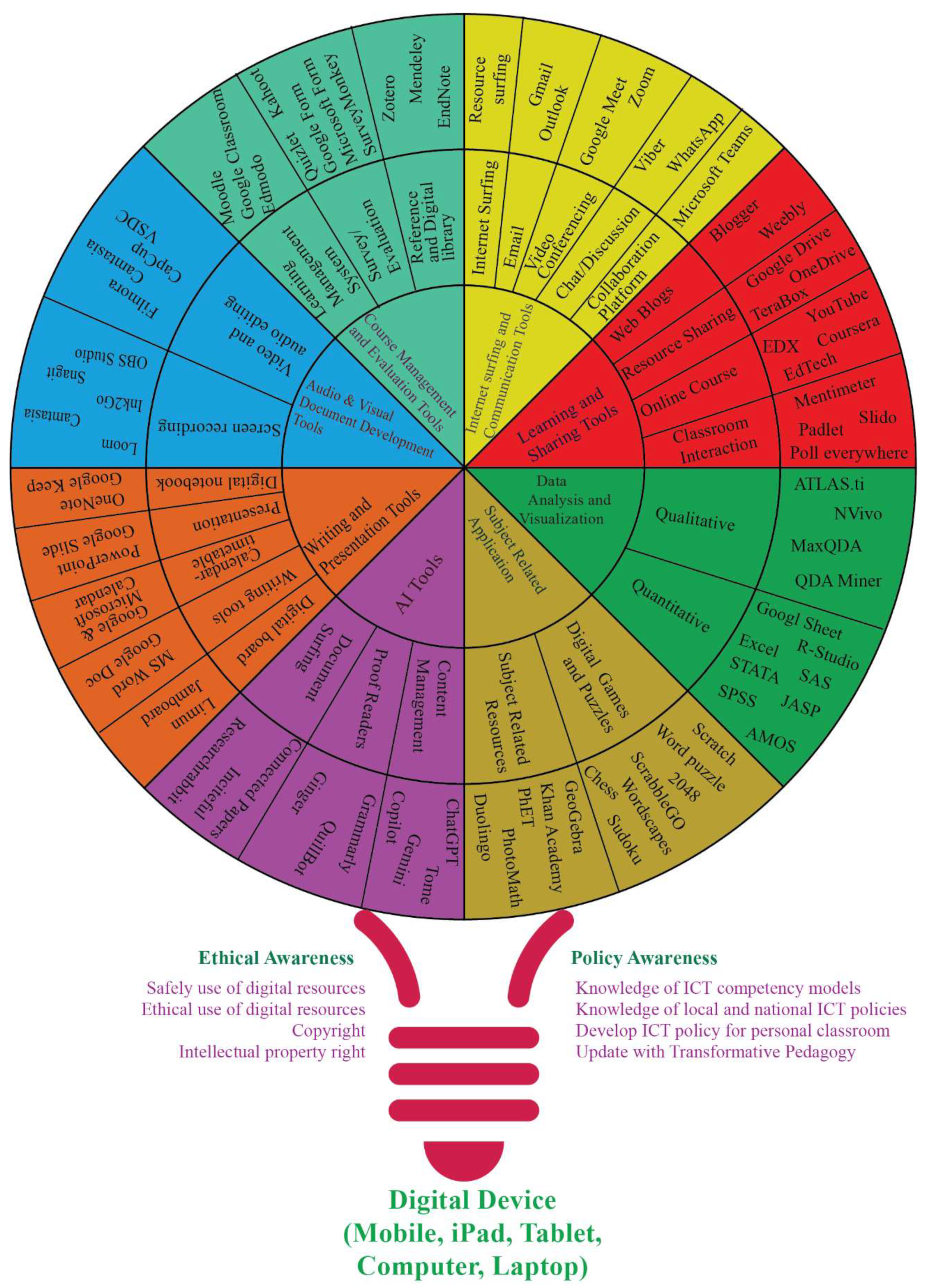

Table 1.
Detail of literature review.
| Author(s) | Name of framework | Key features/massage |
| Martin and Grudziecki (2006) | DigEuLit: Concepts and tools for digital literacy development | Three digital competency levels as Level I- Digital competence (skills, concepts, approaches, attitudes), Level II- Digital use (professional/descipline application), and Level III- Digital transformation (Innovation/creativity) |
| Mishra and Koehler (2006) | Technological, pedagogical, content knowledge (TPCK) model | 21st century teachers must have all three types of knowledge as technology, pedagogy, and content. |
| Puentedura (2006) | SAMR (substitution, argumentation, modification and redefinition) model | Manage different levels as substitution, argumentation, modification and redefinition of digital tools based on their functions. The application of the model is to evaluate digital resources using status and patterns of teacher in their instructional activities (Romrell et al., 2014). |
| (UNESCO, 2008, 2013, 2018, 2023) | ICT Competency Framework for teachers | Framework has three levels competency as technology literacy, knowledge depending, and knowledge creation by taking six indicators as understanding ICT in education, curriculum, and assessment, pedagogy, applications of digital skills, organization and administration, and teacher professional learning. |
| Catalunya (2015) | Core digital competencies | Eleven competencies under four competency domains as (1) devices and applications, (2) information processing and organizing work and learning environments (3) interpersonal communication and collaboration, and (4) Citizenship, habits, civic-mindedness and digital identity. This framework is applicable for all students, teachers, and general public. |
| DQ Institute (2017) | Digital Intelligence (DQ) framework | The framework contains eight key skills: digital safety, security, emotional intelligence, communication, literacy, right, identity, and use along with 24 sub-skills which are important for teachers and students however not limited to the teachers. |
| Redecker (2017) | Digital Competency Framework for educators | The competencies are divided into educators' professional and pedagogical skills and learners' competencies, comprising 22 indicators across six areas. These areas include professional engagement, digital resources, teaching and learning, assessment, empowering learners, and digital competencies. The model encompasses research, collaboration, professional development, content modification, teaching, evaluation, feedback, and learner support in digital skills, alongside ethical and policy awareness, data analysis, and audio-visual document development skills. |
| Kelentric et al. (2017) | Professional Digital Competence Framework for teachers | The framework comprises seven indicators: subject, basic skills, school and society, ethics, pedagogy and subject didactics, leadership in learning processes, and interaction, communication, change, and development. Each indicator is clearly outlined through three techniques: necessary knowledge, skills, and teacher competencies. The model emphasizes the effective use of subject-related digital resources and materials, considering intellectual property, privacy, security, and ethical values. It also highlights the digital awareness of teachers, guardians, and learners, evaluating and utilizing digital resources, self-learning, creating a digital environment, providing learner feedback, peer communication, curriculum development, and creating learning resources. |
| NIoET (2017) | Digital Competence Framework for teachers | The competency framework encompasses five key areas of competencies for teachers as information and data literacy, communication and collaboration, digital content creation, safety, and problem-solving. It prioritizes skills in internet use, data evaluation, interaction, collaboration, communication, digital content creation, problem-solving, and digital safety. |
| ITU (2018) | Digital skills | The 21st-Century Skills framework emphasizes three key areas for lifelong learning as (1) Foundational Literacies: These core skills include literacy, numeracy, scientific literacy, ICT literacy, financial literacy, and cultural/civic literacy. Students apply these skills to everyday tasks, (2) Competencies: These skills help students tackle complex challenges. They encompass critical thinking/problem-solving, creativity, communication, and collaboration, and (3) Character Qualities: Students develop curiosity, initiative, adaptability, and social/cultural awareness to navigate their changing environment. This integrated approach encourages lifelong learning by combining foundational knowledge with competencies and character attributes |
| ETF (2018) | Digital Teaching Professional Framework for teachers | The Digital Teaching Professional Framework outlines eight indicators across three stages: exploring, adapting, and leading. It emphasizes teachers' competencies in utilizing digital resources for instructional planning, understanding new implications, fostering learners' digital skills, extracting teaching content, employing resources for assessment and feedback, ensuring accessibility, and promoting self-development. |
| Nárosy et al. (2022) | The Digital Competence Framework for Austria – Dig Comp 3.2 (2022) project was developed in 2013 and has been updated in 2017, 2019, and 2022. The framework comprehensively outlines citizens' digital competencies across six domains: digital safety, problem-solving and continuous learning, content creation, communication and collaboration, information and data literacy, and foundational access, encompassing twenty-four distinct sub-domains | |
| Barajas and Frossard (2019) | Barajas and Frossard (2019) classify digital pedagogies into three segments: (1) professional environment linked to educators' professional competencies, (2) digital resources, pedagogies, assessments, and learner empowerment tied to educators' pedagogical competencies, and (3) learners' digital creativity related to learners' competencies. | |
| GoQ (2019) | Digital Competency Framework for students and teachers | This digital competency framework presents a comprehensive approach to digital education, highlighting 12 key indicators necessary for students and teachers. It includes technological skills, digital resources for learning, and information literacy, emphasizing the importance of innovation and creativity. Collaboration, communication, and content production are integral, fostering teamwork and effective information sharing. Critical thinking and problem-solving skills are essential for navigating digital environments. The framework also addresses ethical citizenship, promoting responsible digital behavior. Personal and professional empowerment, along with inclusion and diverse needs, ensure that all individuals can benefit from and contribute to the digital learning landscape. |
| European Union (2019) | Digital Competency Framework for teachers | European Union (2019) digital competency framework outlines the professional, pedagogic, and learner competencies required for effective digital engagement. Educators' professional competencies include organizational communication, professional collaboration, reflective practice, and digital CPD. Pedagogic competencies encompass teaching and learning, digital resources, and assessment, focusing on collaborative learning, resource selection, and feedback strategies. Learner competencies cover transversal competences like information and media literacy, communication, creativity, critical thinking, and problem-solving. The framework emphasizes the need for teachers to facilitate learners' digital competences and empower them through differentiated, personalized instruction, and active engagement. It integrates ethical, inclusive practices to foster a comprehensive digital learning environment. |
| Joshi et al. (2021) | DEPSWALIC digital competency framework for teachers | The framework has twenty-seven sub-skills under six keys skills (1) writing and presentation tools, (2) internet surfing and communication tools, (3) course management and evaluation tools, (4) learning and sharing tools, (5) related applications and (6) audio and visual documents development tools. Additionally, the framework included policy and ethical awareness related six awareness for teacher. |
| UNESCO et al. (2022) | Artificial intelligence and digital transformation competencies for civil servants | The UNESCO AI and Digital Transformation Competency Framework highlights digital competencies under three domains as: digital planning and design, data use and governance, and digital management and execution. Trust and creativity related attitudes are under the digital planning and design. Similarly, adaptability and curiosity related attitudes are under the data use and governance, whereas, experimentation comes under digital management and execution. The framework further highlighted four level of digital competency as: basic, intermediate, advanced, and AI-specific under the three domains of mentioned competencies. |
Disclaimer/Publisher’s Note: The statements, opinions and data contained in all publications are solely those of the individual author(s) and contributor(s) and not of MDPI and/or the editor(s). MDPI and/or the editor(s) disclaim responsibility for any injury to people or property resulting from any ideas, methods, instructions or products referred to in the content. |
© 2025 by the authors. Licensee MDPI, Basel, Switzerland. This article is an open access article distributed under the terms and conditions of the Creative Commons Attribution (CC BY) license (http://creativecommons.org/licenses/by/4.0/).
Copyright: This open access article is published under a Creative Commons CC BY 4.0 license, which permit the free download, distribution, and reuse, provided that the author and preprint are cited in any reuse.


