

Submitted:
16 June 2026
Posted:
18 June 2026
You are already at the latest version
Abstract
A novel application of function hooking is presented, allowing software that runs on Windows and uses the MFC/Win32 API to have its user interfaces translated without modifying the original application or requiring access to source code. A launcher is used to run the target executable, loading it into the launcher’s address space and allowing the launcher to hook into functions that display text in the user interface. These functions then transparently replace original text with the translated version and call the original function. The method is effective, with no measurable runtime overhead, but visual imperfections remain due to differing lengths of text and potential numerical translations. Although in principle the translation can be performed at runtime, slow performance and unreliable results made this untenable.
Keywords:
function hooking
; graphical user interface translation
; human computer interaction
; interface translation
; translation
; win32
; windows
1. Introduction
The Microsoft Foundation Class (MFC) library is an object-oriented C++wrapper around the Win32 API (Application Programming Interface). It is a mature toolkit for developing graphical user interfaces (GUIs) on the Microsoft Windows platform and has been continuously released and updated since February 26th 1992[1]. In order to translate an MFC or Win32 GUI, there are typically three options: localised executables, satellite DLLs, and third-party tools. All of these methods, however, are technical measures relating to the packaging and distribution of pre-existing resources. These resources must typically be fixed some time before software is released in order to allow time for them to be translated, many projects therefore declare a “string freeze” some time before release, after which no text can be modified[2,3,4].
Creating a new executable for each language requires duplicating all executable code and requiring the user to launch the correct application (see Figure 1). Though source code is not necessarily required (they can be created from an executable file), any updates to translations require recreation of the entire executable, the number of languages must be known in advance, and digital signatures will no longer be valid for the translated executables.
Satellite DLLs are dynamically-linked libraries (DLLs) that contain localised resources such as images and text[5]. Where a DLL is found that has a name of the form ApplicationNameXYZ.dll (where XYZ is the ISO 3166-1 code for a language), resources are loaded from the satellite DLL whose XYZ matches the user’s system language, falling back to the main executable if no such DLL is found (see Figure 1). They have the disadvantage that a new DLL must be built for each language, which requires access to specific tooling.
Finally, there are third-party tools, such as GNU gettext, which works by scanning the application source code and extracting strings for translation[6,7]. The user must then modify their source code to call a lookup function to find the corresponding string in an external translation table. It has the disadvantage that it requires modification of the original source code, and therefore recompilation and redistribution of the entire application, after which updated translations can be distributed independently.
The gettext documentation lists an eight-step process for translating software, including the modification of every line of code that contains a translatable string. Automated tools can help with this process, but such extensive modifications represent a significant investment of time for any team or individual that wishes to have a translatable interface. The tools required to produce updated translation files (that can be distributed independently of the original application) are freely-redistributable, which has a cost benefit compared to satellite DLLs.
Most approaches to live translation of desktop software work by performing Optical Character Recognition (OCR) on a region of the screen and providing a window containing text translated via a large language model (LLM)[8,9,10].
1.1. Translated GUI User Experience
In [11], it was found that users were often still able to complete a list of guided tasks in an machine-translated vs. manually translated Android app. However, when an the interface was machine-translated (albeit not via an LLM), users generally completed the tasks less efficiently – taking extra, unnecessary steps, skipping steps and so on, whilst expressing dissatisfaction with the quality of the translation[11].
In [12], a user study was performed on three versions of the Microsoft Word interface: the published translated version, the original English version, and a machine-translated version. They selected Word because it is the simplest application in the Microsoft Office suite and they wished to ensure the focus was on the impact of the translation, not the users’ computing skill. Users were monitored performing a number of tasks, which included checking the spelling of the document, inserting a section break, and changing the indentation and spacing of a paragraph, among others. Like [11], they found that task completion was not significantly affected by the means of translation. However, efficiency and self-reported satisfaction were higher for the original English version and published translated versions. They also measured a higher cognitive load higher when using the machine-translated version.
Although the pilot study conducted by [13] found that neural machine translations were preferred by users and resulted in higher task efficiency than traditional machine translation, the number of participants was very low, and the neural machine translations still resulted in higher cognitive load among the participants.
1.2. Non–Invasive Redirection of Function Calls
On Windows platforms there are three main methods of function call redirection; application manifests, dot-local redirection, and function hooking.
Application manifests files are that allow user control over the libraries that an executable loads. This allows loading a different (i.e., local) version of a file in preference to the system version. A complicating factor is that these manifest files can be embedded in an executable file, rendering them inaccessible without the manifest tool (mt.exe) from the Windows SDK. Though it is trivial to update an embedded manifest using mt.exe, doing so would invalidate any digital signature that applied to the executable, which may not be desirable.
If the application manifest does not allow for .local redirections then administrative permissions must be used to enable them globally, making the computer more vulnerable to a malicious user. Depending on the context, this may present a security concern.
Function hooking is a means of patching an executable at runtime, so that any call to function A is replaced by a call to a different function B that has the same signature. It was selected as the most suitable approach as it is widely used and understood, does not require redistribution of a tool from an SDK (mt.exe), and can be used without administrative permissions on the target machine irrespective of whether an application manifest is embedded into the executable.
1.3. Contributions
The contribution is a novel technique for translating a GUI without modifying the original executable. The technique does not require modifying any source code or the program executable, allowing it to be used with digitally-signed executables and legacy applications for which the source code is not available. Provided all relevant functions are hooked, the technique will not miss any displayed text that could be missed by manual source code modification.
The implementation uses XML-based caches, allowing for simple distribution and translation of text. No specialised tools or software are needed at any stage of the process – whether for distributing, translating, or reintegrating the translations. This also simplifies Continuous Integration/Continuous Deployment (CI/CD) pipelines by deserialising the translation process – no resource DLLs are required and no new executables need to be built after translations are received.
1.4. Limitations
The primary limitation is that when text is dependent on user input, the results cannot be computed in advance. For text in ordinary controls, such as buttons, this is unlikely to occur, so depending on the application, this may not present a problem.
The secondary limitation arises when text is displayed that contains computed numbers. In this situation, numbers are extracted and processed separately: namely, by transposition into the new string or by parsing and inserting into the new string. If the target language uses a different character set or formatting, this presents an additional challenge, but does not invalidate the technique presented here.
2. Materials and Methods
2.1. Launcher
The Detours library was selected for hooking functions, as it is widely-used, has a long tenure, and was written by Microsoft[14]. Runtime patching requires a launcher application so that the address space of the target executable is owned by the launcher. The launcher starts the target executable in a halted state, then loads a translation shim that hooks a set of pre-defined functions which present text to the user. In the context of translating a GUI the requirement for a launcher is not a critical problem, and may even be beneficial: users need a way to select their target language, so the launcher is used for the dual purposes of a) selecting the language, and b) hooking the functions behind the scenes. The launcher was implemented with a command-line interface, allowing it to be used to create shortcuts that directly launch a translated application.
2.2. Translation Shim
A library was implemented with a simple API that either accepts a string and looks up the corresponding translation or passes it to an LLM for on-the-fly translation.
For live translation, the llama.cpp project was selected as the interface library as it is widely-used and supports many model formats. SalamandraTA-2B model was selected for live translation[15] for its more ethical approach to training only on publicly-available data and making the training and evaluation scripts publicly available.
Since the text provided to the library has no format constraints, some pre- and post-processing is necessary, especially if it contains newline characters. The model response format is also not uniform, meaning that responses require further processing to extract only the translated text.
The clang compiler was used to parse the headers of the Windows SDK and produce an Abstract Syntax Tree (AST) of the functions and types contained therein. This AST was then parsed to extract only those functions that had string parameter types (specifically, any of the LPCWSTR, LPCTSTR, LPWSTR, or LPTSTR types). The implementation was initially completed with wide-character strings, though the principle and technique apply equally to narrow strings, and adaptation was trivial.
For most functions that took simple parameters, a simple wrapper function written that translated any string parameters before calling the hooked function (see Figure 2). Each of those functions then had their parameters checked against the documentation to ensure that only strings intended for display to the user were translated, not, for instance, class names, which are for internal use by MFC.
Two functions that required minor modifications for performance and correctness are shown in Figure 3.
Finally, some functions used structure pointers, preprocessor macro types, or type-erased parameters, meaning the scripts were not able to automatically determine all relevant functions – some manual searching of the documentation was still required, particularly for structure parameter types, which sometimes had string members requiring translation. Almost all text was able to be translated by hooking a small number of functions, but some needed more detailed handling, such as PostMessageW, whose implementation is shown in Figure 4.
2.3. Caching
It quickly became apparent that when running a language model on a CPU that caching the results was mandatory. The need for a cache might be somewhat mitigated by a graphical or neural processing unit with sufficient memory to hold the model, but such hardware cannot be guaranteed to be available.
A hierarchical caching system was implemented:
- Authoritative: read-only, for known-good translations.
- Live: mutable, for on-the-fly translations.
This two-layer structure allows distribution of a pre-populated, professionally-translated cache whilst still allowing for collection or live translation of as-yet untranslated strings.
Prior to checking either cache, numbers are extracted and replaced with placeholders before looking up the resulting string in the cache, so instead of looking for "Created 3 copies report number 9", the cached string is "Created {} copies report number {}". Numbers are reinserted after cache lookups, ensuring that the cached text is more generalised and can be used even if the application needs to display "Created 4 copies of report 12", thus saving resources.
The live cache is only searched if there is no appropriate entry in the authoritative cache. To populate the live cache; the following procedure is followed:
- Check authoritative cache: if found, return translation.
- Check mutable cache: if found, return translation.
-
If using live translation:
- (a)
- Translate string, store translation in mutable cache.
- (b)
- Persist mutable cache to disk.
- (c)
- Return translation.
-
Otherwise:
- (a)
- Create a placeholder cache entry, where the source and target strings are identical (used for offline translation).
- (b)
- Persist mutable cache to disk.
- (c)
- Return original string.
The persistence to disk ensures the string need not be translated again on subsequent application launches and that is always up-to-date for offline translation.
2.4. Avoiding Translation
It is a truism that the best optimisations involve avoiding work, rather than performing that work faster. Text is passed on as-is, avoiding translation, if any of the following conditions are met:
- it contains no alphabetic characters – pure numbers, dates, etc. do not need translation.1
- it describes a filename – translation of a filename would result in the desired file not being found.
- it is already in one of the caches – recursive translation would at best be useless, and at worst provide a hallucination.
2.5. Generative AI Disclosure
GitHub Copilot was to save time on the initial creation of the benchmarking scripts (which were subsequently modified significantly) and English-to-German translation of UI text. It was also used to decode some unusual-looking data that was received from IrfanView’s hooked functions. This is an implementation detail of IrfanView and does not affect the technique (translation translation simply requires an additional encode/decode step).
3. Results
For testing the technique, two applications were selected:
- Tenacity; an open-source audio editor, and
- IrfanView; a closed-source image viewer.
They are suitable test applications due to their wide availability and zero-cost nature. Although this technique is not necessary in order to use Tenacity in a different language, it was beneficial to initially develop with an open-source application for debugging and analysis.
Tenacity uses wxWidgets, a cross-platform toolkit that calls system-native APIs to create GUI widgets (buttons, menus, etc.). On Windows, this ultimately results in calls to the Win32 API, providing further validation of the technique for programs that use the Win32 API even indirectly. The translated interface can be seen in Figure 5.
3.1. Live Translation
The performance of translating user-visible strings at runtime was tested but found to be inadequate, even with GPU acceleration (using an NVidia Geforce 4060 with 8GB of dedicated memory). Although this only had an effect the first time a string was displayed (as it was in the cache thereafter), the initial opening of any menu or window would cause a significant delay (over thirty seconds in some cases), rendering it impractical.
Even with advances in hardware, the translation quality is variable and the free-form prompts and responses mean that unwanted text could appear in the GUI (e.g., “Sure, here is a translation into $LANGUAGE:”). For this reason, it is recommended to build the text cache and translate it offline.
3.2. Performance
A simple benchmark script was created that performed various UI operations - opening menus and submenus, hovering over buttons to spawn tooltips and interacting with controls like comboboxes and radio buttons. The script was used to drive the original and translated GUIs for 30 iterations, recording the elapsed time after every 5 iterations, which can be seen in Table 1. Prior to running the script, it was ensured that the translation cache was fully populated, and live translation disabled, so there would be no timing contributions from LLM activity.
The program was launched once, with the cycle of interactions repeated, this was deemed acceptable as most users of any software spend considerably longer using it than launching it and the timings reflect the runtime overhead, which occurs on every display of text, rather than the one-off cost of launching the application.
As Table 1 clearly shows, the overhead is negligible, with a less than 1% difference difference in runtime performance. Furthermore, the translated software often completes the benchmark faster than the original version. Since the translated version is performing more computations than the original (due to the translation checks and cache lookups), the timing differences are best be explained by natural runtime variance, despite efforts to control for it.
4. Discussion
A technique for translating a GUI on Windows operating systems was presented that does not require source code, modify the target executable or invalidate digital signatures. Successful deployment of the technique was demonstrated for direct and indirect (via the wxWidgets toolkit) use of the Win32 API.
The technical feasibility of using an LLM for live translation was established, but – when using the SalamandraTA-2B model – was found to provide inconsistent results and be prohibitively slow, and would likely remain so even on high-end hardware. Other LLMs, particularly small-scale ones such as those used by GameTranslate [9], may alleviate this, achieving fast translations with appropriate-length responses. An analysis of such models and the results obtained would provide an interesting avenue for future work, though is beyond the scope of this paper.
To improve the speed and responsiveness, a caching system was used that enabled offline translation. When the caches are translated in advance, the technique has a negligible overhead, making interaction entirely comfortable.
Similar results were achieved on Linux systems not by function hooking, but simply by overriding the LD_LIBRARY environment variable when launching the target application, causing the overlay library to be loaded in preference to the default system library. Since closed-source applications for these systems are less widespread, there is unlikely to be a similar level of demand for it in such contexts. Other common graphical toolkits (for instance, Qt and CopperSpice) may be able to be supported, depending on their internal method of rendering text.
Since a major application is the translation of software for which the source code is unavailable, the Application Binary Interface (ABI) is fixed. To ensure compatible operation, the injected DLL must link to the same runtime libraries as the target application, something that is best achieved by using the same compiler and toolchain as the original application. Detection of the target executable’s ABI may not always be possible, and some manual investigation may therefore be required to build the overlay application in a compatible manner.
Funding
This research received no external funding.
Data Availability Statement
The implementation, test scripts, and German cache are available at https://doi.org/10.5281/zenodo.20433411.
Acknowledgments
During the preparation of this manuscript/experiment the author used GitHub Copilot to reduce time spent on ancillary tasks that do not affect the validity of the proposed technique: initial creation of the benchmark code, translation of text, minor code review, and decoding some data in an unexpected format. The author has reviewed and edited the output and takes full responsibility for the content of this publication.
Conflicts of Interest
The author declares no conflicts of interest.
References
- Luparu, M. Happy 25th Birthday MFC! Available online: https://devblogs.microsoft.com/cppblog/happy-25th-birthday-mfc (accessed on 2025-03-25).
- Django’s Release Process. Available online: https://docs.djangoproject.com/en/6.0/internals/release-process (accessed on 2026-02-24).
- Freezes. Available online: https://documentation.ubuntu.com/project/release-team/freezes/#user-interface-freeze (accessed on 2026-02-24).
- QtReleasing. Available online: https://wiki.qt.io/QtReleasing (accessed on 2026-02-24).
- Microsoft Corporation. Localized Resources in MFC Applications: Satellite DLLs. Available online: https://learn.microsoft.com/en-us/cpp/build/localized-resources-in-mfc-applications-satellite-dlls (accessed on 2025-03-24).
- Gettext. Available online: https://www.gnu.org/software/gettext.
- University, Z.N.; Matuzko, V. SOFTWARE IMPLEMENTATION OF AUTOMATED USER INTERFACE TRANSLATION TOOL. 1, 115–121. [CrossRef]
- Gaminik: Screen Real Time Translator. Available online: https://www.gaminik.net (accessed on 2025-03-24).
- Sebastian Öjefors. GameTranslate. Available online: https://gametranslate.app (accessed on 2025-03-24).
- Kiat, G.T.W.; Chan, J.H.; Chua, H.L. DeskTranslate. Available online: https://desktranslate.github.io/DeskTranslate (accessed on 2025-03-24).
- Qin, X.; Holla, S.; Huang, L.; Montijo, L.; Aguirre, D.; Wang, X. How Does Machine Translated User Interface Affect User Experience? A Study on Android Apps. In Proceedings of the 2017 ACM/IEEE International Symposium on Empirical Software Engineering and Measurement (ESEM). IEEE, 2017, pp. 430–435. [CrossRef]
- Guerberof Arenas, A.; Moorkens, J.; O’Brien, S. The Impact of Translation Modality on User Experience: An Eye-Tracking Study of the Microsoft Word User Interface. Machine Translation, 35, 205–237. [CrossRef]
- Castilho, S.; Guerberof Arenas, A. Reading Comprehension of Machine Translation Output: What Makes for a Better Read? In Proceedings of the Proceedings of the 21st Annual Conference of the European Association for Machine Translation; Pérez-Ortiz, J.A.; Sánchez-Martínez, F.; Esplà-Gomis, M.; Popović, M.; Rico, C.; Martins, A.; Van den Bogaert, J.; Forcada, M.L., Eds., 2018, pp. 99–108.
- Microsoft Research. Detours Package. Available online: https://github.com/microsoft/detours (accessed on 2025-03-24).
- Gilabert, J.G.; Liao, X.; Da Dalt, S.; Bohman, E.; Mash, A.; Fornaciari, F.D.L.; Baucells, I.; Llop, J.; Argote, M.C.; Escolano, C.; et al. From SALAMANDRA to SALAMANDRATA: BSC Submission for WMT25 General Machine Translation Shared Task. [CrossRef]
| 1 | Localisation is not considered here. |
Figure 1.
(a) French localised executable for Tenacity. (b) French satellite DLL for Tenacity.
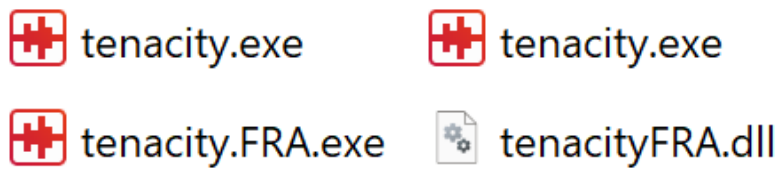
Figure 2.
Example of a Win32 wrapper function that required no modification. pSetWindowTextW is a pointer to the original function.
Figure 2.
Example of a Win32 wrapper function that required no modification. pSetWindowTextW is a pointer to the original function.

Figure 3.
Two examples of more complex wrapper functions: overlay_DrawTextW has an early return in case of a null pointer: the frequency with which this function is called makes this early exit likely to be beneficial. overlay_GetWindowTextW writes text into a buffer, the size of which must be respected even after translation.
Figure 3.
Two examples of more complex wrapper functions: overlay_DrawTextW has an early return in case of a null pointer: the frequency with which this function is called makes this early exit likely to be beneficial. overlay_GetWindowTextW writes text into a buffer, the size of which must be respected even after translation.
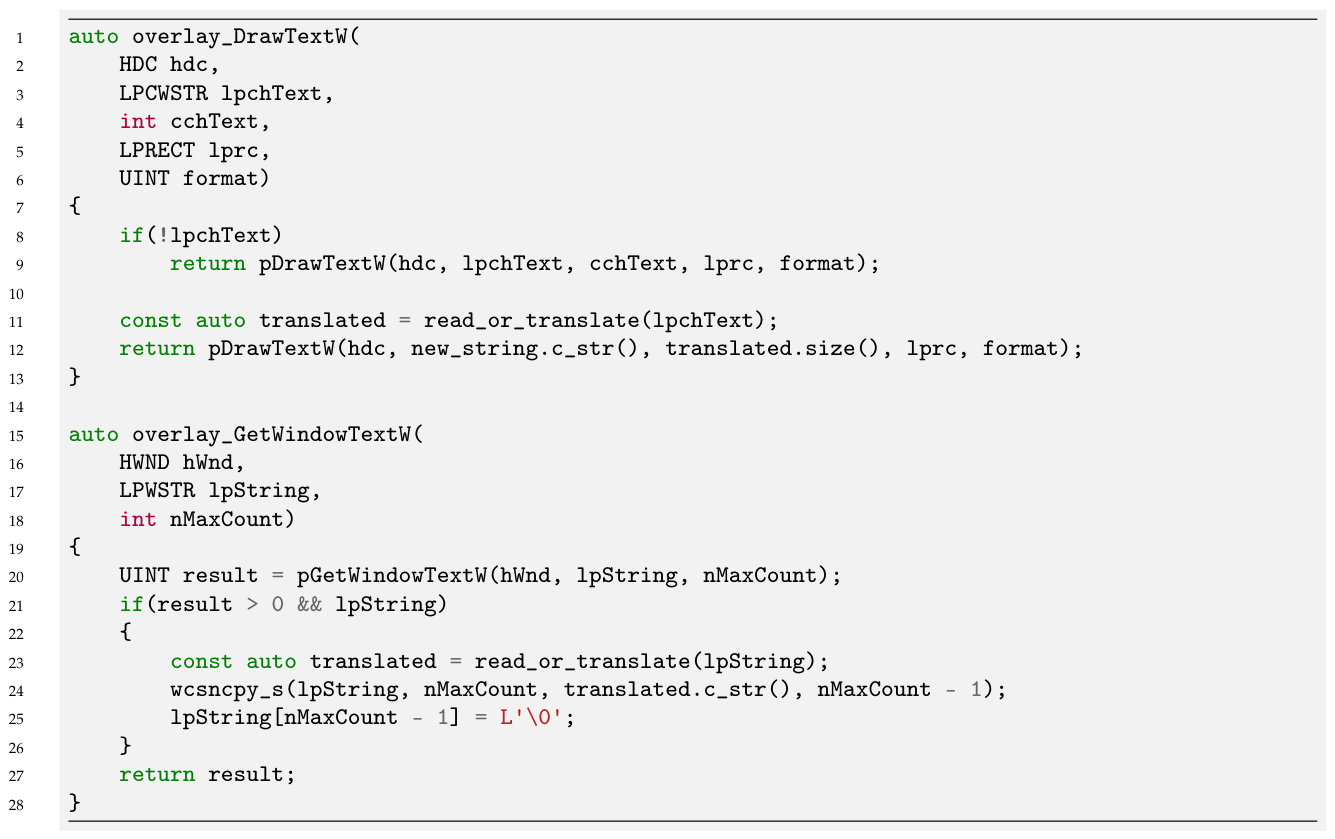
Figure 4.
Overlay function for PostMessageW, which is one of two generic event handler functions (the other being SendMessageW, whose implementation is largely identical). Consequently, it is necessary to select only those events that relate to displaying text to the user.
Figure 4.
Overlay function for PostMessageW, which is one of two generic event handler functions (the other being SendMessageW, whose implementation is largely identical). Consequently, it is necessary to select only those events that relate to displaying text to the user.
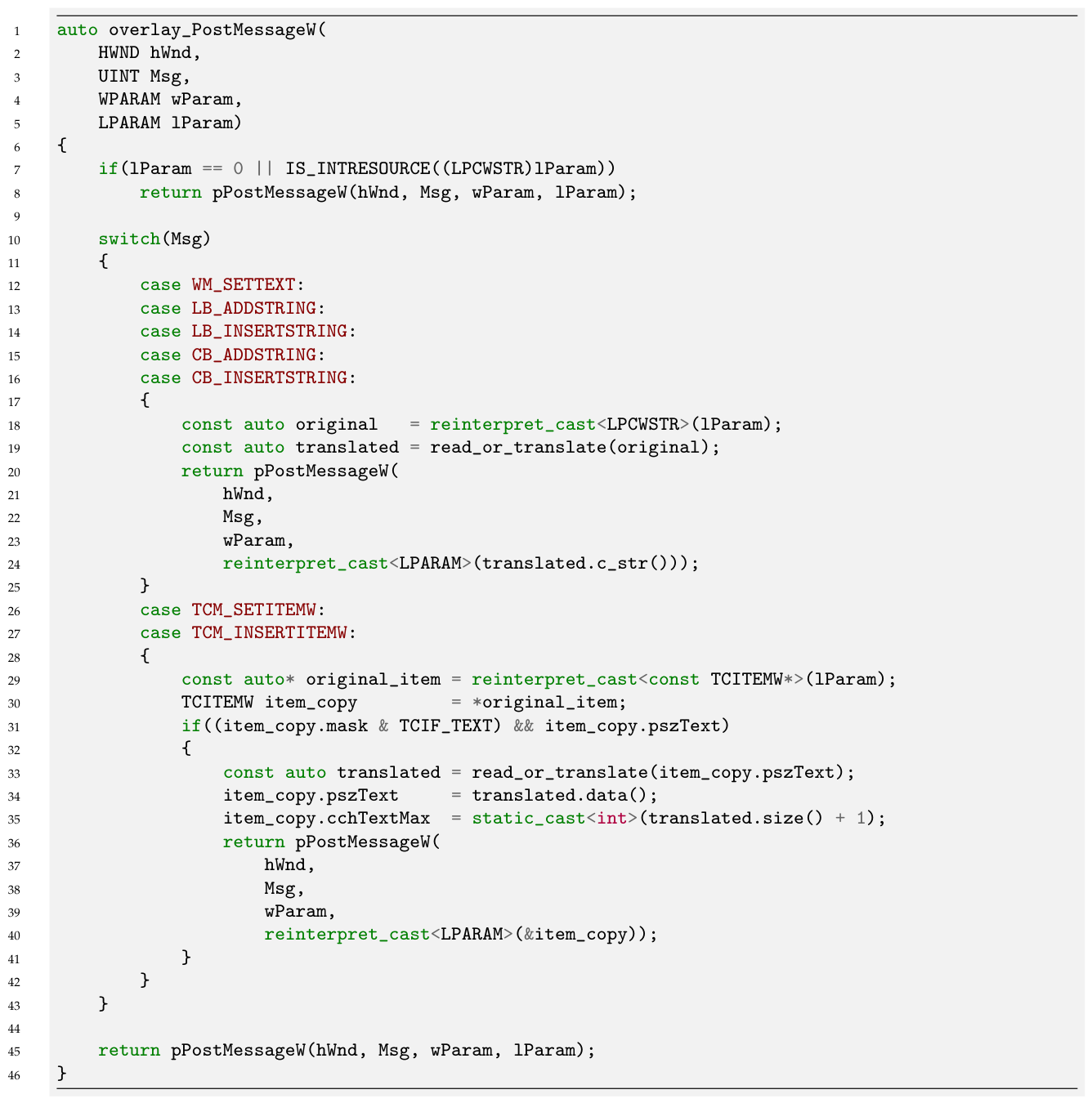
Figure 5.
(a) The user interface for Tenacity in its original form. (b) Tenacity UI when translated by the proposed technique.
Figure 5.
(a) The user interface for Tenacity in its original form. (b) Tenacity UI when translated by the proposed technique.
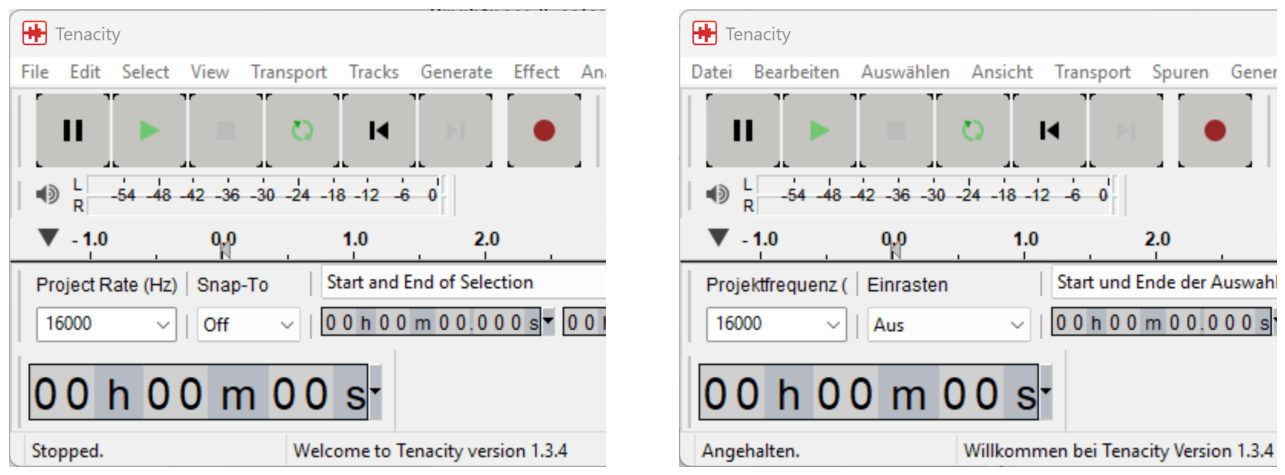

Table 1.
Timings (in seconds) for repeated iterations of the test.
| Iterations | Tenacity (original) | Tenacity (translated) | IrfanView (original) | IrfanView (translated) |
|---|---|---|---|---|
| 5 | 148 | 146 | 171 | 168 |
| 10 | 291 | 290 | 338 | 336 |
| 15 | 435 | 434 | 506 | 502 |
| 20 | 578 | 578 | 673 | 668 |
| 25 | 721 | 722 | 841 | 835 |
| 30 | 864 | 866 | 1008 | 1003 |
Disclaimer/Publisher’s Note: The statements, opinions and data contained in all publications are solely those of the individual author(s) and contributor(s) and not of MDPI and/or the editor(s). MDPI and/or the editor(s) disclaim responsibility for any injury to people or property resulting from any ideas, methods, instructions or products referred to in the content. |
© 2026 by the authors. Licensee MDPI, Basel, Switzerland. This article is an open access article distributed under the terms and conditions of the Creative Commons Attribution (CC BY) license (http://creativecommons.org/licenses/by/4.0/).
Copyright: This open access article is published under a Creative Commons CC BY 4.0 license, which permit the free download, distribution, and reuse, provided that the author and preprint are cited in any reuse.


